Operator manual · General
How to Create a Chatbot in 2026: Plan, Build and Test
In short
How to create a chatbot in 2026: pick the bot type, build intents, test failure cases, and launch with privacy and accessibility checks.
DBotMaker research desk · Updated November 19, 2026 · 13 min read
Most chatbot projects don't fail because the team chose the wrong model. They fail because nobody wrote down which questions the bot must refuse, which answers have to be traceable to a document, and what a wrong answer costs the business. NIST separates benchmark accuracy, the score a system earns on the questions it was tested against, from generalized accuracy, its performance across the wider population of similar questions, and warns that benchmark metrics become optimization targets and lose their usefulness once a team tunes against them (NIST's AI evaluation toolbox report).
That distinction shapes everything else. A bot scoring well on twenty hand-picked prompts tells you nothing about the four hundred phrasings customers will type next week.
Get the sequence right and the model decision becomes small. Get it wrong and no model tier rescues the project.
Table of Contents
- Pick the Bot Type That Fits Your Scope
- How to Build a Chatbot Step by Step
- Choose a Model and Estimate Running Cost
- How to Test a Chatbot Before Anyone Uses It
- Launch Checks for Privacy and Accessibility
- Start Your First Build This Week
Pick the Bot Type That Fits Your Scope
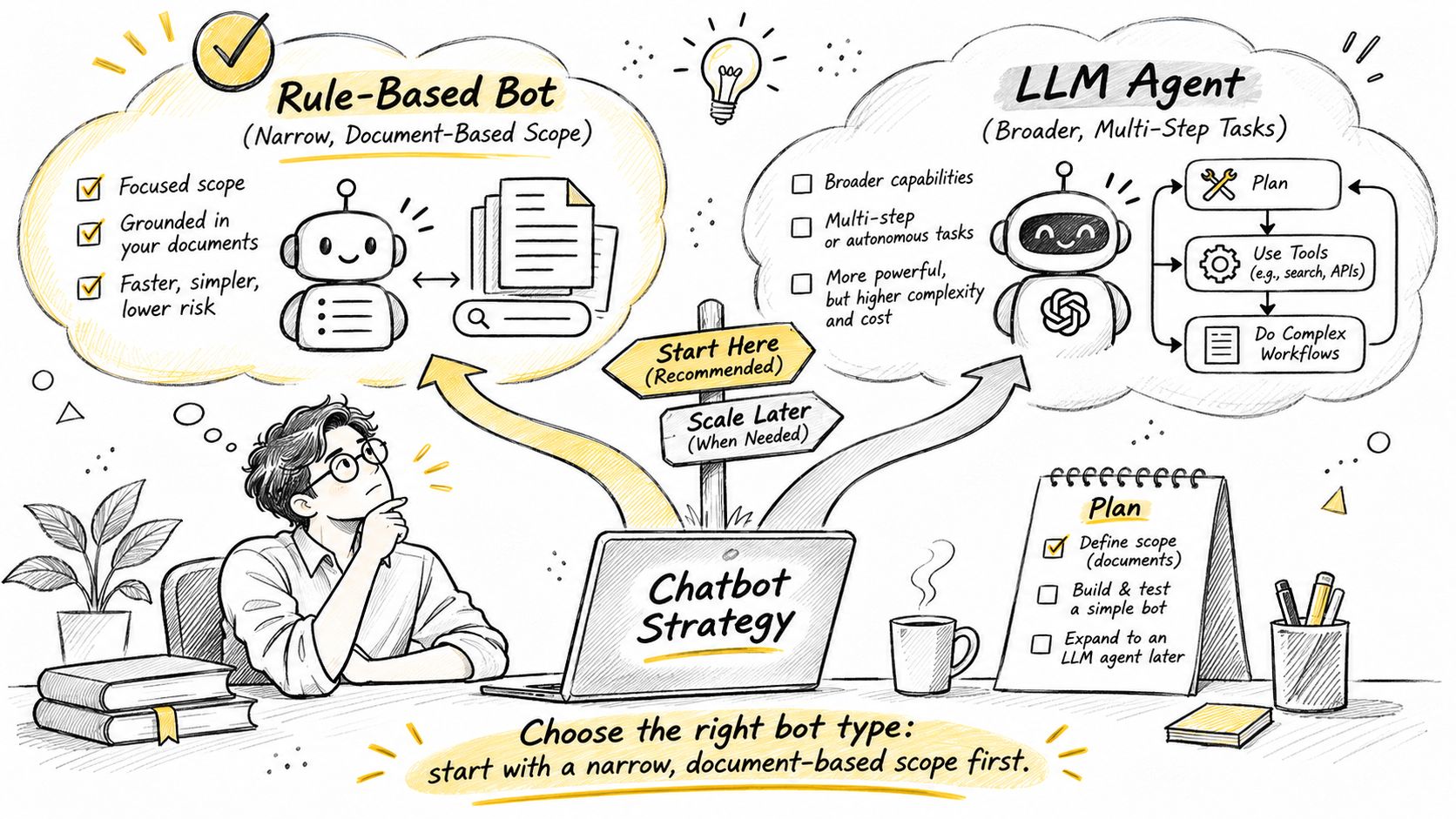
The call: for a first build, choose a bot that answers a narrow set of questions from your own documents, with rules for fixed paths such as order status and retrieval for everything drawn from help articles. Add an LLM agent with tools only when the task needs several steps across systems, such as issuing a refund or moving a delivery date.
A language model is not a prerequisite for a bot that works. ELIZA, built by Joseph Weizenbaum at MIT between 1964 and 1966 and described in a 1966 paper in Communications of the ACM, matched keywords, applied simple transformation rules and returned scripted prompts that kept the user talking (Weizenbaum's ELIZA paper). It had an input channel, keyword analysis, dialogue rules, a response generator and a loop that preserved the interaction. Modern systems add retrieval, tool calls, memory and evaluation, but the pipeline is the same shape.
Four questions that settle the scope
- How many distinct questions must the bot answer? Fewer than twenty with predictable phrasing points to an intent-based bot. Hundreds drawn from documents points to retrieval.
- Do the answers live in a fixed source? If yes, retrieve and cite. If the answer has to be assembled from three separate systems, that's a tool-using agent.
- Must the bot act rather than explain? A refund, an address change or a password reset in a directory all need tools plus an approval step. Explaining is cheaper and safer than acting.
- What does a wrong answer cost? A wrong holiday opening time is an annoyance. A wrong refund is money and a compliance record.
The risk column below is the one that decides whether a small team should attempt a type at all.
| Bot type | Best for | Build effort | Main risk |
|---|---|---|---|
| Rule-based flows | Fixed paths such as order status or booking | Low | Breaks on wording the flow did not anticipate |
| Intent-based bot | Narrow questions with known phrasing | Medium | Needs labeled example phrasings for every intent |
| Retrieval bot | Answers drawn from help articles or product documents | Medium | Answers go stale or cite the wrong passage |
| LLM agent with tools | Multi-step tasks across several systems | High | Wrong actions and rising cost per conversation |
A support team whose two biggest clusters are password resets and billing questions can cover both with retrieval, plus a rule-based path for "reset my password," because the answers already exist in help articles. The same team's refund requests don't fit: a refund needs an order lookup, a policy check and a payment call. That belongs in a tool-using agent with human approval, or with a person until the simpler bot earns trust. Teams mapping those multi-step handoffs can study these workflow automation examples for the pattern.
Write one sentence before any build work begins: this bot serves a named audience, finishes these 10 to 20 tasks, and hands everything else to a person along with a summary of the conversation.
How to Build a Chatbot Step by Step
A useful prototype exists on day one. It answers the top ten intents, hands off the rest and logs every turn. That bar is lower than what teams set for themselves, and it's the bar that produces a bot people trust enough to use twice.
The six steps below run in the order a build happens, with the reason for each and the slip that costs the most time.
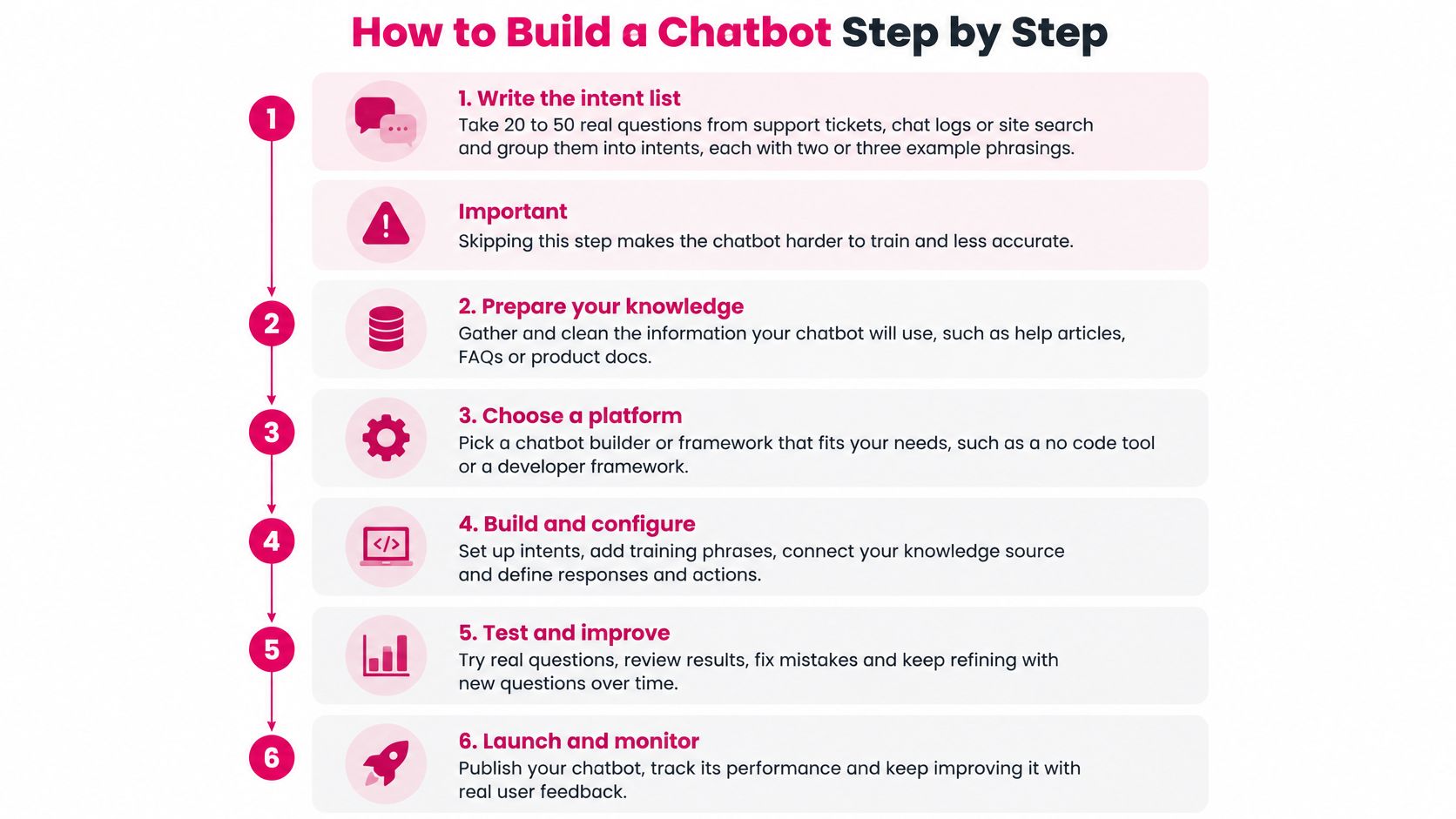
Write the intent list. Pull twenty to fifty real questions from support tickets, chat transcripts or site search, then group them into intents with two or three example phrasings each. The reason is coverage you can measure; the slip is skipping straight to prompts, which produces a bot that answers everything weakly.
Define flows for the highest-volume intents. Each flow needs the question the bot asks when a detail is missing, such as an order number or an account email. The reason is that most real conversations start incomplete; the slip is a flow that assumes the user volunteers everything at once.
Build the knowledge base. Export help articles, delete duplicates, record an owner and a review date for every document, and split long pages into passages of a few paragraphs. The reason is that retrieval matches passages, not pages; the slip is leaving contradictory articles in place, which gives the bot two answers to one question.
Pick a model and wire up retrieval. Start with the smallest model that passes your test set and move up only when a specific intent fails. The reason is that most support intents don't need frontier reasoning; the slip is starting at the top tier and never testing downward, because the first version already "works."
Add guardrails before features. Write a fallback reply that offers a person or a contact form, an escalation route that passes a conversation summary to the agent, and refusal rules for topics outside scope. The reason is that the fallback is the most-used reply in the first month; the slip is a fallback that says "I don't understand" and offers no way forward.
Connect one channel and release small. A website widget or an internal Slack channel is enough for a first release. The reason is that every channel has its own character limits and formatting quirks; the slip is launching on web, mobile app, WhatsApp and voice on the same day.
The cheapest fix available: ten solid intents with an honest handoff beat sixty intents that each half-answer.
Log every turn from the start, including what was retrieved and what the bot chose. Without that record you can't tell a misunderstood intent from a bad document.
Choose a Model and Estimate Running Cost
The decision: match model tier to how many turns each conversation takes and how much retrieved text each answer carries. Leaderboard position is the wrong input.
The price of a fixed level of capability has collapsed. Stanford HAI's 2025 AI Index reports that the cost of querying a model achieving GPT-3.5-equivalent performance on the MMLU benchmark fell from $20 per million tokens in November 2022 to $0.07 per million tokens by October 2024, using Gemini-1.5-Flash-8B as the October example, a reduction of more than 280 times in roughly 18 months (Stanford HAI, AI Index Report 2025). The same report cites Epoch AI's estimate that inference costs have been declining between nine and 900 times per year depending on the task.
That trend doesn't make cost irrelevant. It moves the question from price per token to tokens per resolved conversation.
| Cost driver | What raises it | How to control it |
|---|---|---|
| Prompt length | Long system instructions and full chat history resent each turn | Trim history and keep instructions short |
| Retrieved context | Many or long documents attached to each answer | Retrieve fewer, shorter passages |
| Output length | Long replies where a link would do | Set a reply length limit per intent |
| Traffic volume | Peak hours and repeat users asking the same questions | Cache common answers and route simple questions to rules |
| Model tier | A frontier model handling every turn | Use a smaller model for routine intents |
| Tool calls | Several API calls for one request | Batch lookups and cap the steps per turn |
A worked cost estimate
Take an illustrative bot, not a quote: 5,000 conversations a month, five turns each, a 300-token system prompt resent every turn, two retrieved passages of about 400 tokens each per answer, and replies near 150 tokens. That's roughly 1,290 tokens a turn, or about 6,450 tokens per conversation, so around 32 million tokens a month.
Now route the 70 percent of conversations that are routine through rules and a smaller model with a 120-token prompt and one retrieved passage. Those turns drop to about 710 tokens, so 3,500 conversations consume about 12 million tokens instead of 22 million. The saving comes from shorter prompts and fewer passages, not from a discount.
Three rules make the arithmetic stick. Test the smallest model on your own intents before buying a bigger one. Cap reply length per intent so a "where's my order" answer doesn't become four paragraphs. Cache answers to repeated questions, because support traffic is dominated by repeats.
Budget check to repeat monthly: conversations × turns × tokens per turn × the provider's current price per million tokens, plus human handling cost for every escalation. The LLM API provider comparison is the place to pull current rates before committing.
A cheaper model that escalates more can cost more per resolved conversation than an expensive one that finishes the job. Measure the resolved conversation, not the message.
How to Test a Chatbot Before Anyone Uses It
Teams often test the questions they know the bot handles. It then encounters the phrasings customers type and fails in ways the test set never covered. The fix isn't more testing. It's testing the right cases against thresholds written before the results arrive.
Set the gate first: per-intent resolution above the team's number, fallback rate below it, zero unsafe responses on the policy set. A threshold invented after seeing the score is a rubber stamp.
Build the test set in three groups
Group one is normal questions lifted from real logs. Group two is ambiguous phrasing: half-finished sentences, typos, two questions in one message, mixed languages. Group three is out-of-scope and adversarial, such as asking for another customer's order status or for a discount the policy doesn't allow. Then lock a holdout set the team never tunes against, so the headline score doesn't merely reflect the questions that were patched.
Run the replay loop
When a case fails, label the failure type: intent misunderstanding, unsupported claim, policy violation, poor recovery, or unnecessary escalation. Change one prompt, retrieval setting, tool or routing rule, then rerun the failed conversations plus the full regression suite.
That discipline matters more than it sounds. ACM research on chatbot design found that designers who repeatedly tested only local prompt changes often failed to check whether later edits reintroduced previously fixed errors (ACM study on chatbot design). Replaying conversations is the only reliable way to catch a regression before a customer does.
The methods combine into one workflow: static tests for known utterances, multi-turn dialogues that push back and ask for clarification, mutation tests that deliberately perturb inputs with typos and slang, and human review of whether answers are useful. For retrieval bots, log document IDs, ranks, citations and tool outputs so a failure can be traced to a missing passage instead of guessed at from the final text.
| Metric | What it shows | Where to check |
|---|---|---|
| Per-intent resolution rate | Share of each intent answered without a person | Conversation logs grouped by intent |
| Fallback rate | How often the bot does not understand the request | Fallback events in the log |
| Escalation rate | How often a person takes over the conversation | Handoff records |
| Grounded-answer rate | Answers backed by a retrieved source | Citation and document ID logs |
| Unsafe-response rate | Replies that break the written policy | Annotated red-team results |
| p95 latency | Response time for the slowest 5 percent of replies | Monitoring dashboard |
| Cost per resolved conversation | Spend divided by conversations fully resolved | Billing data joined with conversation logs |
Satisfaction scores can't carry the decision alone, because users accept confident wrong answers and rate them well.
Pilot rule: release to 5 to 10 percent of traffic, then read the first 100 fallback or escalated conversations by hand before widening access.
Launch Checks for Privacy and Accessibility
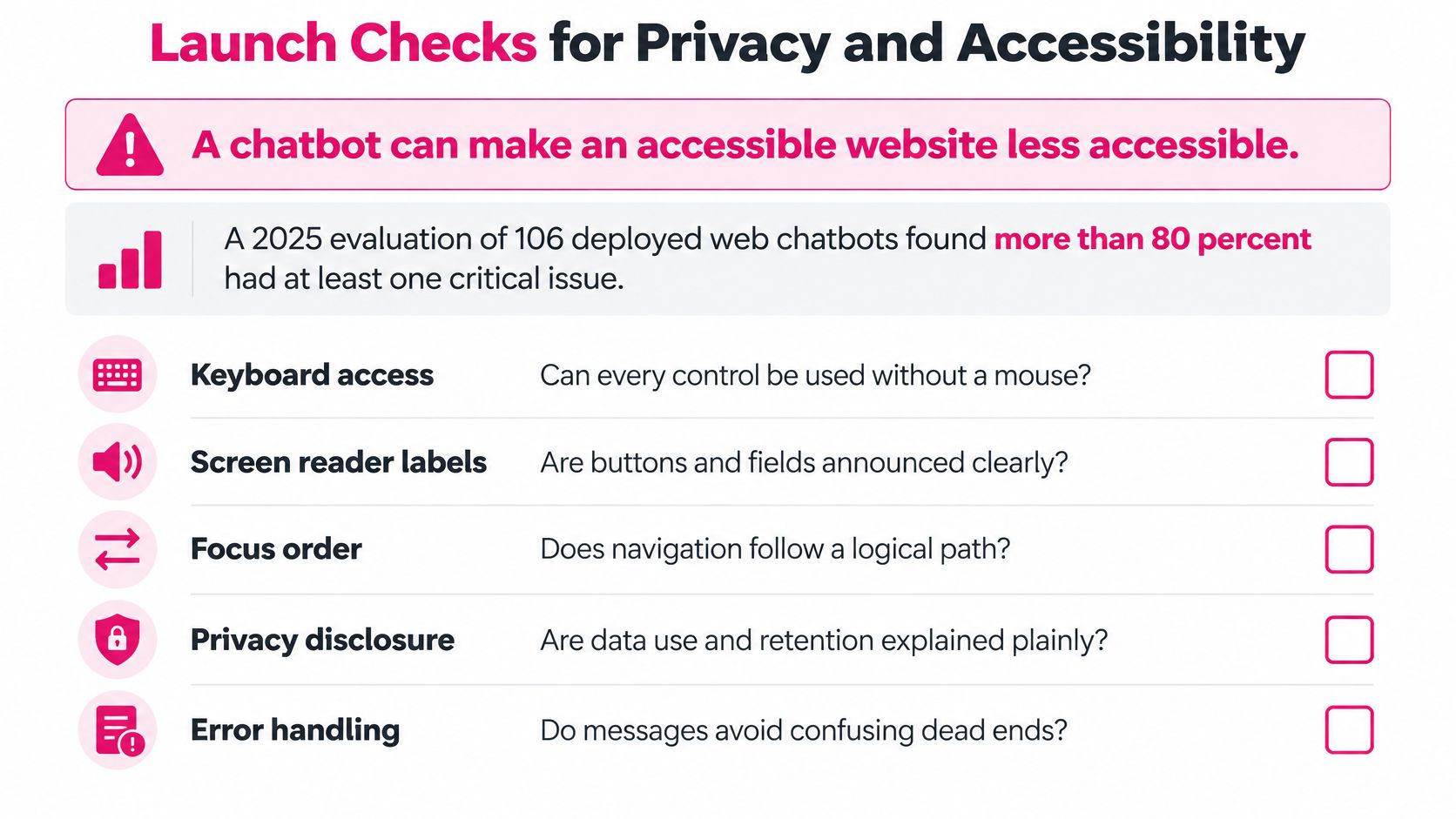
A chatbot can make an accessible website less accessible. A 2025 evaluation of 106 deployed web chatbots found more than 80 percent had at least one critical accessibility issue, and 45 percent had missing semantic structures or misused ARIA roles (ACM evaluation of deployed web chatbots). The widget introduces new focus, timing and keyboard problems even when the surrounding site passes a basic audit.
Treat accessibility as an acceptance test, not a polish pass. The top three tasks must be completable with the keyboard alone, then again with a screen reader announcing status messages and errors. Focus must be visible on every control, contrast must meet the team's written standard, animations must respect the reduced-motion setting, error text must name the problem and the next step, and a person must be reachable from every bot state.
Put privacy at the moment of disclosure
A privacy policy in the footer is not a control. A 2025 study of 12 widely downloaded US healthcare chatbot apps found that half did not show a privacy policy during sign-up, and only two offered a way to disable data sharing at that stage (arXiv study of healthcare chatbot apps). The moment a user is asked for a date of birth or a policy number is the moment consent has to appear.
NIST's Generative AI Risk Profile names the failure modes directly: training data can contain personal information, models can leak or infer sensitive details about individuals, and adversaries can extract memorized data. It recommends evaluating safeguards before deployment and continuously afterward (NIST Generative AI Risk Profile). In practice that means deciding which fields may enter a prompt at all, setting retention and deletion periods with a test deletion that succeeds, limiting log access by role, and running extraction attempts against the bot to see what it gives up.
Prompt injection deserves the same treatment as any other attack. Every tool the bot can call needs its arguments validated, its scope narrowed, and every call written to an audit log.
| Check | Pass condition |
|---|---|
| Top three tasks completable by keyboard only | All three finish without a mouse |
| Screen reader completion | Each task completes with announced status and error messages |
| Visible focus and contrast | Focus is visible on every control and contrast meets the team's written standard |
| Reduced-motion support | Animations respect the reduced-motion setting |
| Readable error states | Each error names the problem and the next step |
| Route to a person | A person can be reached by keyboard from every bot state |
| Consent at disclosure | The notice appears before any personal detail is requested |
| Retention and deletion | Written periods are enforced and a test deletion succeeds |
| Prompt injection and log access | Injection tests fail to override rules and log access is limited to named roles |
After release, alert on fallback spikes, sample conversations weekly, and keep a kill switch that returns users to a person, with one named owner authorized to use it. The guide to deploying AI agents covers the handoff pattern that makes that switch survivable.
Start Your First Build This Week
Five working days is enough to get a rule and retrieval bot in front of real users. Scope it to 20 to 50 intents, test it against a fixed set with thresholds written in advance, and pilot it on a slice of traffic before any agent tools go near it.
- Day 1: write the scope statement and pull 200 real questions from tickets, chat logs or site search.
- Day 2: group those questions into intents with two or three phrasings each, and draft flows for the top ten.
- Day 3: clean the knowledge base, assign an owner and review date to every document, and stand up retrieval.
- Day 4: run the fixed test set, change one component at a time, and rerun the regression suite after each change.
- Day 5: release to 5 to 10 percent of traffic and hand-review the first 100 fallback or escalated conversations.
The checkpoint stays fixed: add tools only after resolution holds above the team's threshold for three consecutive weeks.
Before Day 1, answer one question: which intent, if it fails, costs the most? Test that one first.
The scope statement takes twenty minutes and decides the next three months. Write it, then check your assumptions against published figures rather than your instincts. DBotMaker's Customer Service Chatbot Statistics 2026 page collects 53 figures on chatbots and AI agents used for customer service, drawn from 20 publishers and reports, so you have outside benchmarks to weigh your pilot numbers against once the first conversations come in. Set your target resolution rate on Day 1, price it against the cost of the intent you named above, and build that intent first.
Spotted an error in this guide? Email editorial@dbotmaker.io