Operator manual · General
AI Customer Service: Tools, Benefits and Limits
In short
See how AI customer service works, which tool fits each job, measured results from 2024 to 2026, and when a human should take over.
DBotMaker research desk · Updated November 29, 2026 · 17 min read
Only 24% of consumers say their latest AI customer support interaction was fully resolved without a person, the other 76% escalated, left with a partial answer, or abandoned the chat, 59% prefer always-on AI when it solves the problem, 86% of companies believe customers are satisfied with AI-powered service while only 51% of consumers agree, and 92% say humans should stay the final decision-maker, according to an Ada consumer study.
Resolution is the scarce outcome. In 2025, 30% of customer-service cases were handled by AI, with that share projected to reach 50% by 2027, according to a customer-service statistics compilation from LorikeetCX. A common buying mistake is to judge AI customer service software mainly by how many tickets a bot can contain on its own.
The buying test is the quality of the human handoff once automation hits its limit: the person receives the original question, the steps already tried, and a verified result, rather than a cold restart. Choosing tools for clean escalation and accurate context transfer cuts queue time on routine work. It also avoids spending customer trust on a bot that stops mid-task while the company still assumes the customer is satisfied.
Table of Contents
- AI Customer Service Tools and Which One Fits Your Job
- How an AI Support Conversation Moves From Question to Handoff
- Measured Results From Live Support Operations
- Escalation Triggers and Human Handoff Rules
- Disclosure and Compliance Rules for AI Agents
- Set Up a Pilot and Measure Handoff Quality
AI Customer Service Tools and Which One Fits Your Job
For most support teams, the safe first purchase is a rule-based or AI chatbot connected to a clean, current knowledge base for high-volume, repetitive questions such as order status, opening hours, and return policies. Teams with experienced staff whose replies are slow should add agent assist next, giving humans real-time draft suggestions without removing them from the loop. Generative AI agents that take multi-step account actions belong later in the roadmap, because modifying live orders or issuing refunds requires strict permissions, deep system integrations, and thorough pre-launch testing.
In practical terms, AI customer service is software that reads incoming questions, looks up policies or customer records, and transfers unresolved cases to human staff without requiring a person to type every routine reply. Market adoption reflects that staged path. A Plivo compilation citing IBM's 2024 Global AI Adoption Index and AIPRM's 2024 survey data shows that 74% of businesses used chatbots, compared with 29% running broader conversational-AI systems, while 35% of organizations used AI to improve agent efficiency and 26% of customer-service professionals had integrated or were experimenting with AI in daily workflows. Similarly, an IBM Institute for Business Value 2024 survey of nearly 1,500 customer-service leaders across 34 countries found that 54% of organizations had deployed generative AI in only one to four use cases.
Comparing the Five Tool Types
Every product category solves a narrow operational problem. Buyers who need a deeper breakdown of scripted bots versus autonomous systems can review DBotMaker's comparison of an AI agent vs a chatbot before shortlisting vendors. The table below maps the five primary tool types to the work they handle well and where they break down.
| Tool type | What it does | Best for | Main limit |
|---|---|---|---|
| Rule-based or AI chatbot | Answers common questions from a scripted flow or knowledge base | FAQ deflection, order status, opening hours | Struggles with questions outside its content |
| Generative AI agent | Reads the conversation, looks up records and takes actions such as refunds or rebooking | Multi-step requests that end in an action | Needs permissions, integrations and careful testing |
| Agent assist | Suggests replies and pulls knowledge for a human agent in real time | Experienced teams that want faster answers | Value depends on agents using the suggestions |
| Voice AI and IVR | Handles phone calls, identifies intent and routes or resolves the call | High call volume, routing and simple account tasks | Accents, background noise and upset callers raise error risk |
| Ticket triage and routing | Classifies, tags and prioritizes incoming messages | Large inboxes and queue management | Misrouting when categories overlap |
DBotMaker's research desk compares 9 AI customer support agent products in its 2026 ranking of the best AI customer support agents, written for support leads, founders, and operations managers choosing software that answers routine questions independently and hands the rest to people. Each ranking opens with a spec sheet showing each product's starting price, free plan or trial, supported platforms, integrations or compatibility, whether teams can sign up on their own or must talk to sales, and one key spec for the category. Tools such as Intercom Fin, Crisp, Chatbase, and Salesforce Agentforce Service sit across different tiers of these five categories, so matching the category to your actual ticket load comes before comparing feature lists.
Verification Checks Before You Shortlist
Before signing a contract, verify each tool type against the operational failure mode that hurts it most:
- Rule-based or AI chatbot: Measure containment on a sample of your own historical tickets rather than trusting vendor demo prompts.
- Generative AI agent: Inspect the role-based permission model and confirm that every automated account change writes to an immutable action audit log.
- Agent assist: Track suggestion acceptance rates alongside average handle time to confirm agents aren't ignoring or heavily rewriting drafts.
- Voice AI and IVR: Audit live call transfer rates and verify whether caller verification status passes cleanly into the human agent's screen.
- Ticket triage and routing: Test overlapping ticket categories and confirm disclosure settings plus configuration logs are exportable for EU-facing service.
The Vendor Claims Test
Vendor marketing frequently defines a "resolved" chat as any session where the customer stops typing. That denominator inflates performance because it counts silent abandonment as success. Ask every vendor to supply four separate figures and the exact denominator behind each one: first-contact resolution, transfer rate, repeat-contact rate, and abandonment rate.
Buying rule: Never accept a headline resolution percentage without seeing the exact denominator, the abandonment rate, and the share of customers who contacted support again within seven days on the same issue.
Although automated dialogue traces back nearly six decades from Joseph Weizenbaum's scripted ELIZA program in 1966 to the public release of ChatGPT in November 2022, as documented in Taskade's history of chatbots, most commercial products still layer modern language models onto older chatbot routing engines. Choosing the right category first prevents buying complex agent workflows when a focused chatbot or triage layer would finish the job faster.
How an AI Support Conversation Moves From Question to Handoff
Understanding where an automated support interaction succeeds or breaks down requires tracing one ticket from the first message to final closure. The workflow below illustrates the core stages connecting customer intent to a live human transfer.
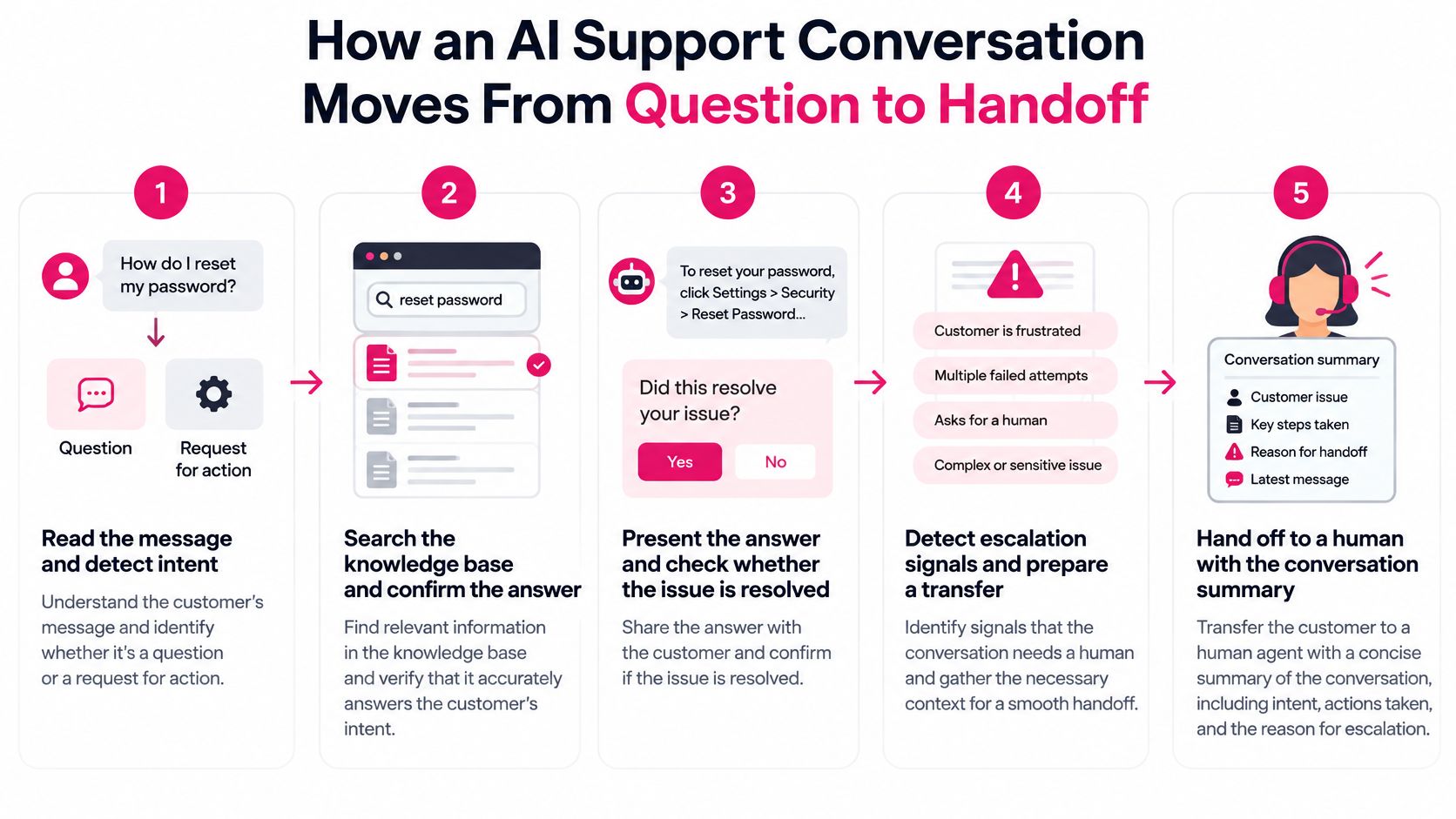
In live operations, a support system executes six distinct steps before a case closes or moves to a person:
- Read the message and detect intent. The software classifies whether the customer is asking an informational question ("Where is my invoice?") or requesting an account change ("Cancel my renewal"). When a message bundles two issues together, weak intent detection latches onto the simpler question and misses the urgent action.
- Search the knowledge base and validate the answer. Before drafting a reply, the bot retrieves matching help articles and checks that the policy covers the request. Stale or contradictory help-center documentation causes the most damaging failure at this stage: the model delivers a confident, grammatically polished wrong answer that violates current company policy.
- Pull account, order, or identity data within strict permissions. If the request requires personal details, the tool queries connected systems such as Shopify, Stripe, or Salesforce using only its granted read permissions. Missing API scopes or broken authentication tokens force an abrupt handoff that strips away progress and makes the customer re-verify their identity from scratch.
- Deliver the answer or execute the action and log the change. For a question, the system replies in plain language; for a transactional request such as a refund or rebooking, it triggers the connected endpoint and records a timestamped audit entry. Skipping action logging leaves human agents blind when a customer follows up to ask why a partial refund failed to settle.
- Confirm resolution or offer one clarifying pass. Good flows explicitly ask whether the answer fixed the problem and allow a single follow-up attempt if the customer adds new details. Allowing endless retry loops traps frustrated users inside a bot that doesn't have the data to help them.
- Hand off to a human with full structured context. When the case remains open, the system routes the ticket to an available agent along with the transcript, detected intent label, identity verification state, and every troubleshooting step already completed. Passing only a raw chat log without a structured summary forces the agent to spend extra minutes reading while the customer waits.
Why Data Readiness Dictates Cost More Than Software Licenses
Generic software comparisons focus on per-seat or per-resolution pricing, yet underlying documentation quality sets the ceiling on bot accuracy. A 2024 statistics compilation published by AIPRM citing business survey data reported that 77% of organizations identified data quality or data availability as the largest obstacle to efficient AI implementation. That same compilation found 35% of companies were using or considering natural-language-processing tools in customer care, while 25% were specifically evaluating AI customer-service automation.
A support bot can't answer policy questions that are missing, outdated, or buried inside conflicting internal PDFs. Before launching any customer-facing tool, operations teams must audit help-center articles, product SKUs, identity records, and escalation pathways. In the first year, the labor required for data cleanup, API integrations, permission scoping, quality monitoring, and ongoing content maintenance routinely exceeds the vendor's direct subscription or usage bill. When comparing tools, record every quoted fee alongside the seller name and the exact date checked. DBotMaker copies prices directly from makers' public pages on the date shown and marks enterprise vendors that only quote on request as pending, because opaque pricing makes first-year cost modeling unreliable.
What a Healthy First Week Looks Like
During the first seven days after launch, resist judging the system solely on total chat volume. A healthy rollout tracks two operational signals side by side: the share of routine chats closed cleanly without human intervention, and a manual audit of escalated transcripts. Have a team lead read a sample of transferred conversations each afternoon to verify whether agents received the right context, whether customers had to repeat themselves, and which outdated help articles triggered wrong answers.
Measured Results From Live Support Operations
Benchmark data across live deployments shows measurable gains in response speed and handling cost, though wide gaps remain between average results and what any single support team should expect. The table below pairs multi-company benchmark figures from the 2026 LLM Research Lab study, covering 2.4 million customer-support interactions across 340 organizations, with frontline agent productivity data from the Stanford and MIT field study published in The Quarterly Journal of Economics.
| Metric | Earlier figure | Later figure | Source and year |
|---|---|---|---|
| Resolved without human intervention | 48% (2024) | 67% (2026) | LLM Research Lab, 2026 |
| Escalation rate | 52% (2024) | 33% (2026) | LLM Research Lab, 2026 |
| Average first-response time | 14 seconds (2024) | 8 seconds (2026) | LLM Research Lab, 2026 |
| Average cost per AI interaction | $3.40 (2024) | $2.14 (2026) | LLM Research Lab, 2026 |
| Issues resolved per hour, average agent | Unassisted control baseline | About 14% higher (13.8% estimate) | Stanford and MIT field study (Quarterly Journal of Economics) |
| Issues resolved per hour, novice agents | Unassisted control baseline | About 34% higher | Stanford and MIT field study (Quarterly Journal of Economics) |
Treat the 2026 benchmark figures as directional reference points across hundreds of organizations, never as guaranteed outcomes for one inbox. A software team answering complex billing disputes won't mirror the autonomous closure rates of an ecommerce storefront answering parcel tracking inquiries. Faster first response and lower per-interaction cost represent the clearest documented benefits of AI support tools, while the primary analytical limit is that company-wide averages mask sharp differences by ticket complexity and staff experience.
Why Agent Experience Changes the Return
The Stanford and MIT researchers studied a staggered live rollout of an AI conversational assistant across approximately 5,179 customer-support agents at a Fortune 500 company. While the overall workforce resolved 13.8% more issues per hour (roughly 14% on average), productivity gains weren't distributed evenly. Novice and lower-skilled agents improved by approximately 34%, whereas experienced, top-performing agents recorded minimal measurable gains.
That gap clarifies how agent-assist software creates value. Rather than acting purely as an automation engine, the assistant captures effective phrasing and troubleshooting patterns from veteran staff and surfaces them in real time to newer hires. Organizations with high agent turnover, seasonal hiring spikes, or large entry-level queues stand to capture far stronger returns than lean teams staffed exclusively by tenured specialists. Teams structuring tiered support queues can also clarify where AI fits by reviewing how a help desk compares with a service desk across incident handling and structured workflows.
Productivity averages hide who actually benefits. If your support floor consists mostly of five-year product veterans, an AI reply assistant will likely shave seconds off typing rather than lifting hourly ticket volume by double digits.
Baselines to Record Before Rollout
According to a Nielsen Norman Group analysis of AI customer support productivity, the measurable throughput lift comes from cutting time spent searching internal wikis and drafting responses while leaving final judgment with the human agent. To verify whether a tool improves operations rather than merely pushing tickets out faster, record four baseline metrics before rollout and compare an AI-assisted group against an unassisted control cohort:
- Inquiries resolved per hour: Measures raw throughput across comparable ticket types.
- Average handle time: Tracks whether drafting and lookup delays drop from start to finish.
- Verified resolution rate: Confirms the customer's issue stays solved without reopening.
- Customer satisfaction (CSAT): Protects against tone degradation or rushed closures.
If hourly throughput climbs while resolution or customer satisfaction drops, the system isn't improving support performance. It's trading service quality for speed.
Escalation Triggers and Human Handoff Rules
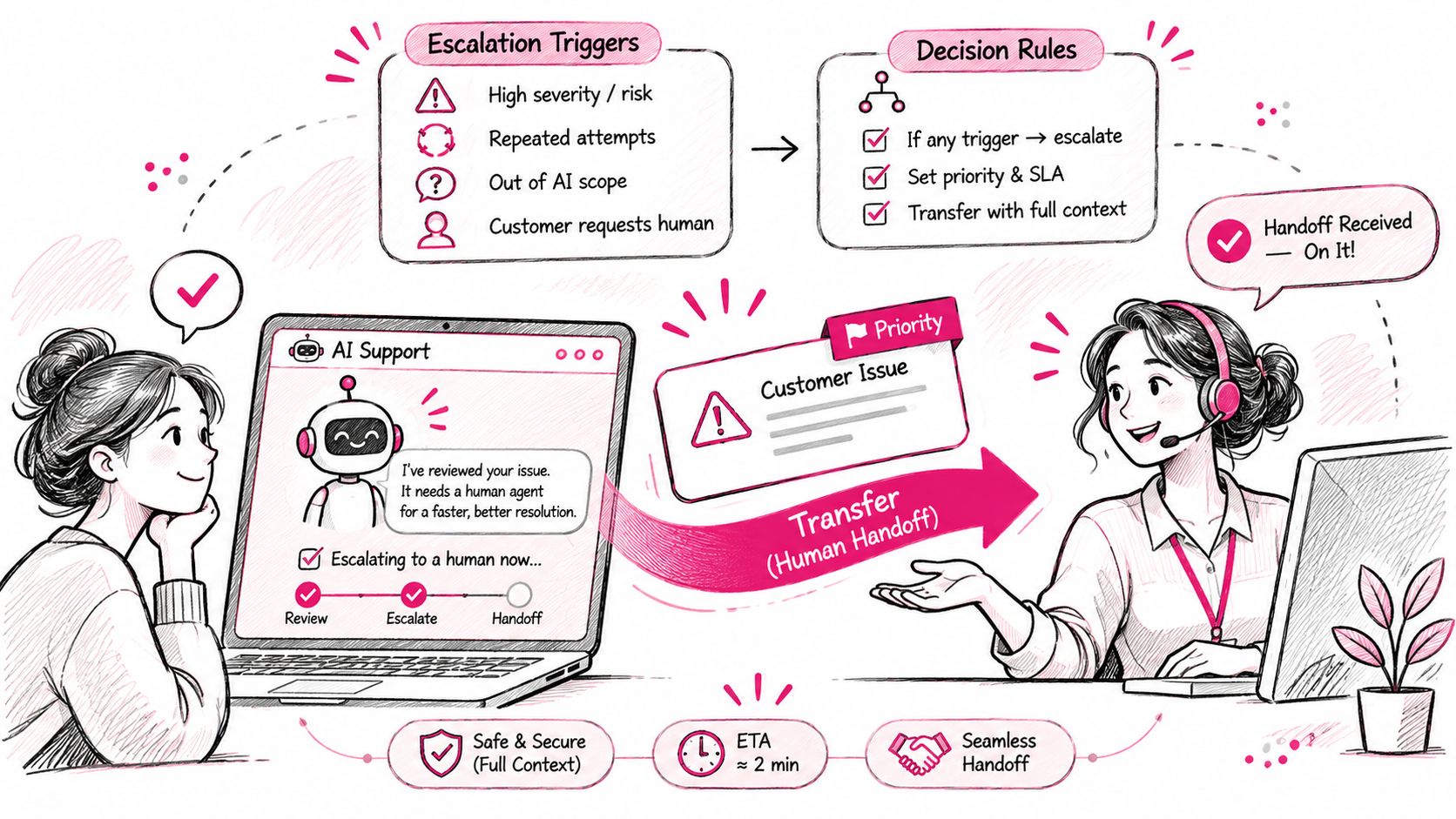
The strongest AI customer service architecture doesn't try to trap every conversation inside a bot. It optimizes for safe, low-friction escalation the moment an inquiry crosses beyond automated competence. Maximizing containment at the expense of easy human access pushes customers to game prompts, open duplicate tickets, or leave the brand entirely.
Consumer behavior backs this call directly. According to Twilio's report on the AI expectations gap, 63% of consumers want a quick, easy way to reach a live person, and 78% have actively tried to bypass AI agents to speak directly with a human. That same press release highlights a sharp continuity breakdown: 95% of customers say cross-channel continuity matters, yet 52% of companies fail to pass earlier interaction information to human agents. In a separate 2026 study spanning the U.S., U.K., and Germany cited in the report, 92% of consumers said they would escalate from AI within 10 minutes, and consumer trust in AI more than doubled, jumping from 26% to 55%, when a human option was clearly visible.
Signals That Must Trigger Immediate Transfer
Rather than letting a model guess on high-stakes tickets, configure hard routing rules that hand off automatically on four specific triggers:
- Sensitive subject matter: Health concerns, billing or fraud disputes, bereavement notices, and account security lockouts require human empathy and manual verification.
- Ambiguous intent: If the classifier returns low confidence across multiple help topics, route early instead of serving a generic FAQ link.
- Repeated contact on the same issue: A customer returning for a second or third attempt on an open problem shouldn't repeat automated troubleshooting steps.
- High financial or legal exposure: Enterprise contract cancellations, regulatory complaints, warranty liability claims, and chargeback threats carry costs that outweigh any per-ticket automation savings.
The Human Handoff Checklist
Before approving a vendor's escalation workflow, confirm that every transferred session passes five concrete elements into the agent workspace:
- Full conversation history: The agent sees the verbatim transcript alongside a three-line structured summary.
- Sentiment reading: Frustration or urgency signals flag the ticket priority so angry callers don't sit at the back of the queue.
- Identity verification status: Authentication completed inside the bot carries over, preventing duplicate security questions.
- Remedies already attempted: Any lookup results, refund checks, or troubleshooting steps already executed appear in an internal note.
- Direct human escape hatch: Customers can type "agent" or click a visible escalation button at any point without losing their session or restarting the form.
Run one decisive check during every software pilot before signing an annual agreement: force a live transfer mid-conversation and inspect whether the human agent receives every piece of context on the first screen.
Disclosure and Compliance Rules for AI Agents
A bot that hides what it is fails two tests at once: it breaks transparency law and it corrupts the handoff, because a customer who believed they were talking to a person arrives at the human agent already distrustful. Under the European Commission's 2026 AI Act guidance, people interacting with systems such as chatbots must be informed that they are communicating with a machine whenever necessary to preserve trust and enable an informed choice. The same guidance notes that the AI Act's first set of prohibitions took effect in February 2025 and outlines ongoing transparency obligations for AI systems and AI-generated content.
For teams configuring customer support tools that serve EU residents, compliance changes specific product settings rather than remaining a footnote in a privacy policy. Teams mapping technical launch steps can sequence disclosure rules alongside integration work on the timeline for how to deploy AI agents, so governance lands in the build instead of after it.
Build Requirements and Named Owners
Before signing a vendor agreement, confirm the software supports the four configurable compliance controls below, and assign a single internal owner to each requirement before go-live:
| Build requirement | What the vendor software must support | Internal owner |
|---|---|---|
| Bot identification in UI and scripts | Clear machine-interaction badges in chat headers and opening greeting templates without pretending to be human | Product lead |
| Plain-language disclosure wording | Editable notice text explaining AI involvement and localized strings for every active market language | Legal counsel |
| Visible route to human assistance | Persistent escalation triggers and queue fallbacks where service design or local regulations require human review | Support operations |
| Conversation and configuration audit logs | Exportable, timestamped records of transcripts, prompt revisions, permission updates, and routing rule changes | Vendor administrator |
Each row removes one ambiguity an auditor would otherwise exploit. If a vendor hard-codes a human persona name into the widget, strips out timestamped configuration histories, or blocks per-locale greeting edits, the tool creates avoidable compliance friction across European markets. The third row matters beyond regulation: a visible route to a person is also the mechanism that makes handoff quality measurable, since customers who cannot find the human path never produce clean transfer data in a pilot.
Require exportable configuration change logs in the vendor contract before launch. Knowing what a bot told a customer six months ago means little if your team can't prove which prompt version and disclosure label were live on that date.
Legal obligations vary across jurisdictions, industries, and service tiers, so support leaders should confirm exact disclosure and data-handling duties with qualified legal counsel before activating customer-facing automation. The audit log row deserves attention during that review, because it is the one control no vendor can retrofit quickly if it is missing from the product at signing.
Set Up a Pilot and Measure Handoff Quality
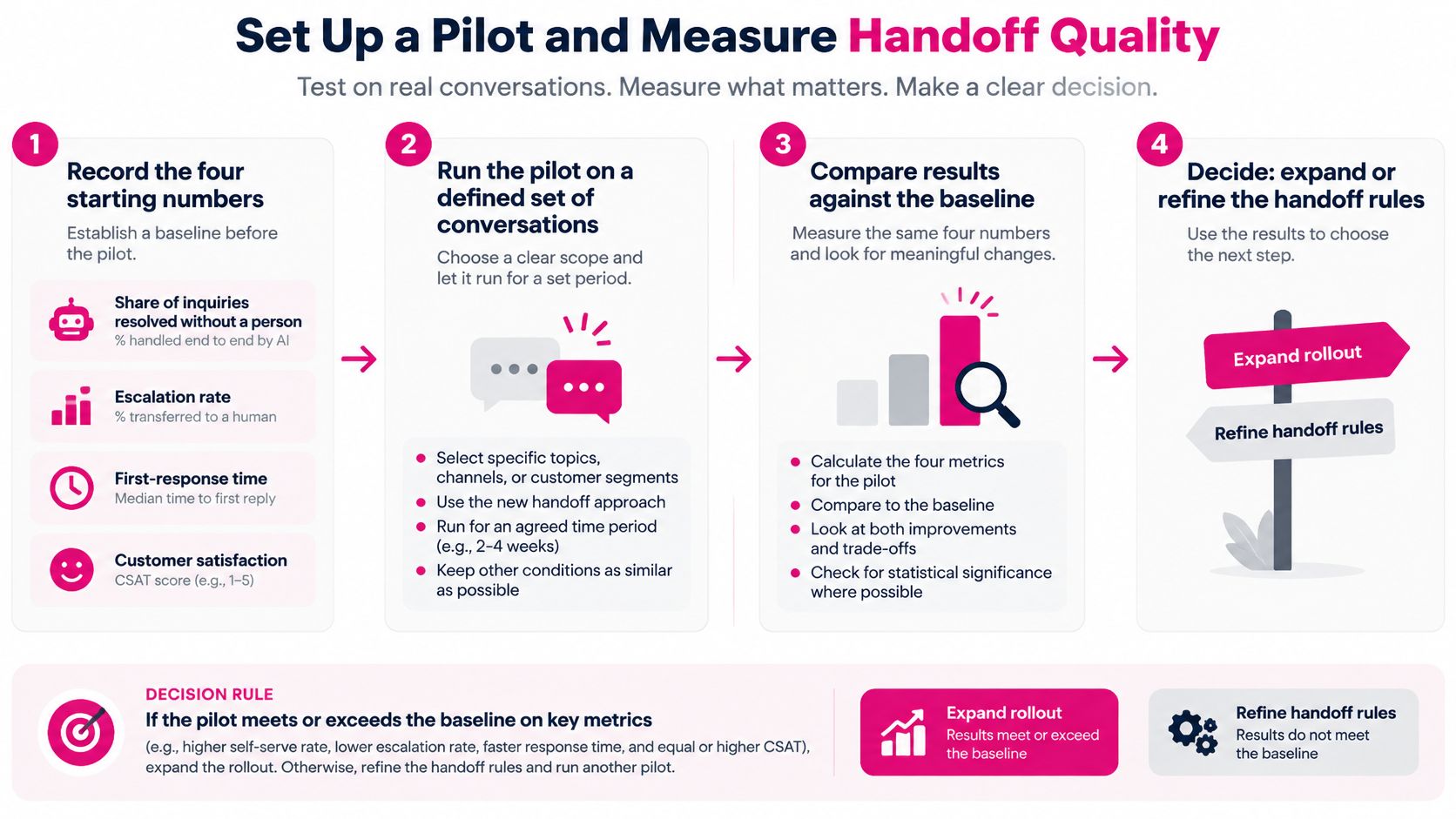
A disciplined pilot tests whether an AI tool improves real support outcomes without hiding failure behind inflated deflection rates. Run the trial on a bounded slice of live traffic, assign clear sign-off owners for every check, and hold expansion until both resolution and handoff metrics pass together.
Six-Step Pilot Plan and Failure Checks
Follow these six steps in sequence during a controlled trial window:
- Record four starting baseline numbers. Before activating the bot, support operations logs the current unassisted share of inquiries resolved without a person (typically zero for a fresh channel), escalation rate, first-response time, and cost per interaction. Failure to watch: Comparing pilot metrics against rough estimates rather than a clean, recent pre-launch period skews every ROI calculation.
- Add two customer-facing quality checks. The product lead configures and signs off on tracking for repeat-contact rate on the same issue and customer satisfaction specifically for AI-handled chats. Failure to watch: A fast drop in handle time paired with a climbing repeat-contact rate hides a bot giving quick, unhelpful answers that force customers to come back through email or phone.
- Select two distinct test workflows. Pick exactly one high-volume routine question type (such as shipping timelines) and one structured multi-step action (such as subscription cancellation or address updates) rather than opening the bot to your entire inbox. Failure to watch: Launching across all ticket categories at once muddies diagnostic data and makes it hard to tell whether the knowledge base or the API integration failed.
- Score forced human transfers for context fidelity. As a worked test scenario, run a batch of 20 forced escalations across both test workflows; operations signs off on the transfer score (checking whether the human received full chat history, verification status, and attempted steps), while the vendor administrator signs off on the configuration log verifying the routing rules fired as set. Failure to watch: Tickets arriving in the human queue stripped of identity verification or attempted remedies prove the handoff integration isn't production-ready.
- Compare pilot numbers against industry reference benchmarks. Review your pilot's autonomous closure rate, transfer share, and speed against published multi-company benchmarks as directional reference points rather than mandatory targets every business must hit. Failure to watch: Chasing an external automation percentage when your ticket mix leans toward complex technical troubleshooting pushes teams to hide human contact links.
- Apply a strict expansion gate. Operations and the product lead authorize broader rollout only when autonomous resolution improves without a drop in customer satisfaction and handoff audits show complete context passing. Failure to watch: Scaling a bot whose apparent containment rises only because frustrated users close the chat window before reaching a person.
When to Narrow Instead of Expand
If your pilot misses either the satisfaction floor or the handoff context check, don't add more automated actions or tune prompts endlessly on live customers. Pull the scope back to narrow FAQ deflection on verified help articles or switch the tool into agent assist mode so humans retain final sign-off while your team fixes underlying documentation and integration gaps. Start narrow, measure the handoffs, and expand only when the numbers hold.
Ready to compare specific platforms before launching your pilot? Check DBotMaker's 2026 ranking of the best AI customer support agents to review side-by-side spec sheets covering 9 products scored on capabilities (40%), ease of setup (30%), and value (30%), complete with verified starting prices, free trial terms, integration lists, and self-serve versus sales-led buying paths. If you spot a changed plan price or want a new support tool added to the rankings, send the details to the DBotMaker editorial desk.
Cite this page
DBotMaker. AI Customer Service: Tools, Benefits and Limits. Updated November 29, 2026. https://dbotmaker.io/ai-customer-service
Spotted an error in this guide? Email editorial@dbotmaker.io