Guide · General
Workflow Automation CRM: How It Works and Where to Start
Workflow Automation CRM explained: triggers, common workflows, time savings, data readiness checks and where to start first.
By the DBotMaker research desk · Updated November 8, 2026 · 14 min read
Adding more automation to a CRM with poor records usually creates more work, not less. In a 2025 CRM data-management survey covering 602 users and stakeholders, 76% said less than half of their organization's CRM data was accurate and complete, according to Validity's State of CRM Data Management in 2025. The call from the DBotMaker research desk is direct. Teams should start with lead assignment, not customer email sequences or automated scoring, and only after the records behind that workflow pass basic readiness checks. A wrong internal assignment costs a correction. A wrong customer message, price or eligibility decision costs trust, revenue and possibly a complaint. The best workflow automation CRM setup is therefore not the one with the most actions. It's the one that matches each level of autonomy to the quality of the data and the cost of a mistake.
Table of Contents
- How CRM Workflow Automation Works
- Common CRM Workflows and Their Triggers
- How Much Time Automation Actually Saves
- What CRM Automation Costs Beyond the License
- Set Data Readiness and Limits Before Launch
- How to Build Your First CRM Workflow
- Keep CRM Automations Reliable After Launch
How CRM Workflow Automation Works
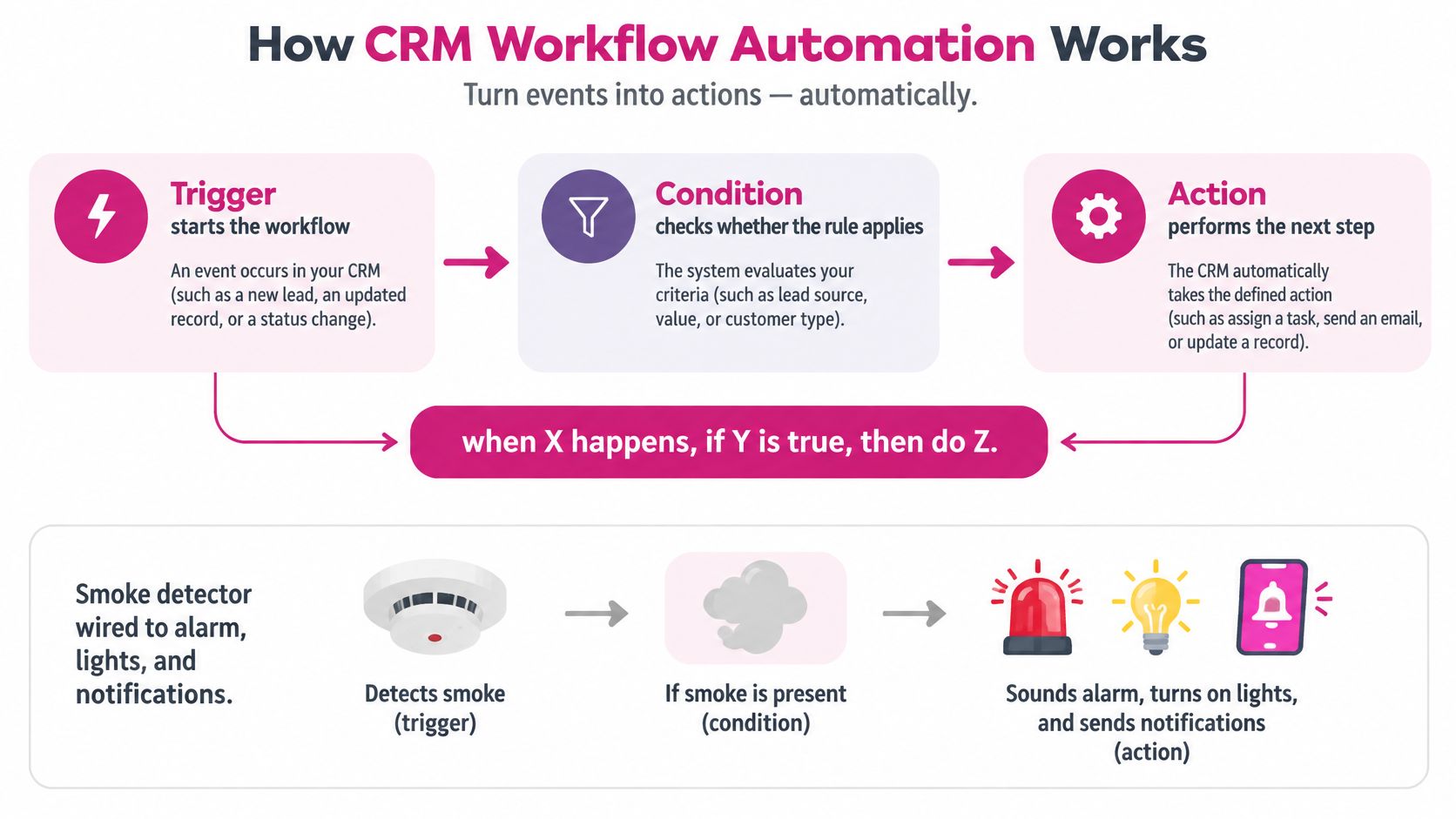
Every workflow follows the same three-part model: when X happens, if Y is true, then do Z. The trigger is the event that starts the run. The condition checks whether the rule applies to that specific record. The action is what the CRM does next, such as assigning an owner, creating a task, updating a stage or sending an internal alert.
A smoke detector wired to a sprinkler system explains the logic better than vendor diagrams usually do. The sensor detecting smoke is the trigger. The check that the signal is real and not steam from a shower is the condition. The spray, alarm and notification that follow are the actions. Remove the condition and the system reacts to every signal, including the wrong ones. CRM workflows fail in the same way when teams build triggers and actions without strict conditions.
The CRM as the Record of Truth
The CRM holds the records a workflow reads from and writes to. Contacts, companies, deals, tickets and activity history sit in one system, so a rule can check a lead's region before assigning an owner, or check the last activity date before creating a reminder. A basic rule that only stores data doesn't change anything operationally. A workflow acts on that data and moves a process to its next step without waiting for a person to notice.
That distinction matters during tool selection. Salesforce Flow, HubSpot workflows and Zoho Blueprint all structure automation around triggers, conditions and actions, even though their builders look different. The model stays constant across vendors.
One Request Traced End to End
Say a prospect submits a demo request through a web form. The submission creates a contact record, which is the trigger. The workflow checks the region field, which is the condition. It then assigns the owner for that region, creates a follow-up task due within a set window and posts an alert to the team chat. Each handoff depends on the previous step completing correctly.
Practical rule: If a workflow can't be written in the when, if, then form on one line, it isn't ready to be built.
Integrations extend the chain outside the CRM. When a workflow reaches email, billing, a support desk or a chat tool such as Slack, it passes through a connector or an integration platform. Every connection is a point where authentication can expire, a field can mismatch or an action can fail. Teams should map each external handoff before launch, not after the first missed lead.
Common CRM Workflows and Their Triggers
Eight patterns cover most of what sales, service and operations teams automate first. The table below lists each workflow with its typical trigger, its actions and a risk level. These are common patterns, not vendor-specific features, so the job is to match each row to an existing internal process rather than to a product menu.
The risk column needs a plain reading. Low means the workflow changes internal records only, and a mistake costs a quick correction. Medium means it changes something a customer can feel, such as a price, a discount approval or a service response time. High means it sends messages to customers or makes a decision about a person.
| Workflow | Trigger | Actions | Risk level |
|---|---|---|---|
| Lead assignment | New lead created or web form submitted | Assign owner by region or lead source and notify the rep | Low |
| Follow-up reminders | Deal stage unchanged for 7 days | Create a task for the owner and send an internal reminder | Low |
| Stage updates | Email reply or meeting logged | Move the deal to the next stage and log the activity | Low |
| Renewal alerts | Contract end date 60 days away | Create a renewal task and notify the account manager | Low |
| Service escalation | Support ticket marked urgent | Route to a senior agent and update the account record | Medium |
| Quote approval | Discount above the set threshold | Hold the quote until a manager approves it | Medium |
| Customer email sequences | Lead opts in or stage changes | Send scheduled emails from approved templates | High, needs consent and content checks |
| Lead scoring or eligibility | Form data or score meets set criteria | Rank leads or decide eligibility for an offer | High, may fall under GDPR for EU individuals |
Where to Start
For many teams, the first workflow should be lead assignment. Its trigger is unambiguous, since a new lead either exists or it doesn't. Its blast radius stays internal, because a misrouted lead goes to the wrong colleague rather than the wrong customer. Feedback also arrives fast, since reps notice bad assignments within days and the routing logic can be fixed before real damage accumulates.
Follow-up reminders belong in the first test group alongside lead assignment. Both rows tolerate imperfect data better than the high-risk rows, and both produce visible results quickly. The other low-risk rows, stage updates and renewal alerts, should follow once the first build has run cleanly for two weeks.
List three team processes that match rows in the table, then pick the one with the lowest risk and the clearest trigger. That single choice settles most first-build debates.
One constraint applies to every row. Even the lowest-risk workflow shouldn't run until the records behind it pass readiness checks. The table says what to build first. Data quality decides whether it should go live at all.
How Much Time Automation Actually Saves
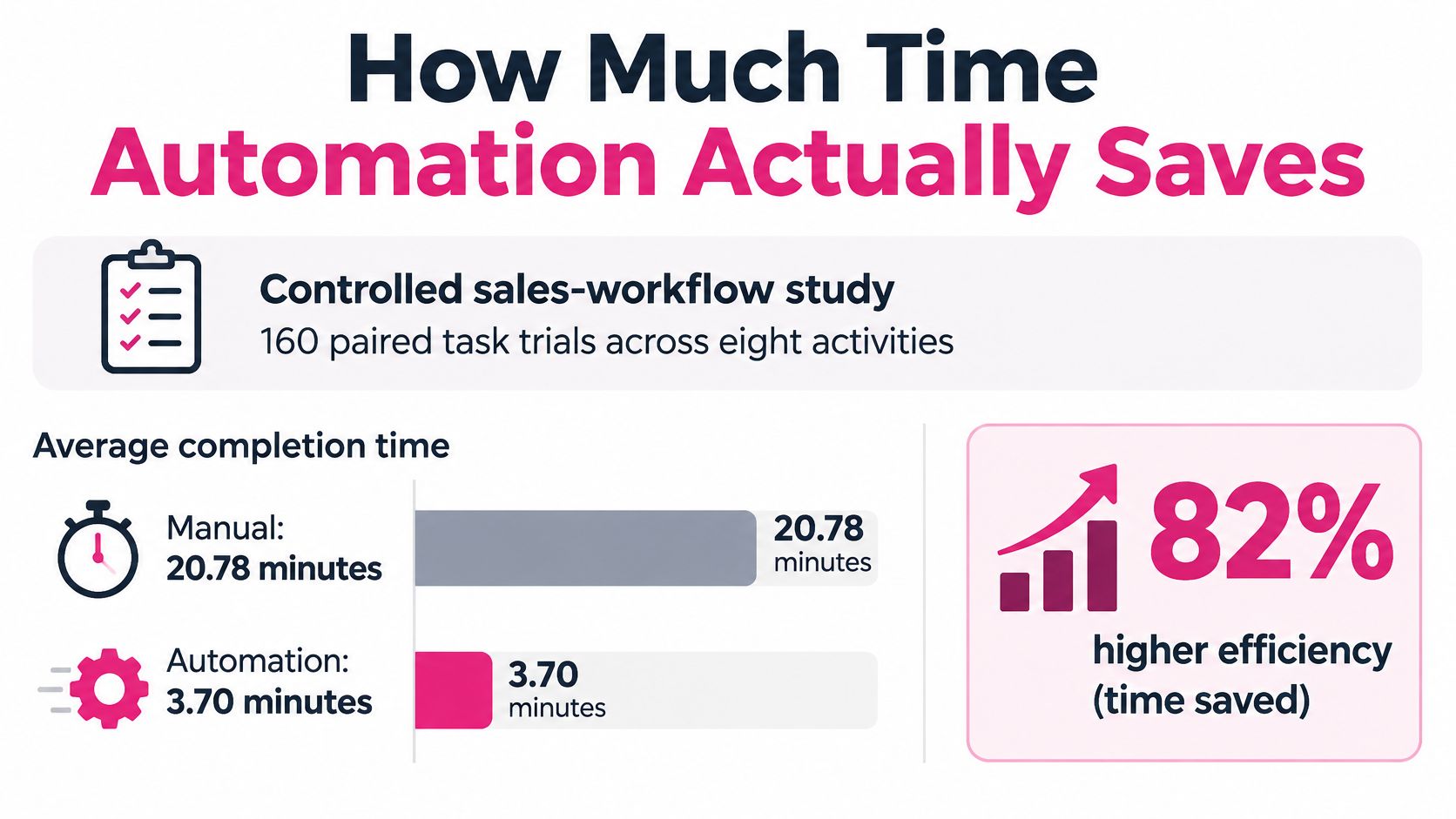
The strongest available number comes from a controlled test rather than a vendor survey. In Bitrix24's CRM benchmark report, a controlled sales-workflow study measured 160 paired task trials across eight activities and found that automation reduced average completion time from 20.78 minutes manually to 3.70 minutes, an 82.17% reduction. The difference was statistically significant, with a paired-samples t(159) = 8.64, p < 0.001 reported in the same benchmark.
Where the Saving Actually Comes From
The largest gain sat in monthly sales reporting. That task fell from 92.74 minutes to 11.97 minutes, a reduction of 87.09%, in the same controlled study. The pattern is instructive. Reporting improved most because automation replaced spreadsheet consolidation and repeated record lookups with event-triggered data aggregation and real-time dashboards. Tasks built on searching, copying and reformatting save the most time. Tasks that need judgment save the least, and forcing them into a workflow usually just moves the work into exception handling.
The arithmetic scales quickly at team level. Each automated monthly report saves roughly 80.77 minutes against the manual baseline in that study. A manager producing ten such reports a month recovers roughly thirteen and a half hours, which is time that can move to pipeline review or coaching instead of spreadsheet assembly.
Treat It as a Benchmark, Not a Forecast
One controlled study doesn't predict results for every team. Savings depend on how manual the starting process is, how clean the underlying records are and how often exceptions pull a person back in. Teams should time each candidate task before building anything, then time it again after launch using the same paired method. Execution time, error rate and exception count belong on the same scorecard, because a fast workflow that produces errors hasn't saved anything.
Broader context helps calibrate expectations. DBotMaker's research desk compiled 52 figures from 22 publishers and reports for its Workflow Automation Statistics 2026 page, which gives operations leaders a wider set of sourced benchmarks to compare against internal measurements.
What CRM Automation Costs Beyond the License
The software fee is the easiest cost to see and often the smallest part of the total bill. A complete estimate has four lines, and three of them never appear on a vendor invoice. Any platform price added to a budget should name the seller and the date it was checked, since plans and seat pricing change without notice.
The Four Cost Lines
- Platform fees: The CRM plan and seat count set this line. Vendors such as HubSpot, Salesforce and Zoho gate advanced workflow features behind higher tiers, so the relevant price is the tier that includes the needed automation, not the entry price on the homepage.
- Integration upkeep: Each connector to email, billing, a support desk or a chat tool needs authentication maintenance and monitoring. A connector that fails without notice stops a workflow without stopping the process that depends on it.
- Data cleanup: Fixing duplicates, missing owners and stale fields before launch takes staff hours. This work is unavoidable, because automating on top of dirty records converts a one-time cleanup problem into a recurring correction problem.
- Review time: Exceptions routed to people, log reviews during the first month and scheduled data audits all consume hours every week the workflow runs.
Cost Follows Consequence
An internal reminder workflow is cheap to run and easy to undo. If it misfires, a task gets deleted and the condition gets tightened. An automated pricing or eligibility workflow sits at the opposite end. A failure there can cost revenue on mispriced quotes, customer trust on wrong decisions and legal exposure where automated decisions about individuals are restricted.
Budget rule: Estimate every workflow across all four lines before choosing it, and mark any figure that can't be sourced from a seller's page as unknown until it's checked.
The practical effect is a sequencing decision. Low-risk internal workflows deliver savings at a cost close to the license fee alone. High-risk workflows need logging, review capacity and rollback procedures budgeted from the start, which often makes them the wrong first project even when the headline time saving looks larger.
Set Data Readiness and Limits Before Launch
Most automation guides start with triggers and treat data quality as an afterthought. That order is backwards. In a 2025 survey covered by FormAssembly's data collection report, 80% of CRM, compliance and data professionals reported data-accuracy or integrity problems caused by fragmented tools, siloed systems and poor visibility across the data lifecycle. Automation applied to records in that condition doesn't remove operational work. It multiplies bad records, duplicate contacts and incorrect ownership at machine speed.
Six Readiness Checks Before Any Trigger Goes Live
- Duplicate rate: Duplicate contacts send one prospect to two reps and split the activity history.
- Required-field completion: A routing rule can't assign by region when the region field is empty.
- Timestamp freshness: Stale activity dates make inactivity triggers fire on active deals.
- Ownership validity: Records owned by departed staff route tasks into a void.
- Consent status: Outbound sequences need a recorded, current basis for contacting each person.
- Cross-system reconciliation: CRM records should match billing and support systems on account identity and status.
Each check needs an agreed threshold before launch, so the go or no-go decision doesn't become a debate later. Where a workflow spans several systems, the connector layer matters as much as the CRM itself, and a structured comparison such as the best iPaaS platforms ranking helps teams judge whether their integration tooling supports the monitoring these checks require.
Set Autonomy by Consequence, Not by Capability
Three tiers keep the decision simple. Internal tasks such as reminders and stage updates can run automatically, because a wrong one costs a minute. Customer-affecting actions such as service escalation and quote approval need confidence checks, audit logs, reversible changes and a named escalation path. High-impact actions such as scoring, eligibility, pricing and outbound sequences need human approval until the data passes every threshold.
Law reinforces the top tier in Europe. Under the GDPR guidance published on the European Union's Your Europe portal, a decision about an individual made solely through automated processing is generally restricted unless an exception applies, such as explicit consent, contractual necessity or authorization under law. Where such a decision is permitted, the business must explain it, provide a right to human review and allow the individual to contest the result. Lead scoring and eligibility workflows involving people in the EU sit squarely inside that rule.
How to Build Your First CRM Workflow
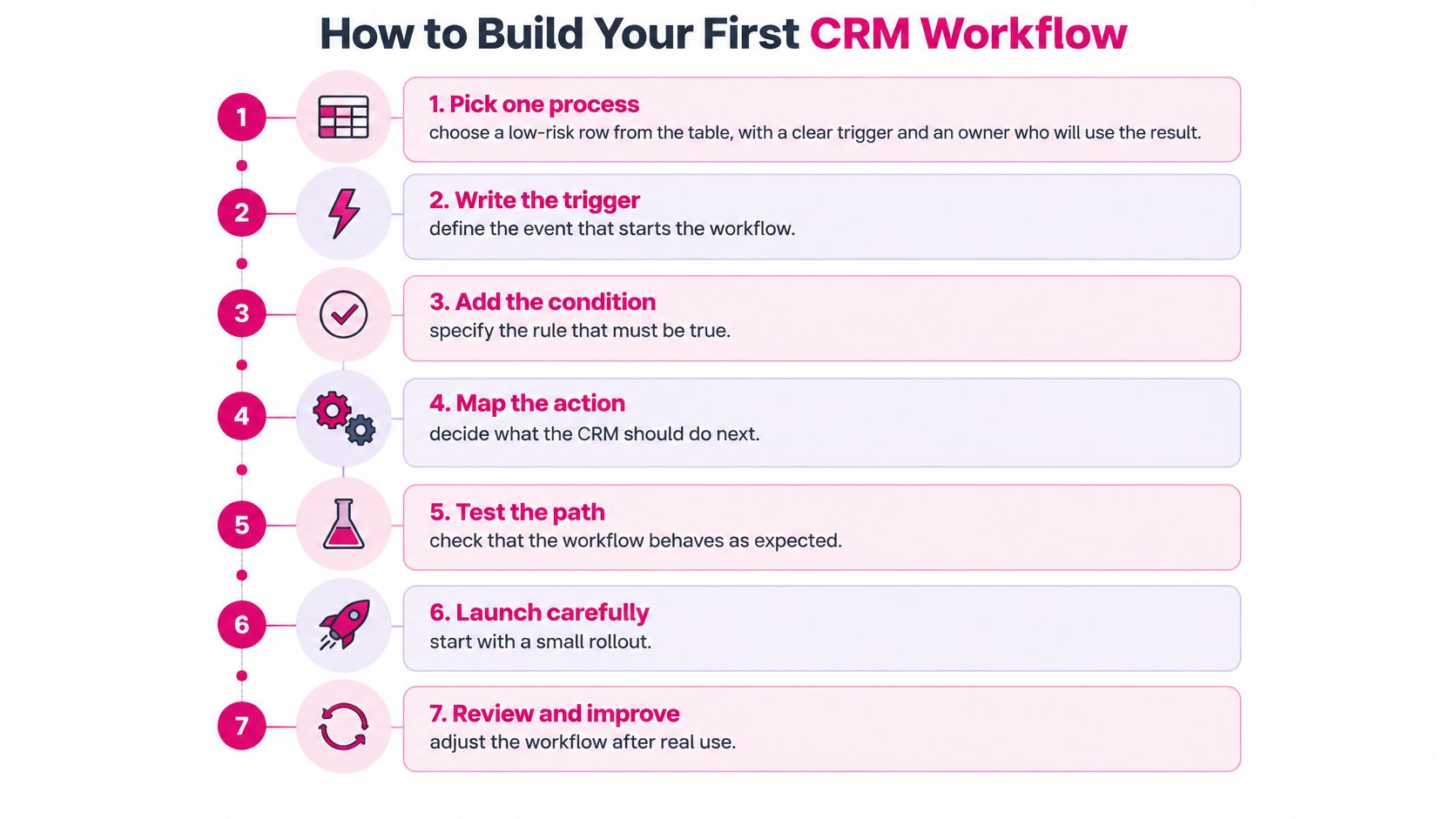
The readiness thresholds for the chosen process need to pass before step one begins. That gate isn't bureaucracy. It's the difference between a workflow that removes admin work and one that manufactures corrections. With the gate passed, the pick from the workflow table stands, and lead assignment becomes the first build.
The Seven Steps
- Pick one process with a clear trigger and a named owner. Lead assignment qualifies because a new lead record is a definite event and the sales manager who owns distribution will use the result daily. A workflow without an owner who feels its failures won't get maintained.
- Write the trigger and conditions in plain words. Use the when, if, then form and circulate it before touching any builder in HubSpot, Salesforce Flow or a tool such as Make. Disagreements about routing rules are cheap on paper and expensive after configuration. Teams evaluating builders at this stage can compare options in the best no-code automation tools ranking against the conditions the written rule requires.
- List each action and who it affects. Assign owner, notify rep, create task. For each action, decide what happens when it fails, because a failed notification leaves an assigned lead that nobody knows about.
- Add a fallback path. When no owner matches the routing rules, the workflow should create a task for a manager rather than leaving the record unowned. Unowned records are where leads go to die.
- Test with deliberately difficult sample records. Include a duplicate contact, a record with the region field missing and one edge case such as an existing customer submitting a new form. Check the result on each record individually, not just the run status. A workflow can report success while routing every test lead to the wrong person.
- Launch to a small group first. One region or one lead source for a week or two exposes real-world messiness at a scale that stays correctable. A full-team launch turns the first logic error into a full-team cleanup.
- Review the run logs against the baseline. Compare time per assignment and misroute count with the manual process timed earlier. If the saving isn't visible in the logs, it doesn't exist yet.
What Healthy Looks Like After Two Weeks
A sound first workflow runs on schedule and its failures are visible and rare. The owner trusts the output enough to stop checking every assignment manually. The team can also name one specific improvement for the next build, such as a tighter condition or a better fallback. If none of those three things is true, the workflow needs another iteration before a second one gets built on top of it.
Keep CRM Automations Reliable After Launch
A workflow that runs isn't the same as a workflow that works. Reliability needs its own measures, separate from the time-saving figures that justified the build. A practical benchmark set described by MakeAutomation's CRM workflow automation guide identifies trigger coverage above 90%, workflow failure rates below 5%, post-trigger required-field accuracy above 95%, on-time completion of automatically created tasks above 80%, and monthly data decay below 10% as useful operating targets.
| Metric | Operating target | Failure it signals |
|---|---|---|
| Trigger coverage | Above 90% | Incomplete event detection |
| Workflow failure rate | Below 5% | Integration, authentication or branching defects |
| Required-field accuracy after trigger | Above 95% | Weak validation or enrichment |
| On-time completion of auto-created tasks | Above 80% | Task routing or deadline logic gaps |
| Monthly data decay | Below 10% | Stale records undermining routing and personalization |
Read Each Metric as a Diagnosis
Low trigger coverage means events are occurring that the workflow never sees, often because a form, import or integration creates records through a path the trigger doesn't watch. A high failure rate points at expiring authentication, a broken connector or branching logic that hits an unhandled case. Poor field accuracy after the trigger signals weak validation at entry. Data decay is the quietest failure, because workflows keep executing successfully on records that no longer reflect reality, and routing quality erodes without any error appearing in a log.
These targets are guidance, not universal standards. Each team should record a baseline per workflow type during the first month, then set its own thresholds based on risk. A customer-facing workflow deserves tighter targets than an internal reminder.
Practices That Keep the Numbers Honest
- Workflow logs for every run: Without logs, a missed lead is an anecdote instead of a traceable event.
- A dead-letter queue: Failed actions should land somewhere visible for review and retry, not vanish.
- Idempotent update logic: Running the same action twice shouldn't create duplicate records or duplicate tasks.
- Validation before downstream steps: Required fields get checked before the workflow writes to billing, support or email tools.
- Monthly data-quality audits: Scheduled checks catch decay before it degrades routing and personalization.
A weekly fifteen-minute review of the run logs during the first month catches most defects while the affected record count is still small.
Reliability work isn't glamorous, but it's what separates automation that compounds savings from automation that compounds corrections.
Start with the decision, not the tool. Pick lead assignment as the first workflow, run the six readiness checks against the records behind it, and set the thresholds before anyone opens a workflow builder. Teams still comparing platforms can use DBotMaker, the decision bot, to get one clear, scored recommendation on the automation stack that fits their CRM, then build the first workflow against the when, if, then rule and measure it against a timed manual baseline within the first two weeks.
Spotted an error in this guide? Email editorial@dbotmaker.io