Review · Software & AI
 GitHub Copilot code review review
Pull request and editor diff review built into GitHub Copilot, requested like a human reviewer or set to run automatically.
By the DBotMaker research desk · Updated November 23, 2026
Short answer · output
GitHub Copilot code review is the AI pull request reviewer built into GitHub Copilot, requested like a human reviewer or set to run automatically, and it is included in every paid Copilot plan from Pro at $10 a month. It is the cheapest way for a team already on GitHub to add AI review, but each review spends AI credits, about $1.50 on average at the default Balanced level according to GitHub's docs. Plans, prices and review costs were checked on GitHub's pricing page and documentation in November 2026.
- Capabilities (40%)
- 8.4
- Ease of setup (30%)
- 9.2
- Value (30%)
- 9.0
In pictures · 2 images
Verdict printout · GitHub Copilot code review
Pick Copilot code review if your code lives on GitHub and you already pay for Copilot, because review comes inside the plan, needs nothing installed, and can run on every pull request through a branch ruleset. Skip it if your repositories are on GitLab, Bitbucket or GitHub Enterprise Server, where CodeRabbit is the better fit, or if you want a reviewer you can talk back to in the thread. The deciding fact is metering: GitHub estimates a Balanced review at $1.50 on average and a Max review at $10, so the $15 of monthly AI credits in Copilot Pro covers roughly ten average Balanced reviews before paid usage or a pause kicks in.
ReadOverview
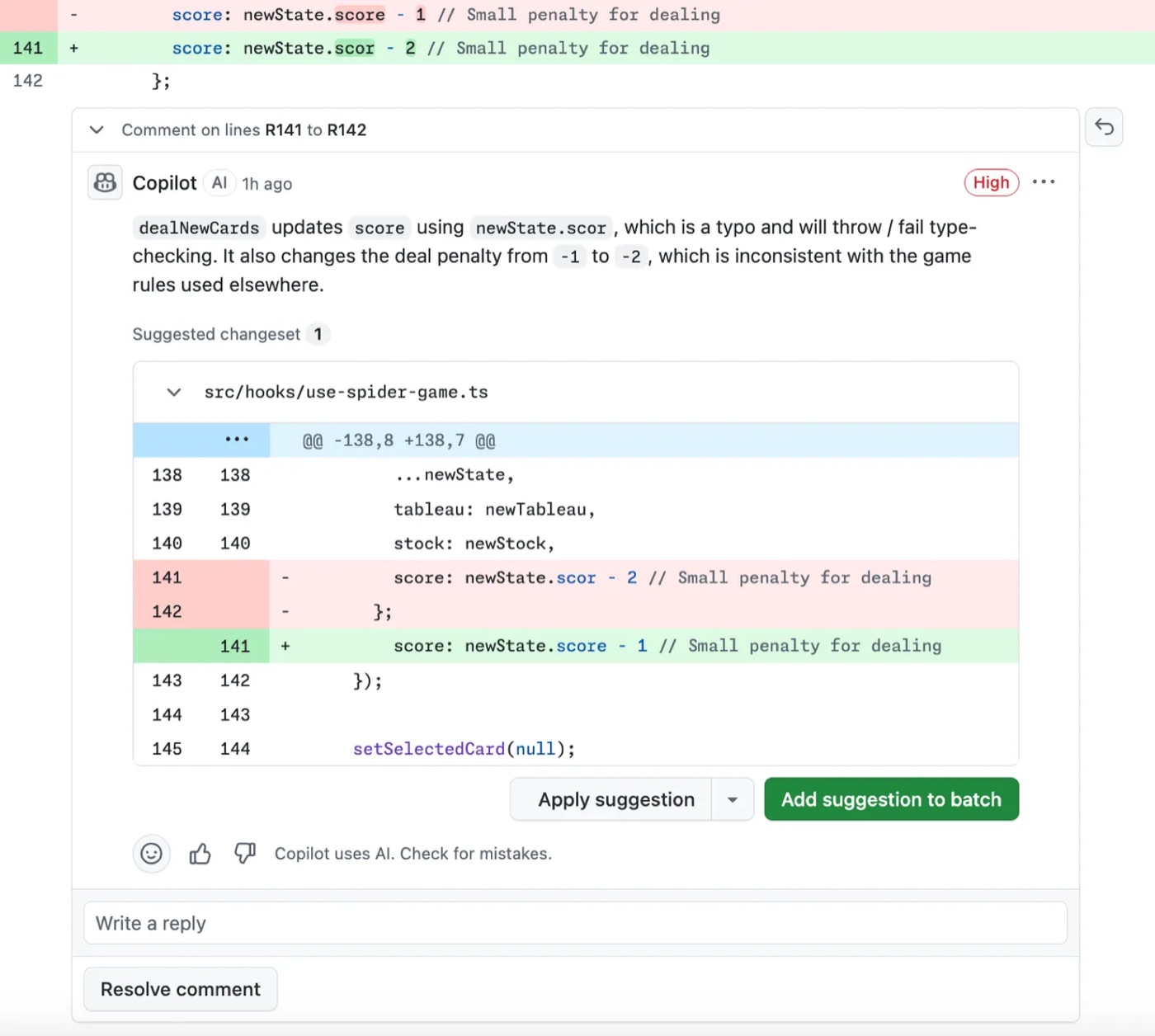
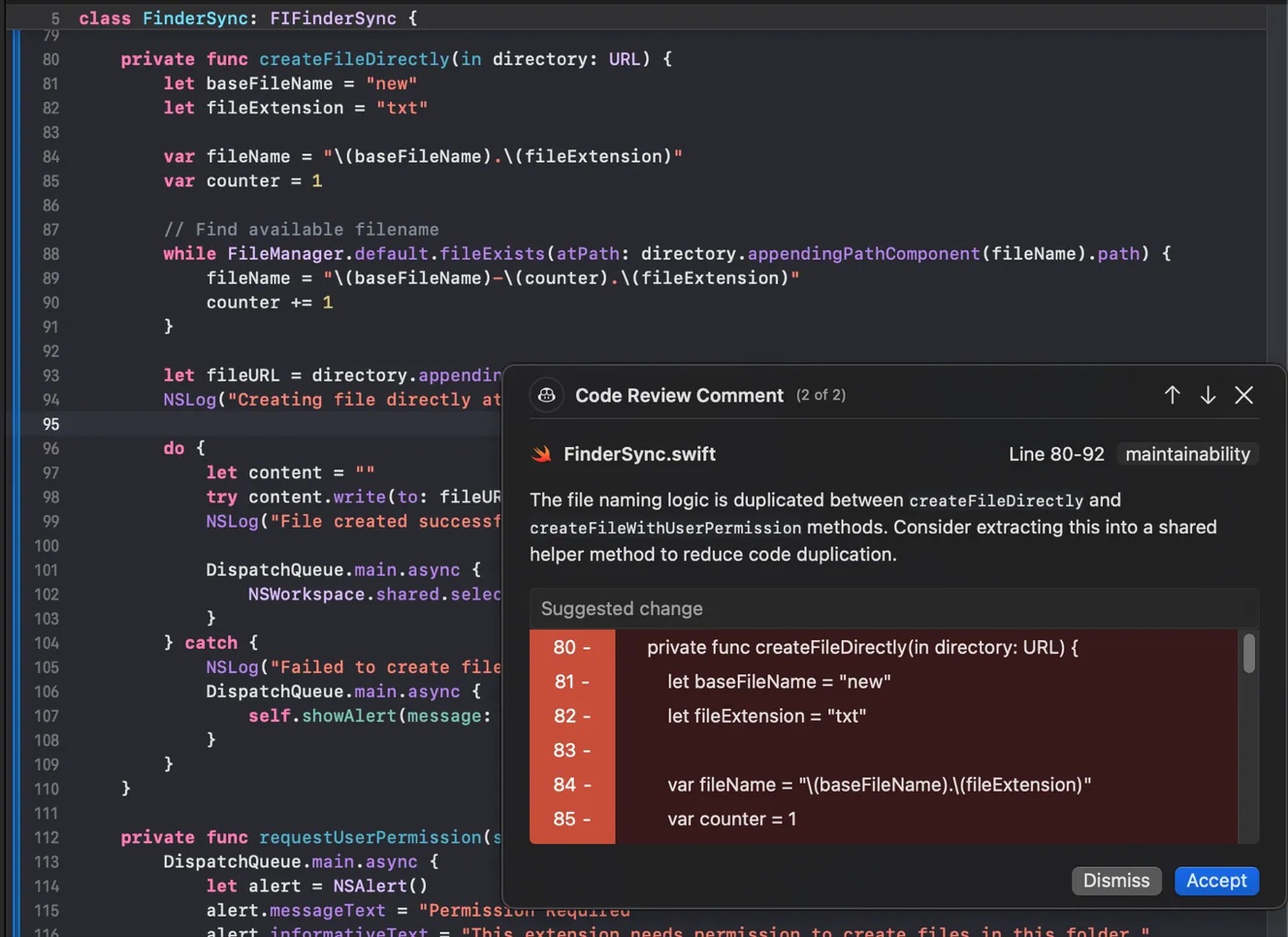
Copilot code review is a feature of GitHub Copilot rather than a separate product. On a pull request, a developer clicks Request next to Copilot under Reviewers, and GitHub's docs say the review usually takes less than 30 seconds. Copilot leaves comments labeled High, Medium or Low severity, often with suggested changes that can be committed in a couple of clicks, and a Fix with Copilot button can hand the feedback to Copilot cloud agent to open a fix. It also reviews file diffs inside VS Code, Visual Studio, Xcode and JetBrains IDEs, and works from GitHub CLI, GitHub Mobile and Azure DevOps.
The big change in 2026 is billing. Copilot now runs on GitHub AI Credits, where one credit equals $0.01, and every code review consumes credits based on the model and tokens used, plus GitHub Actions minutes for the agentic context gathering. GitHub added review effort levels to make that cost visible: Lite averages an estimated $0.25 per review, Balanced (the default) $1.50 and Max $10, with an Adaptive option in public preview that picks a level by pull request risk. Copilot can also now submit an approving review that counts toward required approvals, but only when that is switched on at repository, organization and enterprise level.
Plans that include code review are Pro at $10 a month with 1,500 monthly AI credits, Pro+ at $39 with 7,000, Max at $100 with 20,000, Business at $19 per seat with 1,900 credits per user and Enterprise at $39 per seat with 3,900. Copilot Free does not include pull request review. Business and Enterprise organizations can also let members without a Copilot license request reviews on GitHub.com, with those credits billed to the organization.
Against the other tools on this site's code review list, the main advantage is cost and setup. CodeRabbit starts at $24 per developer a month billed annually and Cursor Bugbot needs a Cursor plan from $30, while Copilot review comes with a $10 plan many developers already have. The trade-offs are scope and control: Copilot review only runs on GitHub and Azure DevOps, the model cannot be switched, and GitHub states that Copilot does not see or reply to comments left on its review threads.
There are documented limits worth knowing before rollout. Dependency files such as package.json and Gemfile.lock, log files and SVG files are skipped. Unless Review new pushes is enabled, an automatic review runs only once per pull request, and on a re-review Copilot may repeat comments that were already resolved or downvoted. Copilot is not available for GitHub Enterprise Server at all.
How it scored
If the deciding question is cost for a team that already lives on GitHub, Copilot code review is the answer. It is part of Copilot Pro at $10 per user per month, so a developer adds Copilot as a reviewer on a pull request, or an admin turns on automatic reviews for a repository or the whole organization. Reviews also work on file diffs inside VS Code, Visual Studio, Xcode and JetBrains IDEs, and teams steer them with instructions.md files. The trade-off is metering. GitHub's docs say each review consumes AI credits, based on the model and tokens used, plus GitHub Actions minutes for context gathering. Pro includes $15 of credits a month, Pro+ at $39 includes $70 and Max at $100 includes $200, and reviews are blocked when the budget runs out. It is the weakest choice outside GitHub, since Azure DevOps support is still a public preview.
Who it is for
GitHub teams already paying for Copilot
Run it if
- Teams on GitHub.com that already pay for Copilot Pro, Business or Enterprise and want a first-pass reviewer without a second vendor
- Organizations with contributors who lack a Copilot license, since Business and Enterprise can extend review to them and bill the organization
- Developers who want a quick review of a file diff inside VS Code, Visual Studio, Xcode or JetBrains before opening a pull request
- Teams that want review rules in the repository, using copilot-instructions.md, path-specific instructions files, AGENTS.md and agent skills
- Small teams that want automatic reviews on every pull request through a branch ruleset with no extra install
Skip it if
- Teams on GitLab or Bitbucket: CodeRabbit supports several Git hosts and is the better fit
- Companies on GitHub Enterprise Server, where GitHub says Copilot is not available: look at Qodo, which offers an Enterprise plan
- Teams that review many large pull requests at Max effort, which GitHub estimates at $10 per review on average: Greptile's per-credit pricing with no seat fees may be easier to budget
- Teams that live in the Cursor editor: Cursor Bugbot is included in Cursor plans and fits that workflow
SpecSpec sheet
| Maker | GitHub (Microsoft) | src ↗ |
|---|---|---|
| Cheapest plan with code review | Copilot Pro, $10 USD per month | src ↗ |
| Free plan | Copilot Free exists, but pull request reviews are not included | src ↗ |
| Billing unit | GitHub AI Credits, 1 credit = $0.01 USD, plus GitHub Actions minutes | src ↗ |
| Average cost per review | Lite about $0.25, Balanced about $1.50, Max about $10 (GitHub estimates) | src ↗ |
| Review effort levels | Lite, Balanced (default), Max; Adaptive in public preview | src ↗ |
| Typical review time | Usually less than 30 seconds | src ↗ |
| Where it runs | GitHub.com, GitHub CLI, GitHub Mobile, VS Code, Visual Studio, Xcode, JetBrains IDEs, Azure DevOps | src ↗ |
| Git hosts | GitHub.com and Azure DevOps; not GitHub Enterprise Server | src ↗ |
| Automatic reviews | Per user, per repository ruleset or across an organization | src ↗ |
| Model choice | Not supported; GitHub uses a tuned mix of models | src ↗ |
| Customization | copilot-instructions.md, path-specific .instructions.md files, AGENTS.md, agent skills, MCP servers | src ↗ |
| Files skipped | Dependency files such as package.json and Gemfile.lock, log files, SVG files | src ↗ |
| Counts as approval | No by default; optional Copilot approvals can satisfy required-approval rules | src ↗ |
Price
Code review included from Pro at $10 per user per month; Pro+ $39; Max $100.
Pro $10 per month
Quoted from the vendor pricing page on November 16, 2026.
Plans on file · 7
| Plan | Price | Includes | Checked |
|---|---|---|---|
| Copilot Free | $0Free | 2,000 completions per month; Entry level models through auto model selection; No pull request review or file diff review | Checked Nov 23, 2026 |
| Copilot Pro | $10 USD per user per monthMonthly | Pull request reviews on GitHub and file diff reviews in editors; Custom instructions with instructions.md; 1,500 total monthly AI credits ($15): 1,000 base plus 500 flex; Copilot in the cloud, unlimited completions, model selection; Option to buy additional AI credits | Checked Nov 23, 2026 |
| Copilot Pro+ | $39 USD per user per monthMonthly | Everything in Pro; 7,000 total monthly AI credits ($70): 3,900 base plus 3,100 flex; Premium models including Opus; Copilot Fusion Standard, High and Max; Audit logs | Checked Nov 23, 2026 |
| Copilot Max | $100 USD per user per monthMonthly | Everything in Pro+; 20,000 total monthly AI credits ($200): 10,000 base plus 10,000 flex; Priority access to new models and features | Checked Nov 23, 2026 |
| Copilot Business | $19 USD per granted seat per monthMonthly | 1,900 AI credits per user per month; Centralized management and Copilot policy control; Code review for members without a Copilot license, billed to the organization; Organization-wide automatic reviews and admin-set review effort | Checked Nov 23, 2026 |
| Copilot Enterprise | $39 USD per granted seat per monthMonthly | Everything in Business; 3,900 AI credits per user per month; Priority access to premium models; Requires GitHub Enterprise Cloud | Checked Nov 23, 2026 |
| Copilot access | $0 for GitHub Enterprise Cloud users, or $10 USD per user per month for Copilot StandaloneMonthly, with usage billed separately | Same feature and model eligibility as Copilot Enterprise; No included AI credit allowance; Available to eligible enterprises | Checked Nov 23, 2026 |
Key features
Request Copilot like a teammate
On a pull request, Copilot appears under Reviewers with a Request button. Comments carry High, Medium or Low severity labels and often include suggested changes that can be committed one at a time or as a group in a single commit.
Automatic reviews through rulesets
A user can turn on automatic review for their own pull requests, a repository admin can add the Automatically request Copilot code review branch rule, and organization owners can apply it across repositories. Options cover reviewing each new push and reviewing draft pull requests.
Review effort levels
Lite gives fast feedback on common bugs, security issues and style, Balanced routes the pull request to a higher-reasoning model and is the default, and Max uses multiple high-reasoning models. GitHub estimates average costs of $0.25, $1.50 and $10 per review respectively, and Adaptive (preview) chooses a level per pull request within an admin-set ceiling.
Full project context
Agentic capabilities run on GitHub Actions to gather context from the whole repository and, in public preview, search related public repositories for code that depends on the change. Self-hosted runners avoid Actions minutes; without runners, reviews fall back to a more limited mode.
Repository instructions, skills and MCP
Teams steer reviews with .github/copilot-instructions.md, path-specific .instructions.md files, AGENTS.md and agent skills, read from the head branch so changes can be tested in the same pull request. The GitHub and Playwright MCP servers are on by default, and teams can add others such as issue trackers.
Fix with Copilot
When Copilot cloud agent is enabled, a Fix with Copilot button on a review comment lets the developer have Copilot apply the feedback as a new pull request against the branch or as a commit to the same pull request.
Optional Copilot approvals
Every review includes an approval assessment in its overview comment. If approvals are enabled at repository, organization and enterprise level, Copilot can submit an approving review that satisfies a required-approval rule; new commits dismiss that approval.
Strengths and weaknesses
Plus · 7
- Included in Copilot Pro at $10 a month, less than half the $24 annual-billing starting price of CodeRabbit on this site's code review list
- Nothing to install for GitHub teams: request Copilot under Reviewers and a review usually arrives in under 30 seconds, per GitHub's docs
- Three effort levels with published cost estimates ($0.25, $1.50 and $10 on average) make the cost of each review predictable in advance
- Business and Enterprise organizations can extend review to members without a Copilot license, with usage billed to the organization
- Works in 8 places, from GitHub.com and GitHub Mobile to VS Code, Visual Studio, Xcode, JetBrains IDEs and Azure DevOps
- Review rules live in the repository through instructions files, AGENTS.md and agent skills, and can be tested on the same branch before merging
- Approvals can be turned on so a Copilot approval satisfies required-approval rules, and are dismissed when new commits land
Minus · 6
- Every review spends AI credits: at GitHub's $1.50 Balanced average, Pro's $15 monthly allowance covers about 10 reviews before paid usage or a pause
- Copilot Free has no pull request review, so there is no permanent free tier for this feature
- No GitLab, Bitbucket or GitHub Enterprise Server support; only GitHub.com and Azure DevOps
- Model switching is not supported, and Copilot does not see or reply to comments left on its review threads
- Skips dependency files such as package.json and Gemfile.lock, log files and SVG files, and may repeat resolved comments on re-review
- Personal automatic review is not available for managed user accounts, and members without a license can only use review on GitHub.com, not in IDEs
Key facts
- Pro: $10 per user per month, $15 monthly AI credits
- Pro+: $39 per user per month, $70 monthly AI credits
- Max: $100 per user per month, $200 monthly AI credits
- Free plan: Copilot Free exists but has no PR review
- Git hosts: GitHub, plus Azure DevOps in public preview
Where it ranks
GitHub Copilot code review is No. 2 in our Best AI Code Review Tools verdict.
AltAlternatives to weigh
- CodeRabbit →Essentials costs $24 per developer a month billed annually and it is free for public repositories; pick it if your code is spread across several Git hosts.
- Cursor Bugbot →Included from Cursor Premium at $30 a month; pick it if your developers already write code in Cursor.
- Greptile →Pro is $1 per credit with no seat fees and a free Starter for one developer; pick it for large teams where per-seat pricing adds up.
- Qodo →Pro Team starts at $30 a month for 2,000 pooled credits with a custom Enterprise plan; pick it for multi-repo organizations that need enforced standards.
Questions readers ask
- QIs GitHub Copilot code review free?
- ANo, Copilot Free does not include pull request reviews. Review starts with Copilot Pro at $10 a month, and every review also consumes AI credits from the plan's monthly allowance, which is $15 on Pro.
- QHow much does a Copilot code review cost?
- AGitHub estimates an average of $0.25 per review at Lite effort, $1.50 at Balanced and $10 at Max. Typical ranges run from $0.05 to $25 depending on effort level, pull request size and custom instructions, and GitHub Actions minutes are extra.
- QIs GitHub Copilot code review worth it?
- AYes for teams already on GitHub that pay for Copilot, because review is included and needs no setup beyond a ruleset. Teams that run many Max-effort reviews should budget for Pro+ at $39, which includes $70 of monthly AI credits, or for paid usage.
- QCan Copilot review pull requests automatically?
- AYes, automatic review can be set per user, per repository through a branch ruleset, or across an organization. By default it reviews a pull request once, and the Review new pushes option re-reviews every new commit.
- QDoes Copilot code review work with GitLab or Bitbucket?
- ANo, GitHub lists GitHub.com, GitHub CLI, GitHub Mobile, several IDEs and Azure DevOps as supported places. Copilot is also not available for GitHub Enterprise Server, so teams on other hosts usually pick CodeRabbit.
- QGitHub Copilot code review vs CodeRabbit: which is cheaper?
- ACopilot review is cheaper to start, since it comes with Copilot Pro at $10 a month while CodeRabbit Essentials is $24 per developer a month billed annually. Copilot review also draws on metered AI credits, so heavy review volume can raise its real cost.
- QCan Copilot approve a pull request?
- AYes, but only if Copilot approvals are enabled in repository, organization and enterprise settings. By default Copilot leaves a Comment review that does not count toward required approvals, and any approval is dismissed when new commits are pushed.
- QCan I choose the AI model for Copilot code review?
- ANo, GitHub says model switching is not supported for code review. Teams control depth instead through the Lite, Balanced and Max effort levels.
LogSource log
- [01]GitHub Copilot code review (GitHub Docs) · checked Nov 23, 2026
- [02]Using GitHub Copilot code review (GitHub Docs) · checked Nov 23, 2026
- [03]Configuring automatic code review by GitHub Copilot (GitHub Docs) · checked Nov 23, 2026
- [04]GitHub Copilot plans (GitHub Docs) · checked Nov 23, 2026
- [05]GitHub Copilot plans and pricing · checked Nov 23, 2026
- [06]CodeRabbit pricing · checked Nov 16, 2026
- [07]Cursor pricing · checked Nov 16, 2026
- [08]Greptile pricing · checked Nov 16, 2026
- [09]Qodo pricing · checked Nov 16, 2026
Deep review last updated November 23, 2026. Prices and specs are rechecked against these pages.
Alternatives we scored
- CodeRabbit8.9
- Greptile8.7
- Qodo8.4
- Sourcery8.4
Cite this page
DBotMaker. GitHub Copilot code review review. Updated November 23, 2026. https://dbotmaker.io/review/github-copilot-code-review
Visit github.com · Questions or corrections: editorial@dbotmaker.io