Decision no. 70471 · Creators & media
9 Best Livestreaming Platforms of 2026
DBotMaker research desk · Updated November 28, 2026 · Next review January 12, 2027 · 9 compared
The decision
THE DECISION
NO. 70471 · NOVEMBER 28, 2026
QUESTION
Best Livestreaming Platforms?
WINNER
Kick
SCORE8.8 / 10
PRICEFREE
FREE PLANYES
WHY
Kick is the best choice for new streamers who want to earn from subs early because paid subscriptions open after 5 hours of streaming and pay 95% to the streamer. Its per-stream Partner pay needs 75 average viewers, so treat it as a later goal.
- 2YOUTUBE LIVE........................................8.7
- 3TWITCH........................................8.6
- 4TIKTOK LIVE........................................7.8
- 5FACEBOOK LIVE........................................7.7
Short answer
If money per subscriber matters most, start on Kick: paid subs open after 5 hours of streaming and pay 95% to you. If being discovered matters most, start on YouTube Live, where vertical streams appear in the Shorts feed and every broadcast becomes a video, but plan for 500 subscribers before fan funding. If you stream games and want the mature chat culture, Bits and the clearest path to a first payout, Twitch Affiliate needs only 25 followers and 3 average viewers, at a 50/50 sub split. Already big on TikTok or Facebook? Stream where your followers are, keeping in mind TikTok's 18+ rule. Not sure yet? Restream's free plan lets you go live on two platforms at once and compare.
Kick pays new streamers the most in 2026: streamers keep 95% of subscription revenue and can turn on paid subs after 5 hours of streaming, against Twitch's standard 50/50 Affiliate split. YouTube Live is the easiest place to be found as a small streamer, because live streams surface in the Shorts feed, though fan funding needs 500 subscribers and 3,000 watch hours. All platforms here are free to stream on as of November 2026; Restream's free plan multistreams to 2 platforms and Standard costs $19 per month, and Patreon suits members-only streams for a 10% fee.
At a glance
| Rank | Product | Best for | Verified price | Score |
|---|---|---|---|---|
| 1 | Kick | New streamers who want the biggest cut of subscription money | Free to stream; streamers keep 95% of subscription revenue | 8.8 |
| 2 | YouTube Live | Streamers who want discovery and a back catalog that keeps earning | Free to stream; fan funding opens at 500 subscribers in the YouTube Partner Program | 8.7 |
| 3 | Twitch | Gaming and community streamers who want the deepest live-only toolset | Free to stream; standard Affiliate subscription split is 50/50, up to 70/30 through the Plus Program | 8.6 |
| 4 | TikTok LIVE | Adult creators who already have a TikTok following | Price not listed | 7.8 |
| 5 | Facebook Live | Creators whose audience already follows them on Facebook | Free to stream; Meta pays $0.01 per Star received | 7.7 |
| 6 | Restream | Streamers who want to test several platforms before picking one | $19 per month | 7.6 |
| 7 | Patreon | Creators who want paid members-only streams | Free to start; Patreon takes 10% of income plus payment fees | 7.4 |
| 8 | Rumble | Talk and commentary streamers in the US, UK, Canada or Australia | $9.99 per month | 7.2 |
| 9 | Owncast | Technical streamers who want full control and no platform rules beyond the law | Free and open source; you pay for your own server | 7.1 |
Decision facts
- The call
- Kick, 8.8 out of 10
- 0.1 points ahead of YouTube Live (8.7)
- Products compared
- 9
- Scores run from 7.1 to 8.8
- Lowest verified starting price
- $9.99 per month
- Rumble, quoted from its pricing page
- Free plans
- 9 of 9
- Kick, YouTube Live, Twitch and 6 more
- Prices quoted word for word
- 8 of 9
- Last checked November 28, 2026
- Top capabilities score
- YouTube Live, 9.3
- Capabilities carries 40% of the total
- Top ease of setup score
- Kick, 9.0
- Ease of setup carries 30% of the total
- Top value score
- Kick, 9.8
- Value carries 30% of the total
Every fact above is computed from the ranking and the vendor prices on this page.
Decision tree
If this, then that
The winner fits most people. If one of these is true for you, take the branch instead.
This list is for people about to go live for the first time and deciding where. We compare platforms, not streaming software: how much of each dollar the streamer keeps, how many followers, hours or viewers you need before you can earn, how new viewers find you, and the content and age rules that decide who can stream at all. On November 28, 2026 we reopened each platform's own help, creator or pricing pages and took every split, threshold and price from them. We compared documented features and published prices; we did not run test channels. Two names often suggested for this topic are left out: DLive now says it is no longer in operation, and Trovo's site did not load when we checked. Restream and Owncast are included as tools that change where you can stream rather than as audiences in their own right. Scores weight capabilities 40, ease of setup 30 and value 30.
IfYou want the best all-round pick
 PickKickHighest weighted score, 8.8 out of 10
IfYou need the most capabilities
 PickYouTube LiveCapabilities 9.3, top score here
IfYou want the fastest setup
PickKickEase of setup 9.0, top score hereIfYou want the most for your money
PickKickValue 9.8, top score hereIfYou want to start for free
PickKickTop ranked free plan, No. 1IfYou want the lowest paid price
 PickRumbleFrom $9.99 per month
By situation
IfGaming and community streamers who want the deepest live-only toolset
 PickTwitchNo. 3, 8.6 out of 10
IfAdult creators who already have a TikTok following
 PickTikTok LIVENo. 4, 7.8 out of 10
IfCreators whose audience already follows them on Facebook
 PickFacebook LiveNo. 5, 7.7 out of 10
IfStreamers who want to test several platforms before picking one
 PickRestreamNo. 6, 7.6 out of 10
IfCreators who want paid members-only streams
 PickPatreonNo. 7, 7.4 out of 10
IfTechnical streamers who want full control and no platform rules beyond the law
 PickOwncastNo. 9, 7.1 out of 10
Spec sheet
Vendor-documented specs. Click a column to sort.
| Product | Free plan or trial | Setup | Monetization threshold | |||||
|---|---|---|---|---|---|---|---|---|
| 1 | Kick | 8.8 | Free | Free plan | Web | Public API | Self-serve | 5 hours streamed |
| 2 | YouTube Live | 8.7 | Free | Free plan | Web, iOS, Android, RTMP encoders | Desktop, mobile and hardware encoders | Self-serve | 500 subscribers plus 3,000 watch hours or 3M Shorts views |
| 3 | Twitch | 8.6 | Free | Free plan | Web | Not published | Self-serve | 25 followers, 4 hours, 4 days, 3 average viewers |
| 4 | TikTok LIVE | 7.8 | Free plan | Free plan | TikTok app | LIVE Effects and multi-guest | Self-serve | Age 18+ plus a follower requirement |
| 5 | Facebook Live | 7.7 | Free | Free plan | Facebook profiles and Pages | Live With guests, Live Producer | Self-serve | Not published |
| 6 | Restream | 7.6 | $19 | Free plan | Web, OBS and other encoders, RTMP, SRT | Encoder integrations and custom RTMP | Both | Not applicable, uses each platform's rules |
| 7 | Patreon | 7.4 | Free | Free plan | Web, Mobile app | App directory with featured integrations | Self-serve | None, paid tiers from day one |
| 8 | Rumble | 7.2 | $9.99 | Free plan | Web, Rumble Studio | Rumble Studio multistreams to Rumble, Locals, YouTube, Twitch and Facebook | Self-serve | 100 followers, 1 hour streamed, Rumble Premium |
| 9 | Owncast | 7.1 | Free | Free plan | Self-hosted server, Web player | Standard streaming protocols | Self-serve | None, self-hosted |
Data on file
- 50 millionGoldman Sachs Research estimated there were about 50 million creators worldwide in 2023 and expected that number to grow 10% to 20% a year for five years.Source: Goldman Sachs
- 4%Only about 4% of creators worldwide earned more than $100,000 a year in 2023, the threshold Goldman Sachs uses to define professional creators.Source: Goldman Sachs
- $3.0kAcross CreatorIQ campaigns with direct payments in 2025, the median creator earned $3,000 while the average was $11,400.Source: CreatorIQ
- $3 billionFacebook paid content creators nearly $3 billion through its creator monetization programs in 2025, up 35% from 2024 and its highest annual total.Source: Meta Platforms
- 3.7 billionNewzoo forecasts 3.7 billion video game players worldwide in 2026, up 4.4% from 2025.Source: Newzoo
All 9 scored
The contenders
- No. 1 · The call8.8 / 10Kick
Live streaming platform that pays streamers 95% of subscription revenue and opens paid subs after 5 hours of streaming.
Best forNew streamers who want the biggest cut of subscription money
- Capabilities
- 8.0
- Ease of setup
- 9.0
- Value
- 9.8
PriceFree
Free to stream; streamers keep 95% of subscription revenue
Quoted from the Kick pricing page on November 28, 2026:
With Streamers receiving 95% of the subscription revenue they generate through the 95/5 split
Monetization threshold5 hours streamed
Plus
- +Lowest bar to paid subs in this list: 5 hours of streaming, with no follower or viewer minimum
- +Streamers receive 95% of the subscription revenue they generate
- +Kick says it does not accept payment for homepage placement
Minus
- −Partner Program needs 75 average CCV, 30 hours streamed, 25 active subs and 250 followers in 30 days
- −Kick does not publish the formula behind Partner Program rates
- −Featured placement is curated by Kick's team, so discovery depends on editorial picks
- Subscription split
- 95/5
- Paid subs open after
- 5 hours streamed
- Verification
- 15 hours, 50 average CCV, 100 chatters, 10 active subs in 30 days
- Partner Program
- 75 average CCV, 30 hours, 25 subs, 250 followers
Full notes on Kick
Kick is the strongest choice here for a new streamer whose first goal is earning from subscriptions. Its help center says a channel reaches KICK Streamer status after 5 cumulative hours of streaming, and that status turns on paid subscriptions with a 95/5 split in the streamer's favor. That is a lower bar than Twitch Affiliate, which also asks for followers and average viewers, and a far larger share than Twitch's standard 50/50 split. The next steps are stricter. Verification needs 15 hours streamed, 50 average concurrent viewers, 100 unique chatters and 10 active subscriptions in 30 days, plus 2FA and recent VODs. The KICK Partner Program, which pays revenue per stream, raises that to 75 average CCV and 250 followers. Kick calculates Partner rates over a rolling window of recent streams and does not publish the formula. Discovery comes from curated featured placements that rotate across languages and regions, and Kick says those placements are not for sale.
- No. 28.7 / 10YouTube Live
Live streaming inside YouTube, with streams surfaced on channel pages, in the Shorts feed and later as videos and Shorts.
Best forStreamers who want discovery and a back catalog that keeps earning
- Capabilities
- 9.3
- Ease of setup
- 8.5
- Value
- 8.0
PriceFree
Free to stream; fan funding opens at 500 subscribers in the YouTube Partner Program
Quoted from the YouTube Live pricing page on November 28, 2026:
These creators need to meet a threshold of 500 subscribers, 3 public uploads in the last 90 days, and either 3,000 watch hours in the past year or 3 million Shorts views in the last 90 days.
Monetization threshold500 subscribers plus 3,000 watch hours or 3M Shorts views
Plus
- +Vertical live puts streams into the Shorts feed, a discovery path the other platforms here lack
- +Streams can be turned into longform videos, Shorts and live archives
- +YouTube says 30%+ of logged-in viewers watch live daily (Q2 2025)
Minus
- −Fan funding needs 500 subscribers, 3 recent uploads and 3,000 watch hours or 3 million Shorts views
- −Channel phone verification is required first and can take up to 24 hours
- −Gifts are limited to select markets
- Fan funding threshold
- 500 subscribers, 3 uploads in 90 days, 3,000 watch hours or 3M Shorts views
- Live formats
- Vertical and horizontal at once, one shared chat
- Ways to earn live
- Ads, Super Chat, gifts, Shopping, memberships
- Setup step
- Phone verification, up to 24 hours
Full notes on YouTube Live
YouTube Live is the best place on this list to be found as a small streamer, because live streams are not limited to a live directory. YouTube's creator site says viewers can discover vertical live streams straight from the Shorts feed, Live rings show when you are live wherever your icon appears, and you can stream vertical and horizontal at the same time into one shared chat. After the stream, the recording can become a longform video, Shorts and a live archive, so one broadcast keeps working. Going live is free and needs phone verification, which YouTube says can take up to 24 hours. Earning is the slower part. Fan funding such as Super Chat and memberships comes through the YouTube Partner Program, which YouTube's blog says starts at 500 subscribers, 3 public uploads in 90 days, and either 3,000 watch hours in a year or 3 million Shorts views in 90 days. That is harder than Kick or Twitch for a brand new channel, but the reach is larger.
- No. 38.6 / 10Twitch
Live streaming platform built around gaming and live communities, with Affiliate and Partner programs for monetization.
Best forGaming and community streamers who want the deepest live-only toolset
- Capabilities
- 9.2
- Ease of setup
- 8.6
- Value
- 7.8
PriceFree
Free to stream; standard Affiliate subscription split is 50/50, up to 70/30 through the Plus Program
Quoted from the Twitch pricing page on November 28, 2026:
The standard subscription revenue split for Affiliates is 50/50 between you and Twitch.
Monetization threshold25 followers, 4 hours, 4 days, 3 average viewers
Plus
- +Affiliate program is available globally
- +Under-18 streamers aged 13 or older can join with a parent or guardian agreeing to the terms
- +Partners get guaranteed transcodes and a dedicated support team
Minus
- −Standard Affiliate subscription split is 50/50, the lowest share of the subscription platforms here
- −Partner needs 6 streams with 75 average viewers in each of two consecutive months
- −Payouts start at $50 for most methods or $100 by wire
- Affiliate requirements
- 25 followers, 4 hours, 4 days, 3 average viewers
- Subscription split
- 50/50 standard, 60/40 or 70/30 with Plus
- Payout threshold
- $50 for most methods, $100 wire
- VOD storage
- 7 days standard, 60 days for Partners
Full notes on Twitch
Twitch remains the reference platform for live-only streaming, and its Affiliate bar is low. The help center lists four achievements: 25 followers, 4 hours streamed, 4 different stream days and an average of 3 viewers over any 4 stream days in the last 30 days. Affiliates can earn from subscriptions, Bits and ads, and the program is available globally. The weak spot is the split. Twitch's standard Affiliate subscription split is 50/50, after taxes and payment fees come off the full price. The Plus Program raises that to 60/40 at Level 1 and 70/30 at Level 2 for qualifying channels, which is still below Kick's 95/5. Partner status needs the Path to Partner achievement and at least 6 streams with 75 average viewers in each of the two months before you apply. Partners get 60-day VOD storage, guaranteed transcodes and priority support. Payouts start at $50 for most methods. Pick Twitch when its chat culture, Bits and category browsing matter more than the size of each sub.
- No. 47.8 / 10TikTok LIVE
Live streaming inside the TikTok app, with Gifts, multi-guest streams and a LIVE Creator Program.
Best forAdult creators who already have a TikTok following
- Capabilities
- 8.2
- Ease of setup
- 7.8
- Value
- 7.2
PriceFree plan
See vendor pricing (USD check pending)
No US price was listed when we checked. See the TikTok LIVE pricing page.
Monetization thresholdAge 18+ plus a follower requirement
Plus
- +Streams reach people already using the TikTok app
- +Multi-guest and co-host features are built into the app
- +TikTok publishes LIVE Monetization Guidelines that explain which content cannot earn
Minus
- −Creators must be at least 18 years old before they can go LIVE
- −Accounts must also meet a follower requirement that TikTok is testing at different levels
- −TikTok does not show the Gift revenue share on the public pages we checked
- Minimum age to go LIVE
- 18
- Follower requirement
- Yes, minimum varies while TikTok tests it
- Earning feature
- LIVE Gifts
- Safety tools
- Over 10 customizable tools
Full notes on TikTok LIVE
TikTok LIVE makes sense when you already have followers on TikTok, because the stream starts inside the app those people already use. TikTok's newsroom says creators must be at least 18 years old to go LIVE and must meet other criteria, including follower requirements, and that it is testing different minimum follower levels for newer creators. Viewers must also be 18 or older to buy coins or send Gifts, which is the main way LIVE earns. New creators get features in phases, so monetization and interaction tools can arrive after the first streams. TikTok's LIVE Monetization Guidelines say content that is graphic, inauthentic or low quality cannot earn through LIVE features, and violations can restrict monetization. The LIVE Creator Hub lists multi-guest streams, LIVE Effects and a LIVE Creator Program with growth coaching. The gaps for a new streamer are the age rule, the follower gate and the lack of a published Gift revenue share on the public pages we could check.
- No. 57.7 / 10Facebook Live
Live video on Facebook profiles and Pages, monetized with Stars and Subscriptions.
Best forCreators whose audience already follows them on Facebook
- Capabilities
- 7.6
- Ease of setup
- 8.0
- Value
- 7.4
PriceFree
Free to stream; Meta pays $0.01 per Star received
Quoted from the Facebook Live pricing page on November 28, 2026:
After setting up your Stars payout, we will pay you $0.01 for every Star you receive.
Monetization thresholdNot published
Plus
- +Stars pay a fixed, published rate of 1 cent per Star
- +Stars also work on Reels, photos, text posts and on-demand video
- +Subscriber-only Lives and Groups give a paid tier without another platform
Minus
- −Stars and Subscriptions each need a separate eligibility check before they turn on
- −Most live discovery comes from people who already follow you
- −Stars pay a fixed cent per Star, so income depends on the volume of tips rather than a revenue share
- Stars payout
- $0.01 per Star
- Live monetization
- Stars and Subscriptions
- Guests
- Live With, one or more guests
Full notes on Facebook Live
Facebook Live is a sensible pick when your audience already lives on Facebook, such as a local community, a church group or a hobby Page. Meta's creator site lists two live monetization products. Stars let viewers buy a virtual good and send it during the stream, with animated gifts tied to Star amounts showing on screen, and Meta says it pays $0.01 for every Star you receive once payouts are set up. Subscriptions give fans a monthly way to support you, and you can offer exclusive Lives or a subscriber-only Group as a benefit. Live With lets you bring in one or more guests, and Comment Moderation and Community Manager help keep chat under control. Stars also work on Reels, photos and text posts, so the same fans can tip outside streams. The trade-offs are that eligibility sits behind a requirements check rather than a published threshold, and discovery leans on people who already follow you.
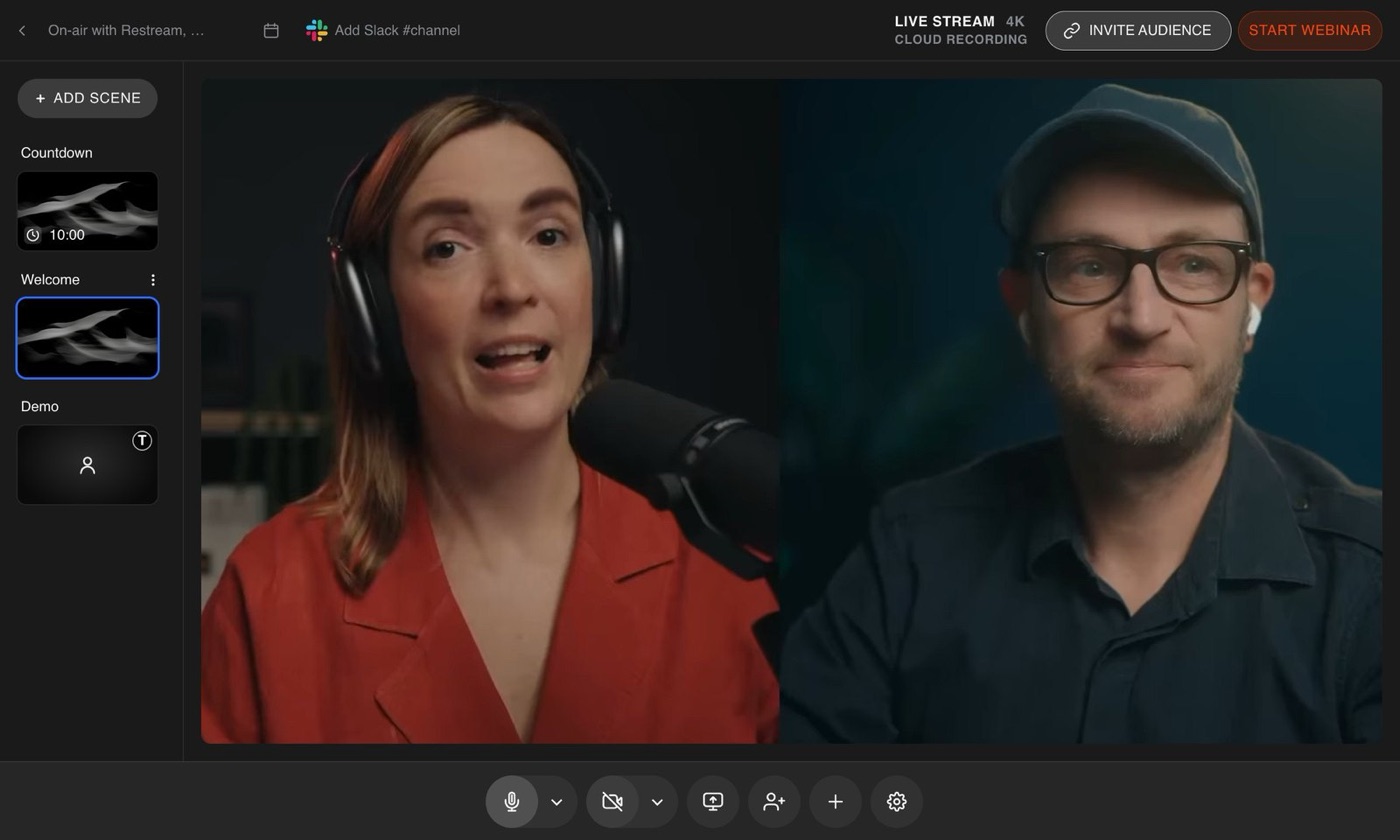
- No. 67.6 / 10Restream
Multistreaming service that sends one stream to several platforms at once, with a browser studio.
Best forStreamers who want to test several platforms before picking one
- Capabilities
- 7.6
- Ease of setup
- 8.2
- Value
- 7.0
Price$19 per month
Free plan for 2 channels; Standard $19 per month for 3 channels
Quoted from the Restream pricing page on November 28, 2026:
Standard $ 19 /mo
Monetization thresholdNot applicable, uses each platform's rules
Plus
- +Lets a new streamer go live on Twitch, YouTube and Kick at the same time and compare results
- +Works with OBS and other encoders without extra load on your PC
- +Clips add-on turns streams into TikTok-ready clips
Minus
- −Not a platform itself, so it adds no audience and no payout
- −Free plan shows Restream branding
- −Clips cost extra: $19 per month for 50 clips on Standard
- Free plan
- 2 channels, Restream branding
- Standard
- $19 per month, 3 channels
- Professional
- $49 per month, 5 channels, Full HD
- Business
- $239 per month, 8 channels
Full notes on Restream
Restream is not a streaming platform but a relay, and it earns a place here because it answers the question many new streamers have: which platform should I pick? Its pricing page shows a free plan that streams to 2 channels at once with Restream branding, and Standard at $19 per month that removes the branding and reaches 3 channels. Professional at $49 per month raises that to 5 channels, Full HD output and dual format streaming, sending horizontal video to YouTube and vertical video to TikTok at the same time. You can feed it from OBS or another encoder, or use the browser studio, which allows 6 on-screen participants on the free plan. A cross-platform chat collects comments from every channel. The limits are clear: Restream brings no audience and pays nothing, and each platform's own rules and thresholds still apply. Read each platform's terms before you multistream.
- No. 77.4 / 10Patreon
Membership platform with native video and livestreaming for paying members.
Best forCreators who want paid members-only streams
- Capabilities
- 7.2
- Ease of setup
- 7.6
- Value
- 7.4
PriceFree
Free to start; Patreon takes 10% of income plus payment fees
Quoted from the Patreon pricing page on November 28, 2026:
Patreon is free to start. You only pay when you start earning. 10% of the income you earn on Patreon
Monetization thresholdNone, paid tiers from day one
Plus
- +No audience threshold: paid tiers can start on day one
- +Patreon handles chargebacks, disputes, fraud and most tax collection
- +Exportable email lists, so the audience stays reachable
Minus
- −Patreon takes 10% of income, plus payment processing, currency conversion and payout fees
- −Not a discovery platform, so members usually come from another channel
- −Streams reach paying members, not the general public
- Platform fee
- 10% of income
- Extra fees
- Payment processing, currency conversion, payout fees, taxes
- Currencies
- 16+
- Live
- Native video and livestreaming
Full notes on Patreon
Patreon is the right add-on when you want a paid, members-only stream rather than a public one. Its pricing page says starting a Patreon is free and you only pay when you earn: 10% of the income you make on Patreon, plus payment processing, currency conversion and payout fees and applicable taxes. The same page lists native video and livestreaming alongside monthly and annual subscriptions, membership tiers and one-time payments. There is no follower or watch-hour threshold, so a streamer with 20 loyal fans can open a paid tier the same day. Patreon also takes on chargebacks, disputes and fraud, collects most applicable taxes, and supports 16+ currencies. The trade-off is reach: Patreon is where existing fans go to pay, not where strangers find you, so most streamers pair it with a public platform such as Twitch, Kick or YouTube and use Patreon for bonus or ad-free streams.
- No. 87.2 / 10Rumble
Video and live streaming platform with Rumble Studio, Rants tipping and a Creator Program funded by Rumble Premium.
Best forTalk and commentary streamers in the US, UK, Canada or Australia
- Capabilities
- 7.4
- Ease of setup
- 7.0
- Value
- 7.2
Price$9.99 per month
Free to stream; Creator Program needs Rumble Premium at $9.99 per month
Quoted from the Rumble pricing page on November 28, 2026:
Monthly Subscription $9.99/month Automatically renews
Monetization threshold100 followers, 1 hour streamed, Rumble Premium
Plus
- +Creator Program entry needs only 100 followers and 1 hour streamed via Rumble Studio
- +Rumble Studio multistreams for free to Rumble and other platforms
- +Raids help send viewers between creators
Minus
- −Creator Program requires an active Rumble Premium account, $9.99 per month
- −Staying active needs 30 hours streamed, 500 watch hours and 75 chatters per month, plus 20 shorts
- −Creator Program is open only to creators in 7 countries or regions
- Creator Program entry
- 100 followers, 1 hour via Rumble Studio, active Premium
- Monthly activity
- 30 hours streamed, 5 hours to Premium, 500 watch hours, 75 chatters
- Countries
- Australia, Canada, El Salvador, Macedonia, South Korea, UK, US
- Premium
- $9.99 per month or $99 per year
Full notes on Rumble
Rumble suits streamers in a handful of countries who want a second home with an open multistreaming studio. Rumble Studio is free to sign up for and sends a stream to Rumble, Locals, YouTube, Twitch and Facebook, with up to 9 people on the canvas and one aggregated chat. Fans can tip during streams with Rumble Rants. The main income route for small creators is the 2026 Creator Program, which shares a portion of Rumble Premium profits based on minutes watched, new signups and new Premium subscribers a creator brings in. Getting in is easy: 100 followers and 1 hour streamed via Rumble Studio in the last 30 days. Staying paid is not. Each month you need 30 hours streamed, 5 of them to Premium, 500 hours of watch time, 75 chatters, raids in five separate streams and 20 shorts, and you must keep a Rumble Premium account, $9.99 per month. The program is open only in Australia, Canada, El Salvador, Macedonia, South Korea, the UK and the US.
- No. 97.1 / 10Owncast
Free, open-source software for running your own live stream server with built-in chat.
Best forTechnical streamers who want full control and no platform rules beyond the law
- Capabilities
- 6.8
- Ease of setup
- 5.5
- Value
- 9.0
PriceFree
Free and open source; you pay for your own server
Quoted from the Owncast pricing page on November 28, 2026:
There are no subscriptions, viewer limits, or forced ads.
Monetization thresholdNone, self-hosted
Plus
- +No revenue share or platform cut at all
- +No content rules beyond your own and your host's
- +Accepts streams over standard streaming protocols
Minus
- −No built-in audience or discovery
- −No built-in payments, so income needs a separate tool
- −You run and pay for the server and its bandwidth
- License
- Free and open source
- Chat
- Built in, with moderation and custom emotes
- Limits
- No subscriptions, viewer limits or forced ads
Full notes on Owncast
Owncast is the do-it-yourself option for streamers who want to own the whole setup. It is free, open-source software that runs on your own server and accepts a stream over standard protocols, so a standard encoder can feed it. Its site says there are no subscriptions, viewer limits or forced ads, and the stream can be as private or public as you want. Real-time chat is built in without third-party services, with moderation tools, custom emotes and user authentication. Because you host it, there is no revenue split and no platform content policy beyond your own and your hosting provider's. That freedom comes with work. You rent and maintain the server, you pay for bandwidth as viewers grow, and there is no browse page, recommendation feed or built-in payment system, so you bring the audience and the tip or membership tool yourself. Most new streamers should start on a public platform and add Owncast later as a backup or a home for a niche community.
Before you decide
Checklist
- 1
Compare the split on subscriptions, not the headline
Kick pays streamers 95% of subscription revenue. Twitch's standard Affiliate split is 50/50, rising to 60/40 or 70/30 for channels that qualify for the Plus Program, and Twitch deducts taxes and payment fees before the split. Patreon takes 10% of income plus payment fees. Facebook pays a flat $0.01 per Star. Check which deductions happen before the split as well as the percentage.
- 2
Count the hours and viewers you need before earning
Kick turns on subs after 5 streamed hours. Twitch Affiliate needs 25 followers, 4 hours on 4 different days and 3 average viewers. Rumble's Creator Program opens at 100 followers and 1 hour streamed, but needs an active $9.99 per month Premium account. YouTube fan funding needs 500 subscribers plus 3,000 watch hours or 3 million Shorts views. Patreon and Owncast have no threshold at all.
- 3
Discovery decides how fast a small channel grows
YouTube surfaces vertical live streams in the Shorts feed and keeps broadcasts as videos. Kick curates featured placements that rotate across languages and regions and says they are not for sale. TikTok and Facebook mostly reach people who already follow you. Patreon and Owncast bring no new viewers, so they work best next to a public platform.
- 4
Read the age and content rules before you pick
TikTok requires creators to be at least 18 to go LIVE and has LIVE Monetization Guidelines that bar graphic, inauthentic or low-quality content from earning. Twitch lets 13 to 17 year olds join Affiliate with a parent's agreement. Rumble's Creator Program requires original content that shows the creator or an avatar persona and is open in only 7 countries or regions.
- 5
Test two platforms at once before committing
Restream's free plan streams to 2 channels and Standard to 3 for $19 per month, and Rumble Studio multistreams to Rumble, YouTube, Twitch and Facebook for free. A month of streaming to two places shows where your viewers actually come from. Check each platform's own terms before you multistream.
Asked and answered
Questions readers ask
- QWhich streaming platform pays streamers the most?
- AKick pays the largest share of subscription revenue: streamers keep 95% under its 95/5 split, according to Kick's help center. Twitch's standard Affiliate split is 50/50, and its Plus Program tops out at 70/30.
- QIs Kick better than Twitch for new streamers?
- AFor earning from subs early, yes: Kick turns on paid subscriptions after 5 hours of streaming and pays 95%, while Twitch Affiliate needs 25 followers and 3 average viewers and pays 50/50. Twitch still has the more mature toolset, with Bits, ads and 60-day VOD storage for Partners.
- QWhere is it easiest to grow as a small streamer?
- AYouTube Live is the easiest place to be found, because vertical live streams can be discovered straight from the Shorts feed and broadcasts are kept as videos and Shorts. Earning there takes longer, since fan funding starts at 500 subscribers and 3,000 watch hours or 3 million Shorts views.
- QHow many followers do you need to make money on Twitch?
- A25 followers. Twitch's Affiliate program also needs 4 hours streamed on 4 different days and an average of 3 viewers over any 4 stream days in the last 30 days.
- QHow old do you have to be to go live on TikTok?
- A18. TikTok's newsroom says creators must be at least 18 years old before they can go LIVE, and accounts must also meet follower requirements.
- QCan I stream to Twitch, YouTube and Kick at the same time?
- AYes, with a multistreaming service such as Restream, whose free plan streams to 2 channels and whose Standard plan covers 3 for $19 per month. Read each platform's own terms before you multistream.
- QIs there a streaming platform with no revenue cut?
- AOwncast, because you host it yourself: it is free, open-source software with no subscriptions, viewer limits or forced ads. You pay for the server and bring your own audience and payment tool.
How the call is made
Three dials, same weights for every product
Every entry gets a 0 to 10 rating on each criterion, and the order follows the weighted total. Ratings rest on documented features and published prices on each maker's own pages, never hands-on testing.
Sourced numbers behind this topic
- Creator Economy Statistics 55 figures
- Gaming Community Statistics 51 figures
- 40%Capabilities
- 30%Ease of setup
- 30%Value
Spotted an error or a price change? Write to editorial@dbotmaker.io. How we work is in our editorial policy. Makers change prices and terms often, so check the price on their site before you buy.
Sources and price checks
- Kick, price quoted, checked November 28, 2026help.kick.com/en/articles/12273402-how-to-become-a-kick-streamer-and-enable-subscriptions
- YouTube Live, price quoted, checked November 28, 2026blog.youtube/inside-youtube/are-you-ready-to-make-money-on-youtube
- Twitch, price quoted, checked November 28, 2026help.twitch.tv/s/article/joining-the-affiliate-program
- TikTok LIVE, price not listed, checked November 28, 2026newsroom.tiktok.com/en-africa/tiktoklive
- Facebook Live, price quoted, checked November 28, 2026creators.facebook.com/tools/live
- Restream, price quoted, checked November 28, 2026restream.io/pricing
- Patreon, price quoted, checked November 28, 2026patreon.com/pricing
- Rumble, price quoted, checked November 28, 2026rumble.com/premium
- Owncast, price quoted, checked November 28, 2026owncast.online
Cite this page
DBotMaker. 9 Best Livestreaming Platforms of 2026. Updated November 28, 2026. https://dbotmaker.io/best/best-livestreaming-platforms
Related decisions