Review · Creators & media
 Restream review
A multistreaming service and browser studio that sends one stream to many channels and merges their chat.
By the DBotMaker research desk · Updated November 24, 2026
Short answer · output
Restream is a browser-based multistreaming service that sends one live stream from Restream Studio, OBS or any RTMP encoder to 30+ platforms and merges their chat into one window. As checked in November 2026, the Free plan streams to 2 channels with Restream branding, and paid plans run $19 a month (Standard, 3 channels), $49 (Professional, 5 channels and 1080p Studio) and $239 (Business, 8 channels). It suits creators who already produce in an encoder or want a no-install studio and need to reach several platforms at once.
- Capabilities (40%)
- 8.3
- Ease of setup (30%)
- 9.0
- Value (30%)
- 7.8
In pictures · 2 images
Verdict printout · Restream
Buy Restream if you stream to three or more platforms and want one place to read and answer chat from Twitch, YouTube, Kick, X and Discord, with a relay bot that copies messages between them. Skip it if you only stream to one channel, because OBS Studio does that for free, and skip the Studio side if you need Full HD from the browser on a budget, since Studio is 720p until the $49 Professional plan. The deciding fact is the channel count: Free covers 2 channels, Standard at $19 a month covers 3, and every extra destination after that means a $49 or $239 plan.
ReadOverview
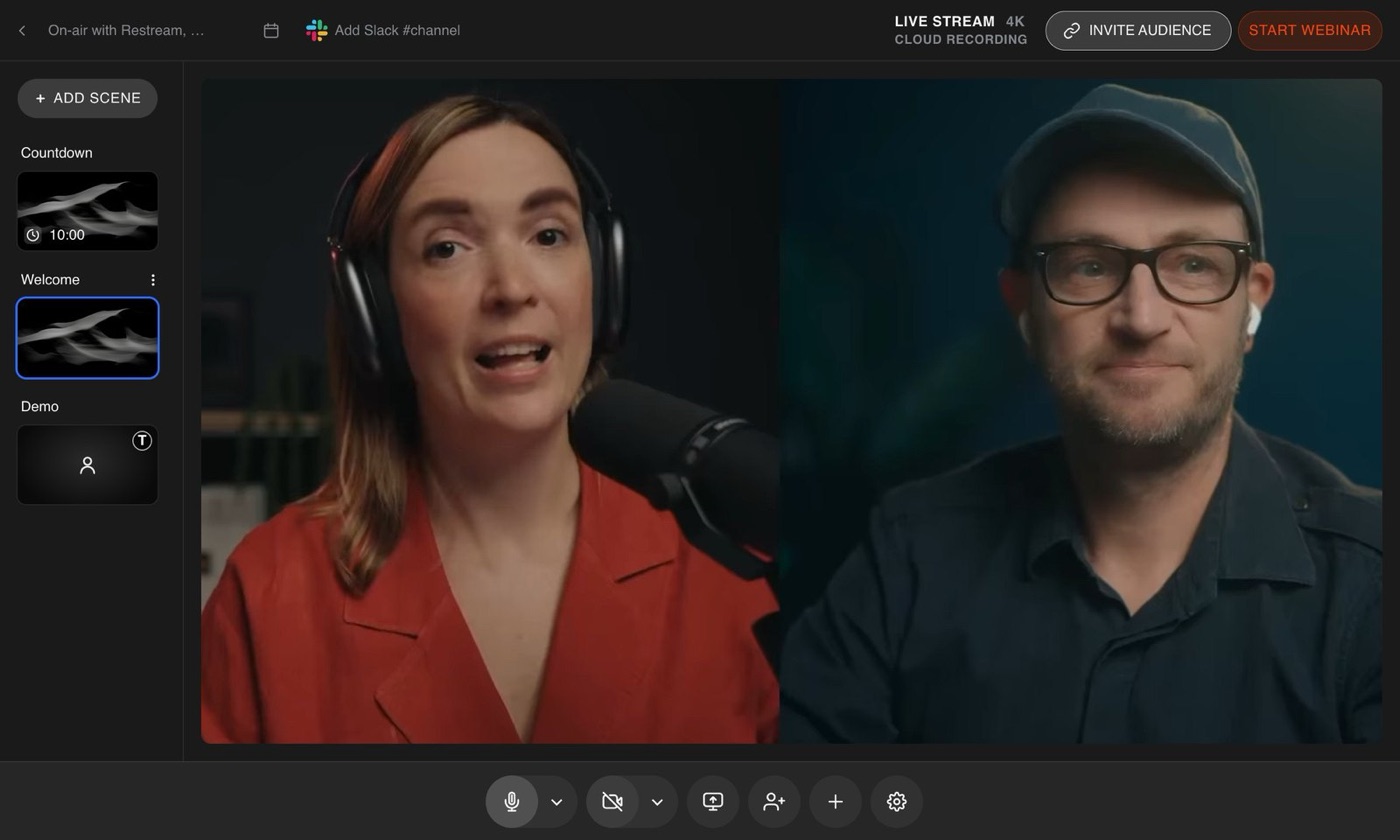
Restream is live streaming software from Restream, Inc., which its help center says was founded in 2015 and is based in Austin, Texas. It does three jobs. It takes one incoming stream and delivers it to many destinations, it offers Restream Studio, a browser production tool for cameras, guests, screen shares and overlays, and it gathers comments from every connected channel into Restream Chat. Restream says on its home page that it is trusted by 10 million creators and 100,000 businesses; that is the maker's own figure.
The current line-up, as listed on the pricing page in November 2026, is Free at $0, Standard at $19 a month, Professional at $49 a month and Business at $239 a month, with Enterprise priced on request. The page shows monthly prices and says annual billing saves 20%. Clips and Webinars are separate add-ons: Clips costs $19 a month for 50 clips on Standard, $29 for 100 on Professional and $59 for 250 on Business, and Webinars starts at $99 a month for 100 attendees. Recent changes include dual format streaming, which sends a horizontal and a vertical version of the same show at once from Professional upward, and local 4K participant recording in Studio, which the Studio page marks as beta.
For chat, the part most relevant to bot users, Restream Chat reads messages from Twitch, YouTube, Facebook, Instagram, Discord, LinkedIn, X, Rumble and Kick, and can reply to most of them. Its relay bot copies messages between platforms, but only Twitch, Kick, YouTube, Discord and X can receive relayed messages. Reply commands are limited: they are pre-set messages that only the streamer can trigger, with an optional timer from 5 to 60 minutes. Restream Chat is a unified inbox and relay tool, not a moderation or loyalty bot like Streamlabs Cloudbot or Streamer.bot, and its word filters and mutes only hide messages inside Restream Chat, not on the platforms themselves.
Against the other streaming tools on this site, Restream is a delivery and chat layer rather than a full desktop production suite. OBS Studio is free and open source but streams to one destination without plugins or a relay service. Streamlabs Desktop puts multistreaming in its Ultra bundle, which Streamlabs lists at $27 a month or $189 a year. StreamYard is the closest browser rival and starts at $18.99 a month, or $14.99 a month billed yearly, with 2 destinations on Essential. vMix and Wirecast are desktop production suites that cost more and need a capable PC.
The limits are documented. Restream Studio streams at 720p on Free and Standard; Full HD 1080p needs Professional, and Studio's ceiling is 1080p, so 4K delivery requires an external encoder, which Restream says it passes through without resolution limits. Cloud recordings start on paid plans with 6 hours per stream on Standard and 10 hours on higher plans, stored for 15 or 30 days. TikTok access through Restream depends on TikTok's own approval, which since July 7, 2025 requires at least 50% gaming content, and Instagram requires 1,000 followers and caps live streams at one hour. Refunds are limited to a 7-day money-back window for first-time subscribers, and renewals are not covered.
How it scored
Restream started as a way to send one encoder feed to many platforms, and that is still its core. You can push a stream from OBS, Zoom or another encoder to Restream and let it fan out, or produce the show in Restream Studio in the browser. The free plan streams to 2 channels with Restream branding. Standard, at $19 per month, raises that to 3 channels, removes the branding and adds guest channels. Professional at $49 per month reaches 5 channels, streams the studio in Full HD 1080p, records in 4K and adds dual format streaming to vertical and horizontal platforms at once. Business at $239 per month adds 8 channels, a website player, 2 team seats and co-producer mode. Every plan gets cross-platform chat, a live health monitor and encrypted RTMPS. Clips and Webinars are sold as add-ons, and the studio stays at 720p on the lower plans, so serious producers often pair Restream with a desktop encoder.
Who it is for
Creators who already have an encoder and want to reach several platforms at once.
Run it if
- Streamers who already produce in OBS, vMix or another encoder and want to send that feed to 3 to 8 platforms without uploading several copies
- Multi-platform streamers who want one chat window for Twitch, YouTube, Kick, X and Discord, with a relay bot so viewers on each platform see each other
- Podcasters and interview shows that need browser-based guests, up to 10 people on screen on paid plans, with no software install for guests
- Brands and organizations running product launches, town halls or webinars that need scheduled events, team seats and a website player
- Creators publishing to TikTok and YouTube Shorts who want a vertical and a horizontal version of one show at the same time, on Professional or Business
Skip it if
- Streamers who only broadcast to one platform: OBS Studio is free and needs no relay service
- Channels that need moderation, loyalty points or viewer commands in chat: Restream's reply commands only work for the streamer, so a chatbot such as Streamlabs Cloudbot or Streamer.bot is still needed
- Creators who want 1080p from a browser studio on a small budget: StreamYard lists Full HD from its Essential plan at $18.99 a month, while Restream Studio needs the $49 Professional plan
- Producers who need full desktop switching, instant replay and many camera inputs: vMix or Wirecast are built for that
SpecSpec sheet
| Starting price | Free plan; paid from $19 a month (Standard) | src ↗ |
|---|---|---|
| Simultaneous channels | 2 Free, 3 Standard, 5 Professional, 8 Business, custom on Enterprise | src ↗ |
| Supported destinations | 30+ platforms, plus custom RTMP and custom SRT | src ↗ |
| Encoder video quality | Original resolution kept, up to 4K 2160p on every plan | src ↗ |
| Studio video quality | 720p on Free and Standard, 1080p on Professional and up | src ↗ |
| Studio on-screen participants | 6 on Free, 10 on paid plans | src ↗ |
| Cloud recording length | 6 hours per stream on Standard, 10 hours on Professional and Business | src ↗ |
| Recording storage | 15 days on Standard and Professional, 30 days on Business | src ↗ |
| Added delay | Under 2 seconds, per Restream's FAQ | src ↗ |
| Chat read support | Twitch, YouTube, Facebook, Instagram, Discord, LinkedIn, X, Rumble, Kick; not TikTok | src ↗ |
| Chat relay targets | Twitch, Kick, YouTube, Discord and X | src ↗ |
| Reply command timer | 5 to 60 minutes, streamer-triggered only | src ↗ |
| Extra team seats | $25 per seat per month | src ↗ |
| Refund policy | 7-day money-back for first-time subscribers; renewals excluded | src ↗ |
Price
Free plan; Standard from $19 per month, Professional $49 per month.
Standard $ 19 /mo Choose this plan
Quoted from the vendor pricing page on November 20, 2026.
Plans on file · 6
| Plan | Price | Includes | Checked |
|---|---|---|---|
| Free | $0free | Multistream to 2 channels at once; Restream branding: logo watermark on Studio streams and a Restream link in descriptions on some platforms; Restream Studio at 720p with up to 6 people on screen; Cross-platform chat, live health monitor and encrypted RTMPS | Checked Nov 24, 2026 |
| Standard | $19per month, or 20% less billed annually | Multistream to 3 channels at once; No Restream branding; Guest channels that guests can pair to your stream; Cloud recordings up to 6 hours per stream, stored 15 days; Up to 10 people on screen in Studio, 720p; Optional Clips add-on at $19 a month for 50 clips | Checked Nov 24, 2026 |
| Professional | $49per month, or 20% less billed annually | Multistream to 5 channels at once; Studio streaming in Full HD 1080p; Record in 4K Ultra HD; Dual format streaming to horizontal and vertical platforms at the same time; Cloud recordings up to 10 hours per stream; Optional Clips add-on at $29 a month for 100 clips | Checked Nov 24, 2026 |
| Business | $239per month, or 20% less billed annually | Multistream to 8 channels at once; Website player for 1,000 concurrent viewers; 2 included team seats and team workspaces; Co-producer mode; Recording storage for 30 days; Optional Clips add-on at $59 a month for 250 clips | Checked Nov 24, 2026 |
| Enterprise | price not listedcontact sales | Custom channel count; SSO and security review; SRT ingest and stream backup; Unlimited Upload & Stream; Dedicated account management | Checked Nov 24, 2026 |
| Webinars add-on | $99 a month for 100 attendees; $299 a month for 500 attendees on Businessper month, on top of a paid plan | Private webinars; Streaming to a team on Slack | Checked Nov 24, 2026 |
Key features
Multistreaming to 30+ destinations
One incoming stream from Studio, OBS or another RTMP encoder goes out to platforms such as YouTube, Twitch, Facebook, LinkedIn, Kick and TikTok, several channels of the same platform, partner channels, or custom RTMP and SRT targets. The channel count is the main plan limit: 2, 3, 5 or 8 at once.
Restream Chat with relay bot
Messages from Twitch, YouTube, Kick, X, Discord, Facebook, Instagram, LinkedIn and Rumble appear in one feed. Replies can go to all platforms or a single one, and relay mode copies viewer messages to Twitch, Kick, YouTube, Discord and X so each audience sees the others. TikTok chat is not supported.
Chat filters and reply commands
Filters can hide common chat bots, hide messages that start with an exclamation mark, mute named chatters and block words, but only inside Restream Chat. Reply commands post a preset message such as social links when the streamer types a trigger word that starts with an exclamation mark, with an optional repeat timer between 5 and 60 minutes; viewers cannot trigger them.
Chat overlay and desktop app
An embed URL drops the merged chat into OBS or any encoder that supports browser sources, with theme, opacity and auto-hide options. A desktop app for Windows, Mac and Linux can pin chat on top of other windows and read messages aloud with text to speech.
Restream Studio in the browser
Studio runs in Chrome on Windows, macOS and Linux, with guests joining by link without an account. It offers scenes, overlays, QR codes, a scrolling ticker and background music. It streams at 720p on Free and Standard and 1080p from Professional.
Dual format streaming
On Professional and Business, Studio sends a horizontal version of a show to platforms such as YouTube and a vertical version to platforms such as TikTok at the same time, without a second production.
Upload & Stream
Pre-recorded MP4, MOV, M4V or MKV files can be scheduled to air as live streams on every connected channel, with playlists and looping on higher Upload & Stream tiers, for premieres or round-the-clock channels.
Clips add-on
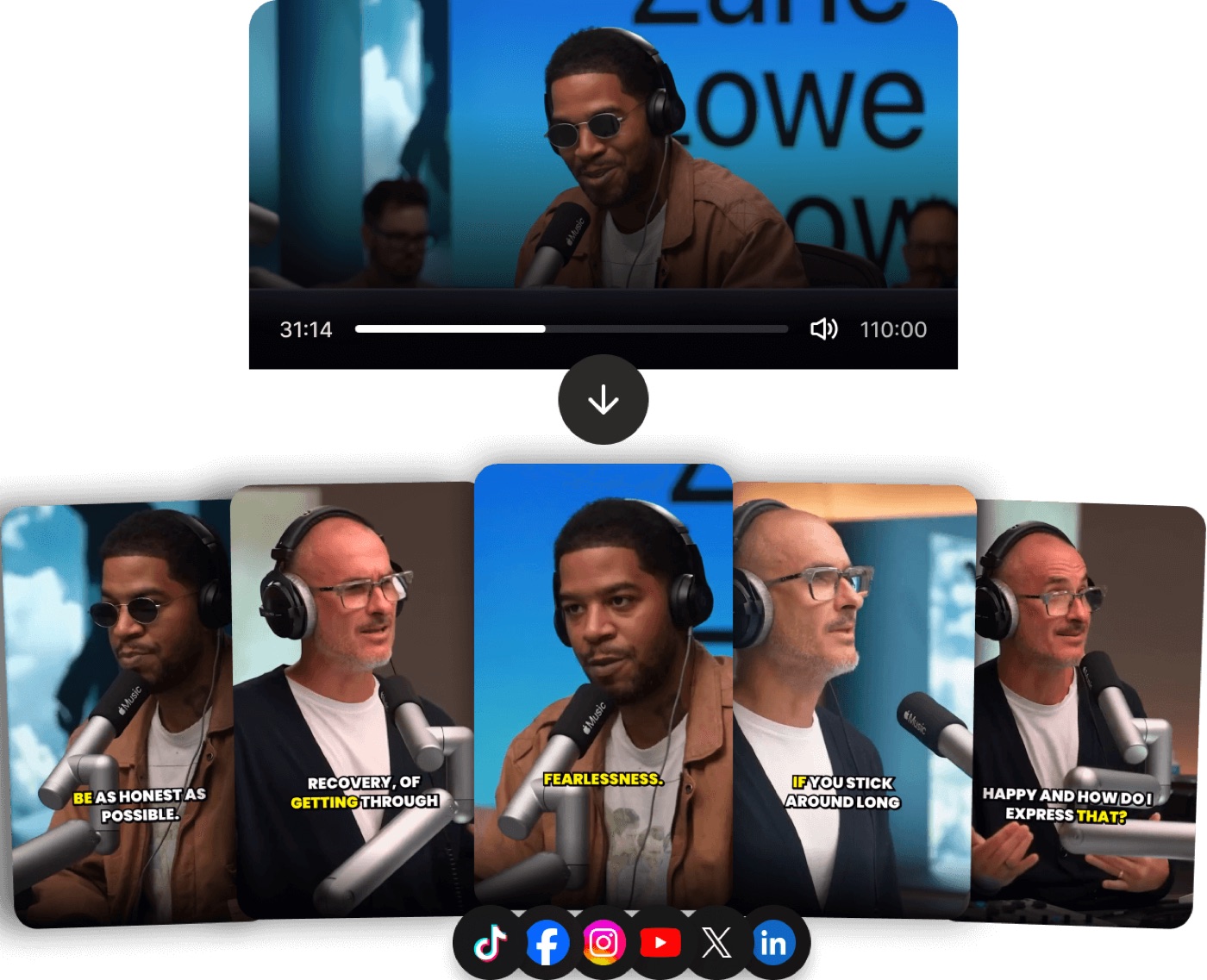
AI scans finished streams and uploads for highlight moments, reframes them as captioned vertical clips for TikTok, YouTube Shorts and Instagram Reels, and supports 52 languages. It generates 5 clips per stream or upload, counted against a monthly cap of 50, 100 or 250 clips.
Strengths and weaknesses
Plus · 7
- Free plan is listed at $0 forever and multistreams to 2 channels at once
- Encoder streams keep their original resolution up to 4K 2160p on every plan, including Free
- Merged chat reads 9 platforms and relays messages between Twitch, Kick, YouTube, Discord and X
- Restream states added delay stays under 2 seconds regardless of channel count, with no bitrate limits of its own
- Studio fits up to 10 people on screen on paid plans and guests join from a link without an account
- Clips add-on detects and transcribes 52 languages and starts at $19 a month for 50 clips
- Paid plans include 24/7 live chat support, according to the home page FAQ
Minus · 6
- Free plan adds a Restream watermark to Studio streams and a Restream link in descriptions on some platforms
- Studio is limited to 720p until the $49 a month Professional plan, and Studio never exceeds 1080p
- The jump from Professional to Business is $49 to $239 a month for 3 more channels and team features
- Chat tools are thin for bot users: commands are streamer-only, there are no loyalty points or games, and filters do not moderate the actual platform chats
- Clips and Webinars cost extra, with Webinars from $99 a month on top of a plan
- The 7-day money-back guarantee covers first purchases only, not renewals or charges after a 7-day trial
Key facts
- Professional: $49 per month, 5 channels, Full HD 1080p
- Business: $239 per month, 8 channels, 2 team seats
- Annual discount: Save 20%
- Vendor user figure: 10 million streamers
Where it ranks
Restream is No. 4 in our Best Streaming Software verdict.
AltAlternatives to weigh
- StreamYard →The closest browser studio rival, with Full HD from its Essential plan at $18.99 a month, but only 2 destinations on that plan versus 3 on Restream Standard.
- OBS Studio →Free, open source desktop production with full scene control; many streamers pair it with Restream, but it is enough alone if you stream to one platform.
- Streamlabs Desktop →Desktop streaming app with alerts and widgets; multistreaming comes in the Ultra bundle at $27 a month or $189 a year, which also adds a custom-named chatbot.
- Streamlabs Cloudbot →A free cloud chatbot with mod tools, loyalty points and viewer commands, which fills the moderation gap Restream Chat leaves.
- vMix →Desktop production suite with lifetime licenses from $60 and up to 5 simultaneous streams built in, for producers who want local control instead of a cloud relay.
Questions readers ask
- QIs Restream free?
- AYes. The Free plan multistreams to 2 channels at once with Restream branding, and Restream Studio runs at 720p with up to 6 people on screen. Paid plans start at $19 a month for 3 channels without branding.
- QHow much does Restream cost?
- AAs listed in November 2026, Standard is $19 a month, Professional $49 a month and Business $239 a month, with 20% off for annual billing. Enterprise is priced on request, and Clips and Webinars add-ons cost extra.
- QIs Restream worth it?
- AIt is worth it if you stream to three or more platforms and want one merged chat, since Standard covers 3 channels for $19 a month. For a single destination, OBS Studio streams free, and for 1080p from a browser studio StreamYard costs less than Restream Professional.
- QDoes Restream lower video quality?
- ANo, according to Restream: streams from an encoder keep their original resolution and frame rate, up to 4K, on every plan. Restream Studio is the exception, capped at 720p on Free and Standard and 1080p from Professional.
- QCan Restream Chat work as a chatbot?
- AOnly partly. Restream Chat merges and relays messages and can post preset reply commands on a 5 to 60 minute timer, but only the streamer can trigger commands and its filters only hide messages in Restream Chat, so moderation and viewer commands need a separate bot.
- QRestream vs StreamYard: which is better?
- ARestream sends to more channels per dollar, 3 on its $19 Standard plan, and supports any encoder up to 4K. StreamYard offers Full HD in its browser studio from $18.99 a month but with 2 destinations on that plan, so it suits browser-first shows.
- QCan Restream stream to TikTok and Instagram?
- AYes, with conditions set by those platforms. TikTok has required at least 50% gaming content for third-party live access since July 7, 2025, and Instagram needs 1,000 followers, an account at least 60 days old and limits lives to one hour.
- QDoes Restream offer refunds?
- AYes, a 7-day money-back guarantee for first-time subscribers who cancel within 7 calendar days of the first purchase. Auto-renewals and charges after a 7-day trial are not covered.
LogSource log
- [01]Restream: Pricing Plans · checked Nov 24, 2026
- [02]Restream home page · checked Nov 24, 2026
- [03]Restream Studio · checked Nov 24, 2026
- [04]Restream Multistreaming · checked Nov 24, 2026
- [05]Restream Clips · checked Nov 24, 2026
- [06]Restream Upload & Stream · checked Nov 24, 2026
- [07]What is Restream Chat? · checked Nov 24, 2026
- [08]Relay comments across streaming platforms · checked Nov 24, 2026
- [09]Filter chat comments · checked Nov 24, 2026
- [10]Use reply commands in chat · checked Nov 24, 2026
- [11]Embed chat on your streaming software · checked Nov 24, 2026
- [12]How to use the desktop app for Restream Chat · checked Nov 24, 2026
- [13]How can I remove Restream branding? · checked Nov 24, 2026
- [14]Can I stream in 4K? · checked Nov 24, 2026
- [15]Can I stream in Full HD? · checked Nov 24, 2026
- [16]Stream to TikTok · checked Nov 24, 2026
- [17]Stream to Instagram · checked Nov 24, 2026
- [18]How to get a refund · checked Nov 24, 2026
- [19]How to cancel a free trial · checked Nov 24, 2026
- [20]Is Restream safe? · checked Nov 24, 2026
Deep review last updated November 24, 2026. Prices and specs are rechecked against these pages.
Alternatives we scored
Cite this page
DBotMaker. Restream review. Updated November 24, 2026. https://dbotmaker.io/review/restream
Visit restream.io · Questions or corrections: editorial@dbotmaker.io