Review · Community & social
 Ticket Tool review
A dedicated Discord ticketing bot with panels, forms, transcripts, tags and support roles, used on more than 5.8 million servers.
By the DBotMaker research desk · Updated November 23, 2026
Short answer · output
Ticket Tool is a single-purpose Discord support bot that opens private ticket channels or threads from a panel button, with forms, transcripts and support roles included on the free Standard plan. It is the clear pick for servers that run support, orders or applications through private tickets, and Premium costs $7.99 a month for one server (the docs also list $66 a year). Its homepage counter showed 5,870,249 servers and more than 662 million tickets when checked in November 2026.
- Capabilities (40%)
- 7.4
- Ease of setup (30%)
- 8.8
- Value (30%)
- 8.4
In pictures · 3 images
Verdict printout · Ticket Tool
Ticket Tool suits any Discord server that handles support requests, staff applications, appeals or shop orders in private and wants that handled by a bot built for nothing else: the free Standard plan already includes unlimited panels, transcripts, support roles and 5-question forms. It is the wrong choice for a server that wants one bot for moderation, levels and tickets, where Dyno or MEE6 cover basic tickets inside a wider feature set. The deciding fact is the free plan's rate limit and feature split: free servers can open 10 tickets every 10 seconds and 1 per user every 10 seconds, while ticket claiming, automations, thread-style tickets, DMs to ticket owners and more than 7 days of statistics all need Premium at $7.99 a month.
ReadOverview
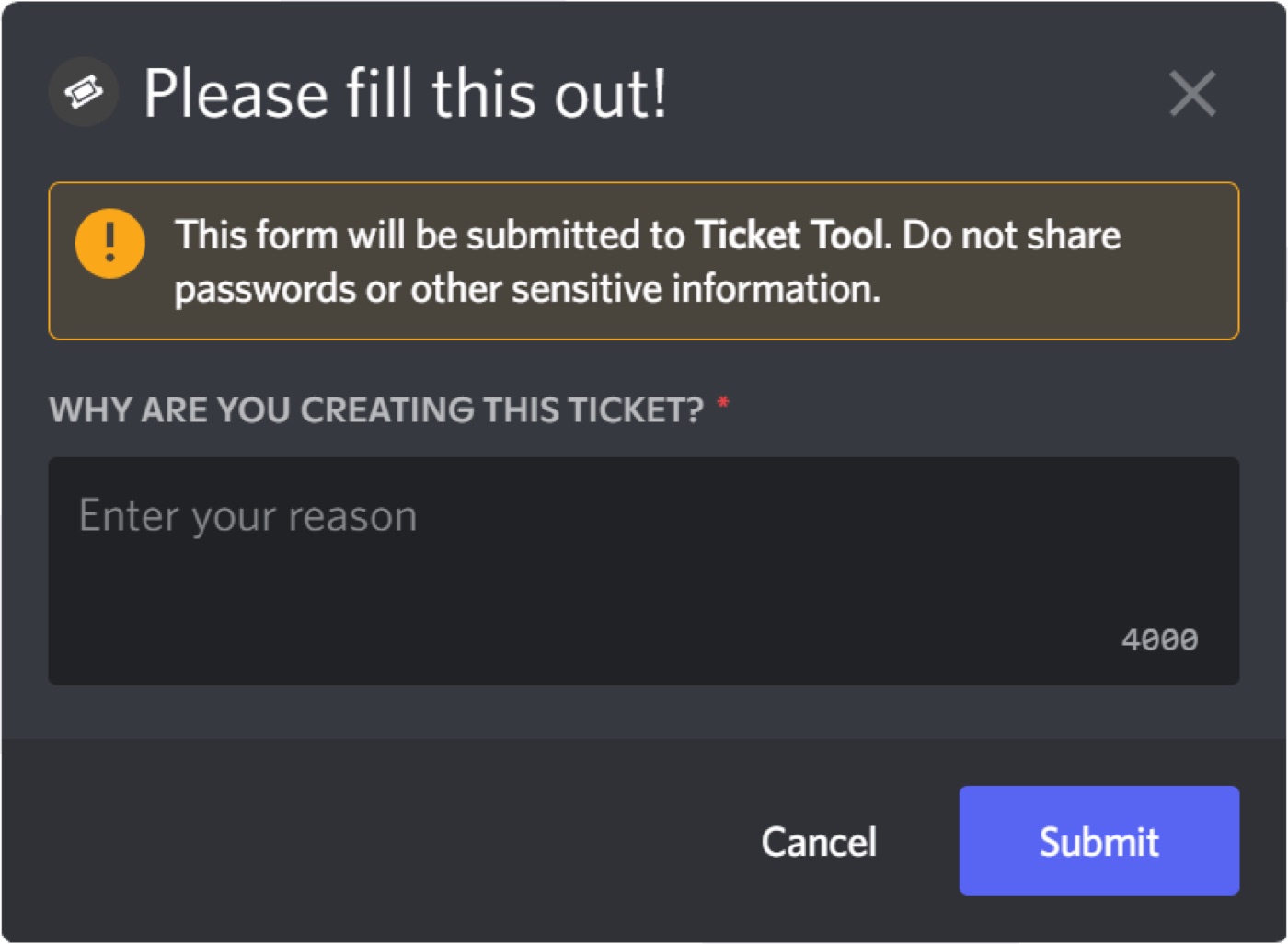
Ticket Tool is a Discord bot that creates private support channels, which it calls tickets, between a server's staff and the member asking for help. According to its documentation, development started in 2019. A member clicks a button or picks an option from a dropdown on a panel message, optionally fills in a form, and the bot opens a ticket that only the member and the configured support team roles can see. Setup is done in a web dashboard at tickettool.xyz, and the bot also answers chat commands with the default $ prefix as well as slash commands, which were added in October 2022.
Scale is the main reason it shows up in so many servers. The live counter on tickettool.xyz reported 5,870,249 servers, 662,982,784 tickets and 165 clusters on 23 November 2026, and its Discord application is verified and monetized, which means Premium can also be bought inside Discord. The documentation's own welcome page still quotes an older figure of more than 4,630,000 active servers and 435 million tickets, so the homepage counter is the current number.
Recent changes are mostly about billing and storage. The changelog lists a new payment provider and updated Premium pricing in August 2024, alongside a full dashboard rewrite, dynamically generated transcripts and the end of vote rewards. In February 2025 it added a Google Drive integration that saves every transcript to a folder in the server owner's Drive, the option to DM the ticket owner from custom commands, and a new shard manager. Transcripts themselves are HTML files sent to a Discord channel; the FAQ states that Ticket Tool deletes them from its own systems after sending, so the copy lives on Discord's CDN.
Against the general bots on this site, Ticket Tool is narrower and deeper. Dyno and MEE6 both include a ticket module on their free plans, but MEE6 keeps custom embeds and transcripts of deleted tickets for Premium, and neither documents the panel limits, escalation between panels, opening schedules or channel recycling that Ticket Tool offers. ProBot also has a tickets feature inside a multipurpose bot priced at $80 a year. The trade-off is that Ticket Tool does nothing else, so most servers will still run Dyno, Carl-bot or another general bot for moderation and roles.
The limits are documented plainly. Free servers face a rate limit of 10 tickets every 10 seconds per server and 1 ticket every 10 seconds per user, a 250-character cap on the ticket message embed description, and statistics that cover 7 days. Transcripts are capped at 1,000 messages on every plan. Discord itself allows only 500 channels per server and 2,000 channel creations per day, which Ticket Tool addresses with Storage Categories that recycle deleted ticket channels and with thread-style tickets on Premium. Premium bought through Discord's app store cannot be billed yearly or moved to another server, which the FAQ warns about.
How it scored
Ticket Tool does one thing: private support tickets inside Discord. Members open a ticket from a panel button, optionally answering a form first, and the bot creates a private channel for them and your support roles. The free Standard plan already includes unlimited panels, transcripts and support roles, with a limit of 10 tickets a minute that only very busy servers will hit. Premium at $7.99 per month removes that limit and adds automatic transcripts, full embed customization, custom reactions, direct messages when tickets open or close, ticket claiming, automated closing and a faster premium-only bot. Custom tags let staff answer common questions with saved replies. The site reports more than 5.8 million servers and over 658 million tickets created. Dyno, MEE6 and ProBot now include ticket modules too, so a dedicated bot makes most sense when support volume is high or you need forms and transcripts.
Who it is for
Support desks and applications
Run it if
- Game, software and creator communities that take bug reports, account issues or refund requests in private instead of public channels
- Servers selling commissions, services or in-game items that want a panel button to open a private order ticket with a short form
- Staff teams that run applications, ban appeals or partnership requests and need a transcript of each conversation
- Busy support servers that need claiming, escalation between panels, opening hours and statistics on who answered what
- Roblox communities that want Bloxlink data pulled into tickets on Premium
Skip it if
- Servers that want one bot for moderation, levels and occasional tickets: Dyno's free plan includes automod, tickets and forms in one dashboard
- Communities that mainly want XP levels, social alerts and an economy with tickets as a side feature: MEE6 bundles all of these
- Companies that need email, live chat and a shared inbox outside Discord: a dedicated help desk such as those on this site's help desk lists is the better fit
- Owners who want a fully white-labeled bot with its own name in DMs: Ticket Tool's Premium customization changes the avatar, banner and bio in one server only and still appears as Ticket Tool in direct messages
SpecSpec sheet
| Type | Single-purpose Discord ticket and support bot, in development since 2019 | src ↗ |
|---|---|---|
| Servers using it | 5,870,249 (homepage counter, 23 November 2026) | src ↗ |
| Tickets created | 662,982,784 (homepage counter, 23 November 2026) | src ↗ |
| Free plan | Yes: Standard plan with unlimited panels, transcripts and support roles | src ↗ |
| Premium price | $7.99 per month per server; docs list $66 per year | src ↗ |
| Free plan rate limit | 10 tickets every 10 seconds per server, 1 ticket every 10 seconds per user | src ↗ |
| Form questions | Up to 5 questions per form, up to 4,000 characters per answer | src ↗ |
| Transcript length | Capped at 1,000 messages; Premium embeds up to 8 MB of attachments | src ↗ |
| Automations | Premium only, up to 10 per panel, run for up to 7 days per ticket | src ↗ |
| Escalation | A ticket can be transferred to up to 25 other panels | src ↗ |
| Statistics history | 7 days on the free plan, longer on Premium | src ↗ |
| Commands | Slash commands and $ prefix commands, with a configurable prefix | src ↗ |
| Integrations | Google Drive transcript storage (server owner), Bloxlink for Roblox on Premium | src ↗ |
| Payment methods | Debit and credit cards, PayPal, Google Pay in Chrome, Apple Pay in Safari, or Discord's app store | src ↗ |
Price
Free Standard plan; Premium $7.99 per month.
Premium Monthly $7.99 per month
Quoted from the vendor pricing page on November 20, 2026.
Plans on file · 3
| Plan | Price | Includes | Checked |
|---|---|---|---|
| Standard | $0free | Unlimited panels with buttons or dropdowns; Transcripts generated on request and sent to a channel; Support team roles and per-panel permissions; Forms with up to 5 questions before a ticket opens; Rate limit of 10 tickets a minute on the pricing table, documented as 10 tickets every 10 seconds per server and 1 every 10 seconds per user; 250-character limit on the ticket message embed description, 7 days of statistics | Checked Nov 23, 2026 |
| Premium Monthly | $7.99 per monthmonthly, per server, through the Ticket Tool dashboard or Discord's app store | Unlimited tickets with no rate limit; Faster premium-only bot used in fewer servers; Automatic transcripts and up to 8 MB of attachments embedded in transcripts; Full embed customization, custom reactions and DMs when tickets open or close; Ticket claiming, up to 10 automations per panel, thread-style tickets, scheduled panel hours and Bloxlink integration; Per-server bot avatar, banner and bio, longer statistics history and priority support | Checked Nov 20, 2026 |
| Premium Yearly | $66 per yearannual, per server, only through the Ticket Tool website (not available through Discord's app store) | Same features as Premium Monthly; Subscription can be moved to another server when bought through the website | Checked Nov 23, 2026 |
Key features
Panels with buttons or dropdowns
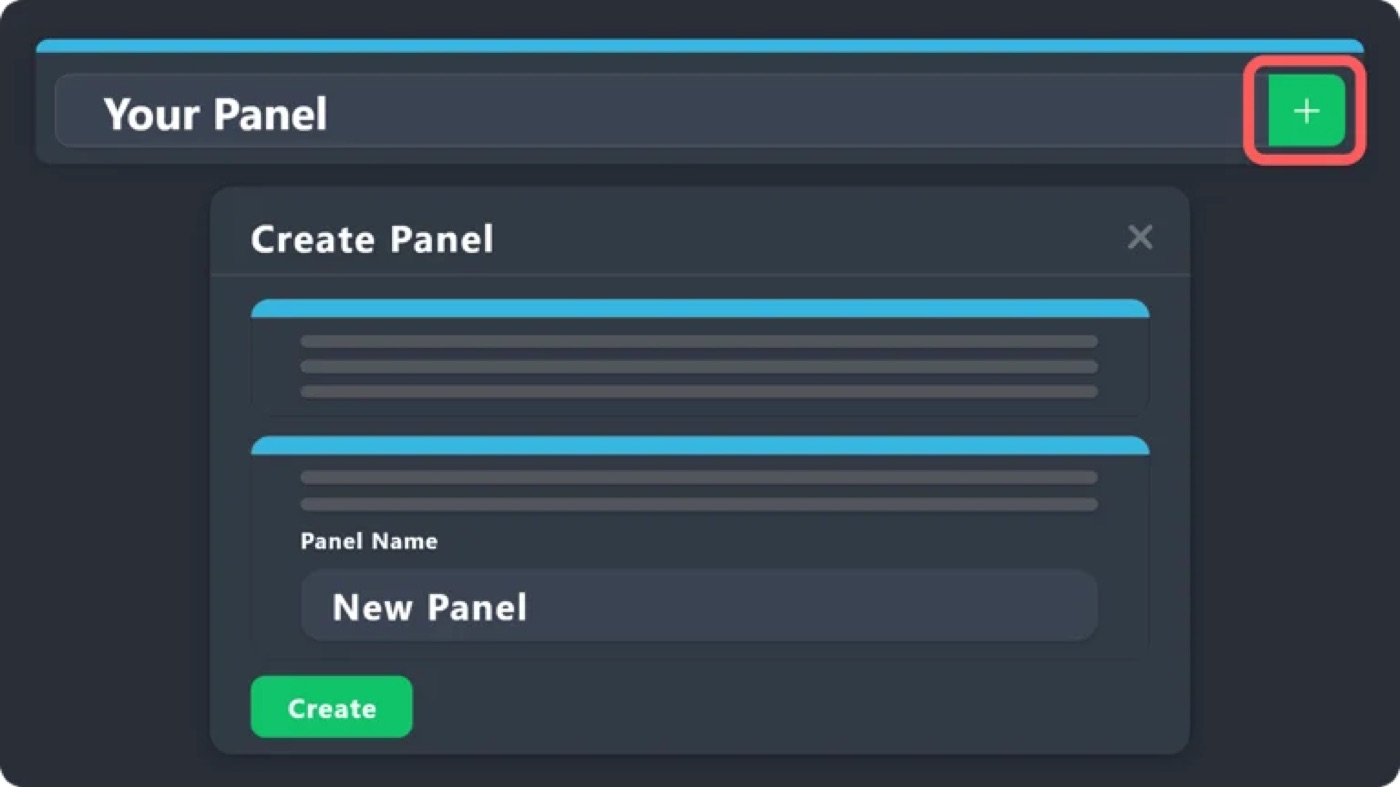
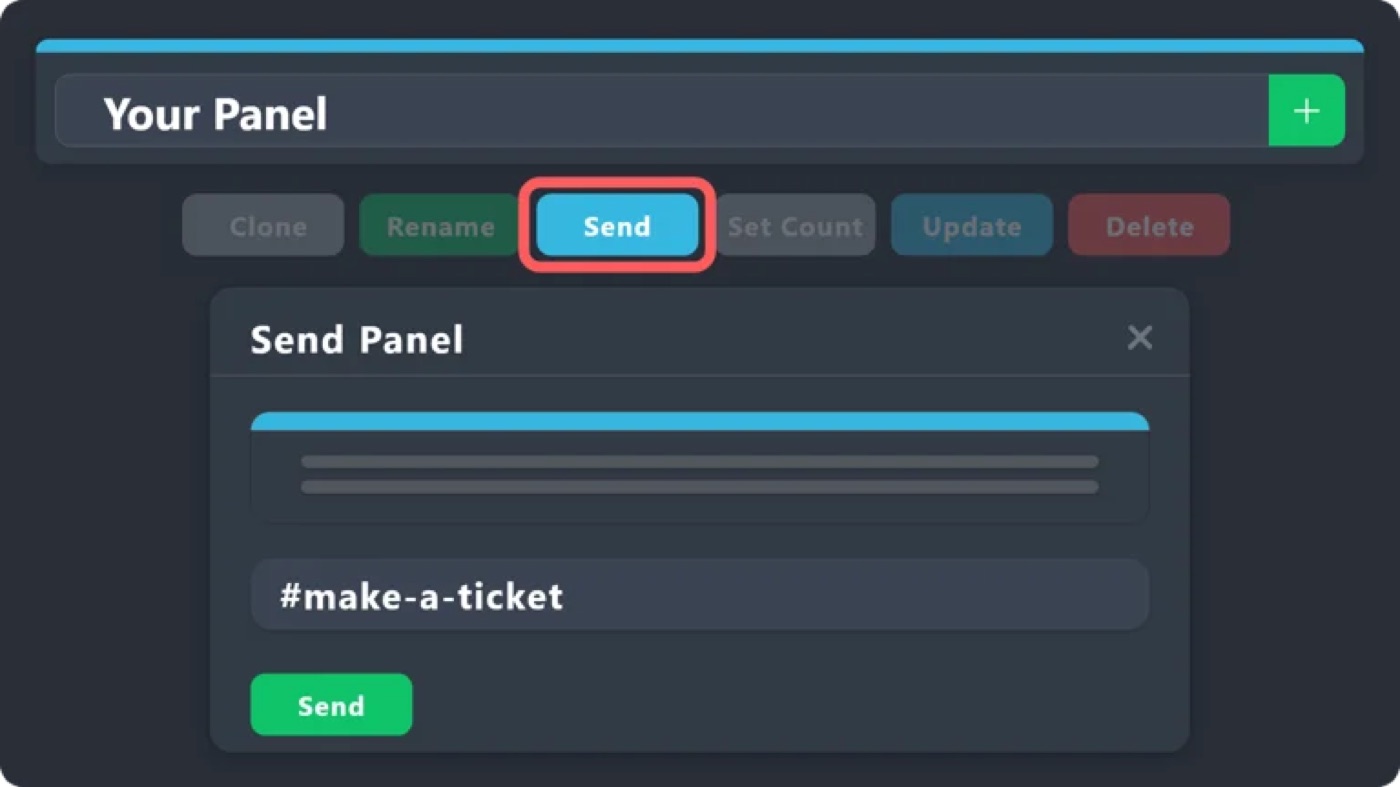
A panel is the message members use to open tickets. Each panel can use buttons or a select menu, has its own support roles, category, ticket message and counter, and can be cloned, renamed or updated in place from the dashboard. A server can run separate panels for support, reports and orders.
Forms before the ticket opens
Form Options use Discord modals to ask up to 5 questions, each with a placeholder, a required flag and minimum and maximum lengths up to 4,000 characters. Answers can be posted automatically in the ticket or inserted into messages with form variables.
Transcripts and Google Drive storage
The $transcript command saves up to the last 1,000 messages as an HTML file sent to a transcript channel. Premium adds automatic transcripts and attachments up to 8 MB, and since February 2025 a server owner can save every transcript to a Google Drive folder per panel.
Limits, schedules and escalation
Each panel can cap how many tickets a user has open or closed, with roles that bypass the caps, plus a global limit across panels. Premium adds opening hours on a weekly schedule. Escalation moves a ticket to any of up to 25 other panels and its category.
Claiming and automations (Premium)
Claiming assigns a ticket to the staff member who takes it and feeds a claim leaderboard in Statistics. Automations, added in early 2023, run up to 10 rules per panel, such as closing a ticket after a period without a reply, with a 5-minute minimum on time conditions.
Storage categories and thread-style tickets
Discord allows 500 channels per server and 2,000 channel creations per day. Storage Categories recycle deleted ticket channels for new tickets, and Premium thread-style tickets open private threads instead of channels, which count against a separate limit.
Custom commands and variables
Custom commands, formerly called tags, give staff saved replies with arguments and variables such as the ticket owner or claimer, and can DM the ticket owner. Variables like {create.form.X} and {reason} also work across ticket messages.
Config backup and restore
Server owners can copy panels and custom commands from one server to another with Backup and Restore, which helps networks of servers that share the same support setup. Tickets themselves are not transferred, so transcripts need saving first.
Strengths and weaknesses
Plus · 7
- The free Standard plan already includes unlimited panels, transcripts, support roles and 5-question forms, which covers most small and mid-size servers
- Scale is documented: the homepage counter showed 5,870,249 servers and 662,982,784 tickets on 23 November 2026
- Premium is a flat $7.99 a month per server, or $66 a year through the website, which works out to $5.50 a month
- Built-in answers to Discord's limits: Storage Categories recycle channels against the 500-channel cap and Premium thread-style tickets avoid it
- Transcripts are not kept on Ticket Tool's servers after sending, per its FAQ, and can go straight to the owner's Google Drive
- Escalation to up to 25 panels, per-panel limits with bypass roles and scheduled opening hours suit larger support teams
- Docs cover every dashboard tab, error codes and commands, with Markdown versions of each page
Minus · 6
- Does one job, so a server still needs a second bot for moderation, roles or levels
- Free servers are rate limited to 10 tickets every 10 seconds and 1 per user every 10 seconds, and the ticket message embed is capped at 250 characters
- Claiming, automations, thread-style tickets, DMs to ticket owners, custom reactions and scheduled hours all sit behind Premium
- Premium bought through Discord's app store cannot be billed yearly or moved to another server
- Customization changes the bot's look in one server only and is not a white-label bot; it still appears as Ticket Tool in DMs
- Transcripts stop at 1,000 messages, so very long tickets are cut off
Key facts
- Free plan: Unlimited panels, transcripts, support roles, 10 tickets a minute
- Premium: $7.99 per month, unlimited tickets and a faster premium-only bot
- Reach: 5,865,483 servers, per tickettool.xyz
- Operator: BattleEye
Where it ranks
Ticket Tool is No. 8 in our Best Discord Bots verdict and No. 3 in Best Discord Ticket Bots.
AltAlternatives to weigh
- Dyno →Better if tickets are one need among many: the free plan bundles automod, tickets, forms and 25 custom commands, and Premium is $49.99 a year per server.
- MEE6 →Better for engagement-focused servers that want XP levels, social alerts and an economy with a ticketing plugin included, though custom ticket embeds and transcripts of deleted tickets need Premium.
- ProBotA multipurpose bot with welcome images, anti-raid protection and tickets in one install, with Premium at $80 a year per server.
- Carl-bot →Not a ticket bot, but the usual companion for Ticket Tool: free reaction roles, automod, logging and tags cover what Ticket Tool leaves out.
Questions readers ask
- QIs Ticket Tool free?
- AYes, the Standard plan is free and includes unlimited panels, transcripts, support roles and forms. Free servers are limited to 10 tickets every 10 seconds and 1 ticket every 10 seconds per user, and features such as claiming and automations need Premium.
- QHow much is Ticket Tool Premium?
- APremium Monthly costs $7.99 per month for one server on Ticket Tool's premium page, and its FAQ lists a yearly option at $66. The yearly plan is only sold through the website, not through Discord's app store.
- QIs Ticket Tool Premium worth it?
- AIt is worth it for busy support servers that hit the free rate limit or need claiming, automations, thread-style tickets and DMs to ticket owners. Servers handling a few tickets a day usually get everything they need from the free plan.
- QHow many servers use Ticket Tool?
- AThe counter on tickettool.xyz showed 5,870,249 servers and 662,982,784 tickets created on 23 November 2026. These are the vendor's own figures.
- QDoes Ticket Tool save ticket transcripts?
- AYes, it creates HTML transcripts of up to 1,000 messages and sends them to a Discord channel, and Premium can generate them automatically on close. Its FAQ says Ticket Tool deletes the files from its own systems after sending, and server owners can also save them to Google Drive.
- QTicket Tool vs Dyno tickets: which is better?
- ATicket Tool is better for support-heavy servers because it adds forms, escalation, panel limits, schedules and statistics built only for tickets. Dyno is better when tickets are a minor need, since one free Dyno install also covers automod, logs and custom commands.
- QCan Ticket Tool use threads instead of channels?
- AYes, thread-style tickets are a Premium feature that opens a private thread for each ticket. This helps large servers stay under Discord's 500-channel limit per server.
- QCan a Ticket Tool Premium subscription be moved to another server?
- AYes, if it was bought through the Ticket Tool website, where the server can be selected or changed. Subscriptions bought through Discord's app store cannot be transferred to another server.
LogSource log
- [01]Ticket Tool homepage and live server and ticket counter · checked Nov 23, 2026
- [02]Ticket Tool Premium page: Standard and Premium Monthly plans · checked Nov 23, 2026
- [03]Ticket Tool Docs: What is Ticket Tool · checked Nov 23, 2026
- [04]Ticket Tool Docs: Changelog · checked Nov 23, 2026
- [05]Ticket Tool Docs: Setup · checked Nov 23, 2026
- [06]Ticket Tool Docs: Commands · checked Nov 23, 2026
- [07]Ticket Tool Docs: FAQs · checked Nov 23, 2026
- [08]Ticket Tool Docs: rate limit error · checked Nov 23, 2026
- [09]Ticket Tool Docs: Server Configs · checked Nov 23, 2026
- [10]Ticket Tool Docs: Panel Configs · checked Nov 23, 2026
- [11]Ticket Tool Docs: Form Options · checked Nov 23, 2026
- [12]Ticket Tool Docs: Transcript Options · checked Nov 23, 2026
- [13]Ticket Tool Docs: Automation Options · checked Nov 23, 2026
- [14]Ticket Tool Docs: Escalate Options · checked Nov 23, 2026
- [15]Ticket Tool Docs: Limit Options · checked Nov 23, 2026
- [16]Ticket Tool Docs: Thread Style · checked Nov 23, 2026
- [17]Ticket Tool Docs: Statistics · checked Nov 23, 2026
- [18]Ticket Tool Docs: Customize Bot · checked Nov 23, 2026
- [19]Ticket Tool Docs: Custom Commands · checked Nov 23, 2026
Deep review last updated November 23, 2026. Prices and specs are rechecked against these pages.
Alternatives we scored
Cite this page
DBotMaker. Ticket Tool review. Updated November 23, 2026. https://dbotmaker.io/review/ticket-tool
Visit tickettool.xyz · Questions or corrections: editorial@dbotmaker.io