Review · Business & work
 Microsoft Edge with Copilot review
Copilot built into Edge to summarize pages, compare tabs, group browsing into Journeys and help with tasks, with higher limits through Microsoft 365.
By the DBotMaker research desk · Updated November 23, 2026
Short answer · output
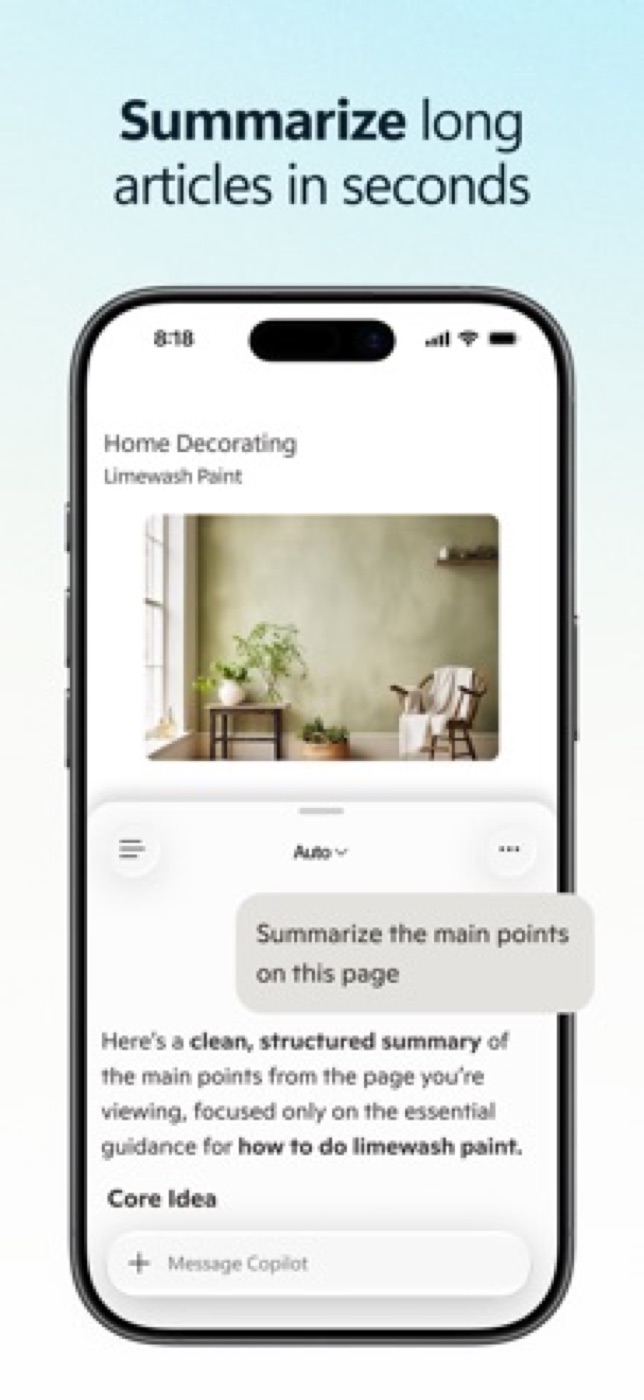
Microsoft Edge with Copilot is Microsoft's free web browser with the Copilot assistant built into a sidepane and new tab page, able to read across open tabs, summarize pages and YouTube videos, and group past browsing into Journeys. It is the easiest AI browser to justify for Windows and Microsoft 365 households: Copilot in Edge is free with usage limits, Microsoft 365 Personal at $9.99 a month raises those limits, and the agentic Browse with Copilot feature needs Microsoft 365 Premium at $19.99 a month in the U.S. only. Features and prices were checked on Microsoft's official pages in November 2026.
- Capabilities (40%)
- 7.8
- Ease of setup (30%)
- 9.0
- Value (30%)
- 8.4
In pictures · 3 images
Verdict printout · Microsoft Edge with Copilot
Use Edge with Copilot if you want free AI help inside a mainstream browser that runs on Windows, Mac, Linux, iOS and Android, and especially if you already pay for Microsoft 365, since the same subscription raises Copilot limits in Edge and adds Word, Excel, PowerPoint and 1 TB of OneDrive storage. Skip it if your main goal is an agent that clicks through websites for you outside the U.S., or if you will not pay $19.99 a month: Browse with Copilot is limited to Microsoft 365 Premium subscribers in the U.S., while Perplexity Comet offers an acting assistant in a free download. The deciding fact is that the free tier covers multi-tab answers, page and video summaries, Voice, Vision and Journeys, so most people never need to pay for the browser part at all.
ReadOverview
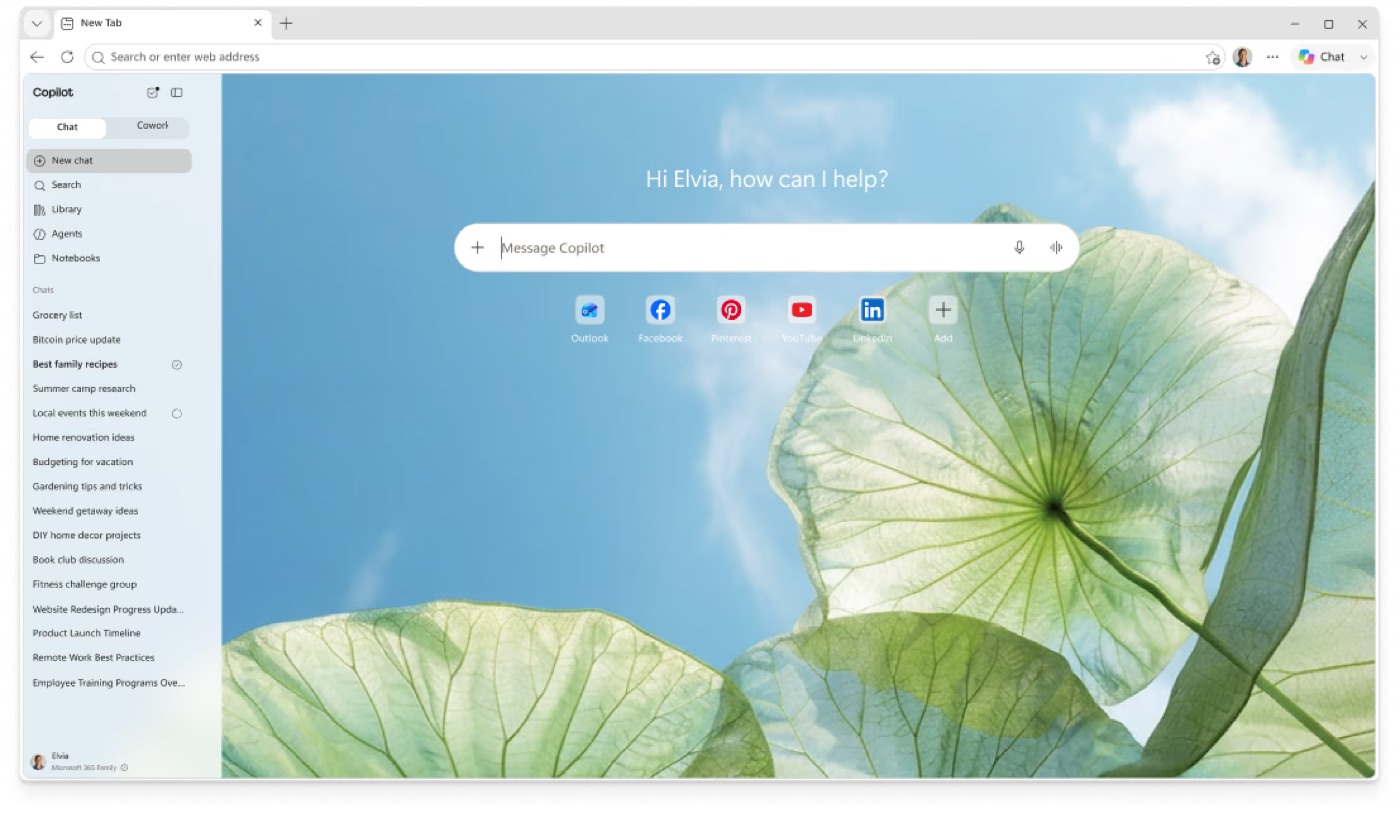
Microsoft Edge is Microsoft's web browser for Windows, macOS, Linux, iOS and Android. Copilot is built into it in two places: a sidepane opened from the Copilot icon at the top right of the window, which Microsoft says can "summarize, compare, or get answers without leaving the page", and a Copilot new tab page where a question, a search or a web address can be typed into one box. Microsoft's feature page also lists writing help, Image Creator, an AI theme generator, PDF summaries, Copilot data sources for email, files and calendars, and Remix, which rewrites how an eligible page looks, such as turning a recipe into a shopping list.
The biggest change in 2026 is that Copilot Mode no longer exists as a separate mode. In a May 13, 2026 post on the Microsoft Edge Blog, Microsoft said it was "retiring Copilot Mode" and moving its features directly into Edge for everyone. Multi-tab reasoning, answers built on browsing history and past chats, Voice and Vision, long-term memory, Copilot quizzes and the redesigned new tab page are now listed as available in all Copilot markets on desktop and mobile. The same post brought Copilot to the Edge mobile app for the first time, added a Study and Learn mode and a writing assistant (U.S. only), and turned tabs into podcasts in English markets.
The former Copilot Actions preview became Browse with Copilot. Microsoft's support page says it can click, type and move between tabs in Edge, shows each step in real time, and lets the user take control at any time. It runs in the current browser window, takes screenshots of the pages it works on and keeps them with the conversation for up to 30 days unless the chat is deleted, and cannot read autofill data, saved passwords or wallet information. It asks for supervision before buying an item, booking a reservation, sending an email or deleting a calendar event. For consumers it is limited to Microsoft 365 Premium subscribers in the U.S., with usage limits.
Among the AI browsers on this site, Edge sits on the chat-and-summarize side with Brave Leo and Google Chrome with Gemini, while Perplexity Comet, Opera Neon and Fellou are built around agents that act on pages. Its paid path is unusual: there is no Edge subscription, only Microsoft 365. Personal at $9.99 a month is cheaper than Brave's Leo premium at $14.99 and Opera Neon's $19.90 Standard plan, and it also includes the Office desktop apps and 1 TB of cloud storage. Premium at $19.99 a month, the tier needed for agentic browsing, costs about the same as Opera Neon and more than Dia's $10 Better Answers plan.
There are real limits. Microsoft does not publish numeric usage caps: its comparison page lists free Copilot as "Limited usage with a free Microsoft account", Personal and Family as "Higher than free" and Premium as "Extensive". AI features on Family and Premium belong to the subscription owner only and cannot be shared with the other five members. Journeys on desktop is limited to English markets and on mobile to the U.S., device sync for Journeys works on PCs only, and Microsoft warns that Browse with Copilot is experimental and can be misled by hidden instructions on web pages. Microsoft's own pages add that feature availability varies by device type, market and browser version.
How it scored
Edge with Copilot is the default AI browser for many Windows users, and Microsoft has made it easy to reach. The Copilot sidepane sits at the top right to summarize, compare or answer questions about the page, and a Copilot new tab routes any question, search or site. Journeys groups related pages, searches and chats so you can pick up research later, and Copilot can compare options across tabs, help write and create images. Microsoft says Copilot users in Edge may get a higher free allowance, and that agents and complex multi-step tasks need a Microsoft 365 subscription. Microsoft 365 Personal costs $9.99 a month or $99.99 a year and also brings Word, Excel, PowerPoint and 1 TB of storage, which makes it the cheapest paid entry here. It ranks lower because Microsoft's page is vague on what browser actions Copilot actually performs, and features vary by market and device.
Who it is for
Windows and Microsoft 365 households who want tab comparisons and summaries in the browser they already have.
Run it if
- Windows users who want AI summaries, tab comparisons and voice help in the browser already on their PC without installing anything new
- Microsoft 365 Personal, Family or Premium subscribers, since the same subscription raises Copilot limits in Edge and in Word, Excel, PowerPoint and Outlook
- Students and researchers who juggle many tabs and want Journeys topic cards, Study and Learn quizzes and summaries of PDFs and YouTube videos
- People who need one AI browser on every platform, including Linux, iOS and Android, with synced passwords, favorites and history
- Office workers signed in with a work account who need Copilot answers covered by their organization's Microsoft 365 privacy and compliance controls
Skip it if
- People outside the U.S. who want an agent that clicks and types on websites for them: Browse with Copilot is U.S.-only on Microsoft 365 Premium, so Perplexity Comet, a free download, is the better fit
- Privacy-first users who do not want page content, history or chats sent to Microsoft's cloud services: Brave Leo, built into Brave's privacy-focused browser, suits them better
- Knowledge workers whose day runs through Slack, Notion and Jira rather than Microsoft 365: Dia connects to those apps directly from $10 a month
- Chromebook owners: Microsoft's support page says Edge does not support Chromebooks, so Google Chrome with Gemini is the practical choice
SpecSpec sheet
| Maker | Microsoft | src ↗ |
|---|---|---|
| Desktop platforms | Windows 10 and 11, macOS 13 or later for Edge 151 and newer, 64-bit Ubuntu 18.04+, openSUSE 15.5+ and Fedora 39+ | src ↗ |
| Mobile platforms | Two most recent iOS versions; Android 10.0 or later on ARM devices | src ↗ |
| Windows 10 support | Edge updates on Windows 10 22H2 until at least October 2028 | src ↗ |
| Browser price | Free | src ↗ |
| Free Copilot use | Yes, limited usage with a free Microsoft account; Edge users may get a higher free allowance | src ↗ |
| Paid upgrade | Microsoft 365 Personal $9.99/month, Family $12.99/month, Premium $19.99/month | src ↗ |
| Agentic browsing | Browse with Copilot, Microsoft 365 Premium subscribers in the U.S. only, usage limits apply | src ↗ |
| Multi-tab context, Voice and Vision | Free in all Copilot markets on desktop and mobile | src ↗ |
| Journeys availability | Desktop in English markets (en-US, en-GB, en-CA, en-AU, en-NZ, en-IN, en-SG); mobile in the U.S. only | src ↗ |
| Journeys data retention | Off by default; older Journeys and their data deleted after 14 days | src ↗ |
| Agent screenshot retention | Up to 30 days unless the conversation is deleted; not used for training | src ↗ |
| Built-in security | Microsoft Defender SmartScreen, scareware blocker, enhanced security mode, Edge Secure Network, passkeys | src ↗ |
Price
Copilot in Edge is free with limits; Microsoft 365 Personal for higher limits and agents $9.99 per month or $99.99 per year.
Microsoft 365 Personal $9.99/month $99.99/year
Quoted from the vendor pricing page on November 9, 2026.
Plans on file · 5
| Plan | Price | Includes | Checked |
|---|---|---|---|
| Copilot in Edge (free) | $0Free with a Microsoft account, usage limits apply | Copilot sidepane and Copilot new tab page; Multi-tab reasoning, page and YouTube summaries; Voice, Vision, long-term memory and Copilot quizzes; Journeys in English markets on desktop; Limited usage with a free Microsoft account | Checked Nov 23, 2026 |
| Microsoft 365 Personal | $9.99 a month or $99.99 a year (limited-time offer: $6.99 first month or $69.99 first year)Monthly or yearly, 1-month free trial | 1 person, sign in on 5 devices at once; Copilot usage higher than free; Word, Excel, PowerPoint, Outlook and OneNote desktop apps with Copilot; 1 TB of OneDrive cloud storage; Microsoft Defender security | Checked Nov 23, 2026 |
| Microsoft 365 Family | $12.99 a month or $129.99 a yearMonthly or yearly, 1-month free trial | Everything in Personal; 1 to 6 people, each on up to 5 devices; 2 TB of shared cloud storage; AI features for the subscription owner only | Checked Nov 23, 2026 |
| Microsoft 365 Premium | $19.99 a month or $199.99 a year (limited-time offer: $13.99 first month or $139.99 first year)Monthly or yearly, 1-month free trial | Everything in Family; Extensive Copilot chat, image, audio and visual AI usage; Agentic AI features, including advanced research and analytics; Browse with Copilot in Edge desktop, U.S. only, usage limits apply | Checked Nov 23, 2026 |
| Microsoft 365 Pro | price not listed on the comparison page as fetchedSubscription | Listed by Microsoft as one of the consumer plans with higher AI usage limits | Checked Nov 23, 2026 |
Key features
Copilot sidepane and new tab page
The Copilot icon at the top right opens a sidepane that answers questions about the current page, summarizes it or compares it with others. The redesigned Copilot new tab page combines chat, search and web addresses in one box and is where Journeys cards appear.
Multi-tab reasoning
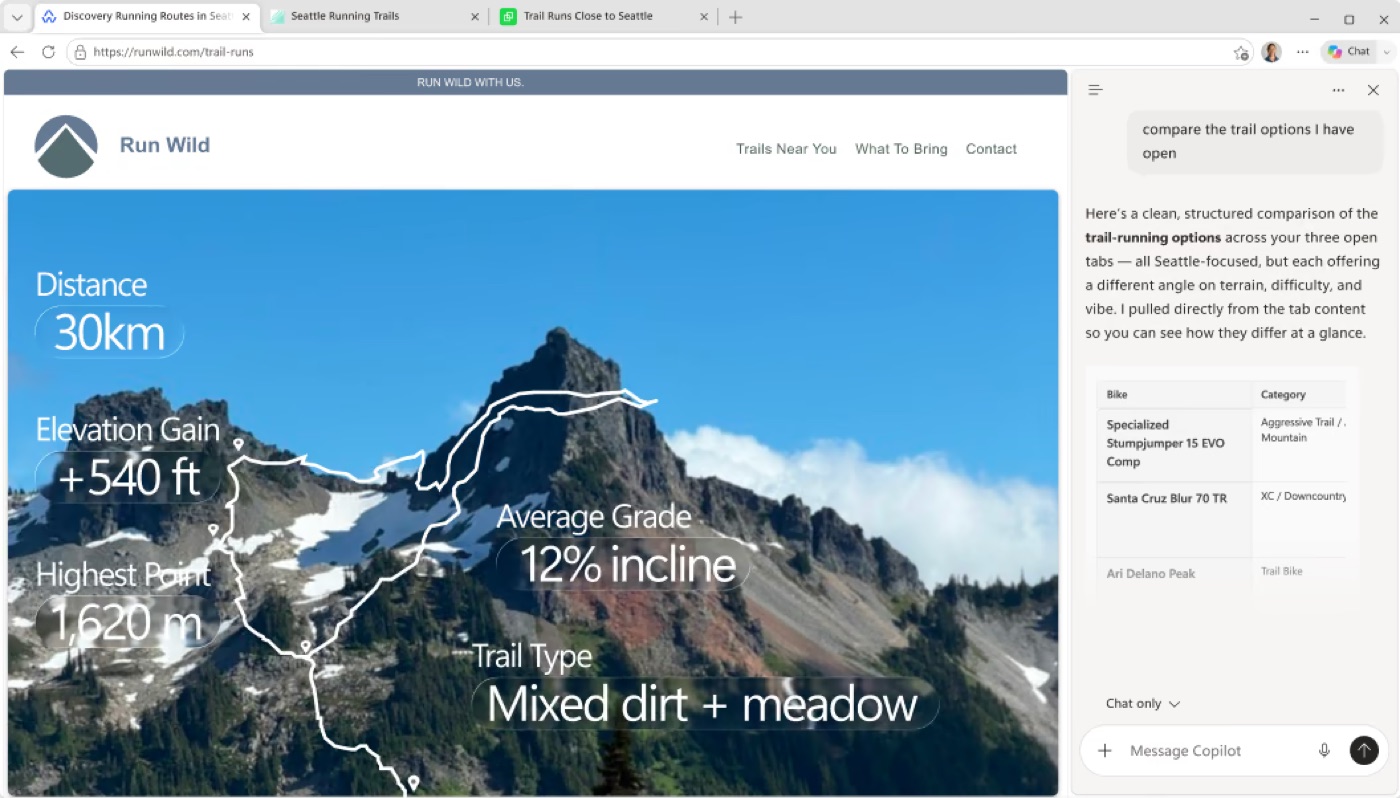
With permission, Copilot reads across the tabs open in the window to compare details and surface key points, for example several apartment listings or winery pages. Microsoft's May 2026 update made this free in all Copilot markets on desktop and mobile.
Journeys
When turned on, Journeys groups browsing history into topic cards on the new tab page, up to three at a time, each with a summary and a suggested next step. It skips banking, healthcare, InPrivate and Guest Mode activity and deletes older Journeys and their data after 14 days.
Browse with Copilot
Copilot can click, type and move between tabs to complete a task, with a cursor icon on the tab it is working in and the option to take over at any time. It cannot read saved passwords or wallet data and asks before purchases, bookings and sending email. U.S. Microsoft 365 Premium subscribers only.
Voice and Vision
Copilot Vision lets the user share the screen and talk through what is on it hands-free, with visual cues showing when Copilot is listening, viewing or acting. It is available on desktop and in the Edge mobile app.
Study, writing and podcasts
Study and Learn mode builds quizzes, flashcards and guided sessions from the page being read. The writing assistant drafts and rewrites text in any text box (U.S. only), and Podcasts turns open tabs into audio in English, with extended usage on Microsoft 365 plans.
Built-in security tools
Edge includes Microsoft Defender SmartScreen against phishing and malicious downloads, a scareware blocker, enhanced security mode, Edge Secure Network for public Wi-Fi, a password generator and passkey sign-in.
Strengths and weaknesses
Plus · 7
- The core AI features, including multi-tab reasoning, Voice, Vision, memory and the Copilot new tab page, cost nothing and are available in all Copilot markets on desktop and mobile
- One of only two AI browsers on this site with Linux builds alongside Windows 10 and 11, macOS 13 or later, three 64-bit Linux distributions, iOS and Android 10.0 or later
- Microsoft 365 Personal at $9.99 a month is the cheapest paid AI browser upgrade on this site and also includes the Office desktop apps and 1 TB of OneDrive storage
- Journeys is off by default, skips banking, healthcare, InPrivate and Guest Mode activity, and deletes older topic data after 14 days
- Browse with Copilot cannot see autofill data, saved passwords or wallet information and asks for supervision before purchases, bookings, sending email or deleting calendar events
- Edge keeps getting updates on Windows 10 22H2 until at least October 2028 without the paid Extended Security Updates program
- Signed in with a work account, Copilot prompts and responses follow the same privacy and security commitments as Microsoft 365 apps and the organization's policies
Minus · 6
- Agentic browsing requires Microsoft 365 Premium at $19.99 a month or $199.99 a year and is available to consumers in the U.S. only
- Microsoft publishes no numeric usage caps: tiers are described only as limited, higher than free, or extensive
- On Family and Premium, AI features belong to the subscription owner only and cannot be shared with the other five people on the plan
- Several features are regional: Journeys desktop covers seven English locales, Journeys mobile and the writing assistant are U.S.-only, and Podcasts is English-only
- Browse with Copilot keeps page screenshots for up to 30 days and Microsoft warns it can be tricked by hidden malicious text on web pages
- No Chromebook support, and macOS 12 stops at Edge 150
Key facts
- Free use: Copilot sidepane and new tab, with usage limits
- Microsoft 365 Personal: $9.99 a month or $99.99 a year
- Trial: 1 month free on Microsoft 365 Personal
- Organization: Journeys group past browsing
- Mobile: Copilot in the Edge mobile app
Where it ranks
Microsoft Edge with Copilot is No. 8 in our Best AI Browsers verdict.
AltAlternatives to weigh
- Perplexity Comet →A free download whose assistant acts on web pages; pick it for agentic browsing outside the U.S. or without a $19.99 Microsoft 365 Premium subscription.
- Brave Leo →Leo AI chat is free inside Brave's privacy-focused browser, with premium at $14.99 a month; pick it if keeping browsing data away from big platforms matters most.
- Google Chrome with Gemini →Gemini built into Chrome suits people who live in Google Workspace and need a browser that also runs on Chromebooks.
- Dia →Connects to Slack, Notion, Jira and Google Workspace for answers drawn from work apps, with Better Answers at $10 a month; pick it if Microsoft 365 is not the center of your day.
- Opera Neon →An agent-first browser with a Standard plan at $19.90 a month; an alternative to Microsoft 365 Premium for people who want task automation without the Office bundle.
Questions readers ask
- QIs Copilot in Microsoft Edge free?
- AYes, Copilot in Edge is free with a Microsoft account, with usage limits. Microsoft says Edge users may get a higher free allowance than other Copilot users, and a Microsoft 365 subscription from $9.99 a month raises the limits.
- QWhat happened to Copilot Mode in Edge?
- AMicrosoft retired Copilot Mode on May 13, 2026 and moved its features directly into Edge for everyone. Copilot Actions from the old preview became Browse with Copilot, which is limited to Microsoft 365 Premium subscribers in the U.S.
- QCan Copilot in Edge browse websites and complete tasks for me?
- AYes, but only with Microsoft 365 Premium in the U.S. Browse with Copilot can click, type and move between tabs on Edge desktop, shows each step, and asks for supervision before purchases, bookings or sending email.
- QIs Microsoft Edge with Copilot worth paying for?
- AFor most people the free tier is enough, because multi-tab answers, summaries, Voice, Vision and Journeys cost nothing. Microsoft 365 Personal at $9.99 a month is worth it mainly if you also want Word, Excel, PowerPoint and 1 TB of storage, and Premium at $19.99 a month only if you are in the U.S. and want agentic browsing.
- QEdge with Copilot vs Perplexity Comet: which is better?
- AComet is better if you want an assistant that acts on websites for free, while Edge is better if you want free summaries and tab comparisons in a browser that also runs on Linux and ties into Microsoft 365. Edge's own agent requires Microsoft 365 Premium in the U.S.
- QDoes Copilot in Edge see my browsing history?
- AOnly if you allow it: Journeys is off by default, and Copilot uses history and past chats for answers with your permission. Journeys excludes banking, healthcare, InPrivate and Guest Mode activity and deletes older Journeys data after 14 days.
- QWhich devices does Edge with Copilot run on?
- AEdge runs on Windows 10 and 11, macOS 13 or later for version 151 onward, 64-bit Ubuntu, openSUSE and Fedora, the two latest iOS versions and Android 10.0 or later. Microsoft says Edge does not support Chromebooks.
- QCan my family share my Microsoft 365 Copilot benefits in Edge?
- ANo, AI features on Microsoft 365 Family and Premium are only available to the subscription owner and cannot be shared. The other members still get the apps, storage and security tools.
LogSource log
- [01]Copilot in Edge | Microsoft Edge · checked Nov 23, 2026
- [02]New updates to Edge across desktop and mobile, Microsoft Edge Blog (May 13, 2026) · checked Nov 23, 2026
- [03]Browse with Copilot, Microsoft Support · checked Nov 23, 2026
- [04]Copilot Journeys, Microsoft Support · checked Nov 23, 2026
- [05]Compare all Microsoft 365 plans · checked Nov 23, 2026
- [06]Microsoft Edge Supported Operating Systems, Microsoft Learn · checked Nov 23, 2026
- [07]Explore Microsoft Edge features · checked Nov 23, 2026
- [08]AI innovations in Microsoft Edge · checked Nov 23, 2026
- [09]Download Microsoft Edge · checked Nov 23, 2026
Deep review last updated November 23, 2026. Prices and specs are rechecked against these pages.
Alternatives we scored
Cite this page
DBotMaker. Microsoft Edge with Copilot review. Updated November 23, 2026. https://dbotmaker.io/review/microsoft-edge-with-copilot
Visit microsoft.com · Questions or corrections: editorial@dbotmaker.io