Review · Software & AI
 Ui.Vision RPA review
Open-source browser and desktop automation that uses image and text recognition to drive any screen.
By the DBotMaker research desk · Updated November 24, 2026
Short answer · output
Ui.Vision RPA is an open-source browser extension, with an optional desktop app, that automates websites and Windows, macOS or Linux programs through page locators, images and OCR. As checked in November 2026, it is free for personal and commercial use with unlimited web and desktop automation; PRO support costs $299 a year and Enterprise starts at $999 a year. It suits individuals and small teams that can run and schedule their own macros, but not organizations that need a central bot control room.
- Capabilities (40%)
- 6.8
- Ease of setup (30%)
- 7.5
- Value (30%)
- 9.3
In pictures · 3 images
Verdict printout · Ui.Vision RPA
Choose Ui.Vision RPA if you need to automate a browser, a Citrix window or a desktop program without a license fee and are comfortable maintaining macros on your own computers. Avoid it if you need central scheduling, role controls and supervised unattended bots, where UiPath or Power Automate is a closer match. The deciding fact is what the paid editions sell: the pricing page lists unlimited web and desktop automation in all three editions, so $299 a year buys email support and $999 a year adds controlled updates and priority support.
ReadOverview
Ui.Vision RPA comes from a9t9 software GmbH, a German company whose founders earlier created iMacros at iOpus. The core is an extension for Chrome, Edge and Firefox. Desktop control, hard-drive storage and local desktop OCR need a separate native app called XModules, now also named Ui.Vision for Desktop. The product combines recorded Selenium-style steps with image matching and OCR, so it can act on a screen even when no usable page element or window handle is available.
Version 10 is the largest recent change. New macros can be ordinary JavaScript using the uiv.* API, an AI assistant can write and repair them, and an MCP bridge lets Claude Code, Codex, Cursor and other clients build and run them. Chrome and Edge also gain Browser Vision, which sends mouse and keyboard input while the browser is in the background and needs no desktop app. The Chrome Web Store lists version 10.0.307, updated November 17, 2026.
The upgrade has a compatibility catch. XModules Version 1 does not work with Version 10, and the replacement XModules Version 2 requires Version 10.0.270 or higher. The maker's download post still labels the new desktop app Beta. Classic command-table macros remain supported, so the required change is the desktop component rather than a full macro rewrite.
Pricing is split into two products that are easy to confuse. RPA PRO at $299 a year and Enterprise from $999 a year cover support and update management. Ui.Vision AI PRO is a separate hosted subscription at an introductory $10 a month, with ten times the AI limits of the free plan. A buyer who only wants more AI assistant use does not need an Enterprise license, and an RPA PRO listing does not promise AI PRO access.
Against rivals on this site, Ui.Vision is cheaper and more portable but has less management around it. Microsoft lists Power Automate Premium at $15 per user a month paid yearly and unattended Process bots at $150 per bot a month; its desktop flows run on Windows. Ui.Vision runs on three operating systems, and its $1,499 Enterprise Player license covers macro replay on unlimited machines. UiPath and Robomotion are better compared on orchestration and managed robots.
The main limits are operational. Native clicks and typing need an unlocked desktop, classic XClick needs the browser in the foreground, and these native steps cannot be captured by the recorder. Scheduled jobs rely on an outside tool such as Windows Task Scheduler. Image targets may also need to be recaptured when an application's appearance changes. Macros run locally, but hosted AI and online OCR send the relevant content to a service.
How it scored
Ui.Vision RPA is the low-cost way to automate a screen that offers no API and no accessible UI tree. Its desktop automation module uses image and text recognition to read words and images on your desktop, then clicks, drags and types on Windows, macOS and Linux. The browser extension covers Chrome, Edge and Firefox, imports Selenium IDE scripts, and a command line API lets Jenkins, Python, PowerShell or C# start macros. Ui.Vision says it is open source and free for personal and commercial use. The pricing page lists PRO at US$299 a year with email support and Enterprise from US$999 a year for up to five users with update management and priority support, plus an Enterprise Player licence at US$1499 for unlimited machines that replay macros. Version 10 adds an AI macro assistant and an MCP bridge. It ranks seventh because there is no central control room, and image-based steps need upkeep when a screen layout changes.
Who it is for
Zero-budget teams automating pixel-only desktop screens
Run it if
- Individuals and small businesses that want recurring browser tasks automated for $0, including commercial use
- Analysts who move data through CSV files and need to read screens, PDFs or remote desktops with OCR
- QA teams that want Selenium IDE import plus visual checks started from Jenkins, Python or PowerShell
- Developers using Claude Code, Codex or Cursor who want an assistant to leave behind a reusable browser macro
- Consultants distributing finished macros to many machines under the $1,499 Enterprise Player license
Skip it if
- Companies that need a central control room for many bots: UiPath is the better alternative
- Microsoft 365 teams that want cloud flows and Windows desktop bots in one service: Microsoft Power Automate fits better
- Teams that want managed robots and cloud run time without maintaining each PC: Robomotion fits better
- Server jobs that must run with a locked desktop and native mouse or keyboard input: prefer an API workflow such as n8n where the target system has an API
SpecSpec sheet
| Platforms | Windows, macOS and Linux | src ↗ |
|---|---|---|
| Browsers | Chrome, Edge and Firefox | src ↗ |
| Current Chrome version | 10.0.307, updated November 17, 2026 | src ↗ |
| License | AGPLv3 open source, or a commercial license | src ↗ |
| Free edition limits | Unlimited web and desktop automation listed | src ↗ |
| Desktop component | XModules Version 2, requires Ui.Vision 10.0.270 or higher | src ↗ |
| Linux requirement | Ubuntu 22.04+, Debian 12+ or Fedora 36+; Wayland and X11 | src ↗ |
| Macro formats | JavaScript uiv.* API and classic Selenium-style command tables | src ↗ |
| Background browser input | Chrome and Edge through Browser Vision; not Firefox | src ↗ |
| MCP bridge | Local Node.js 18+ process; extension 10.0.21 or newer | src ↗ |
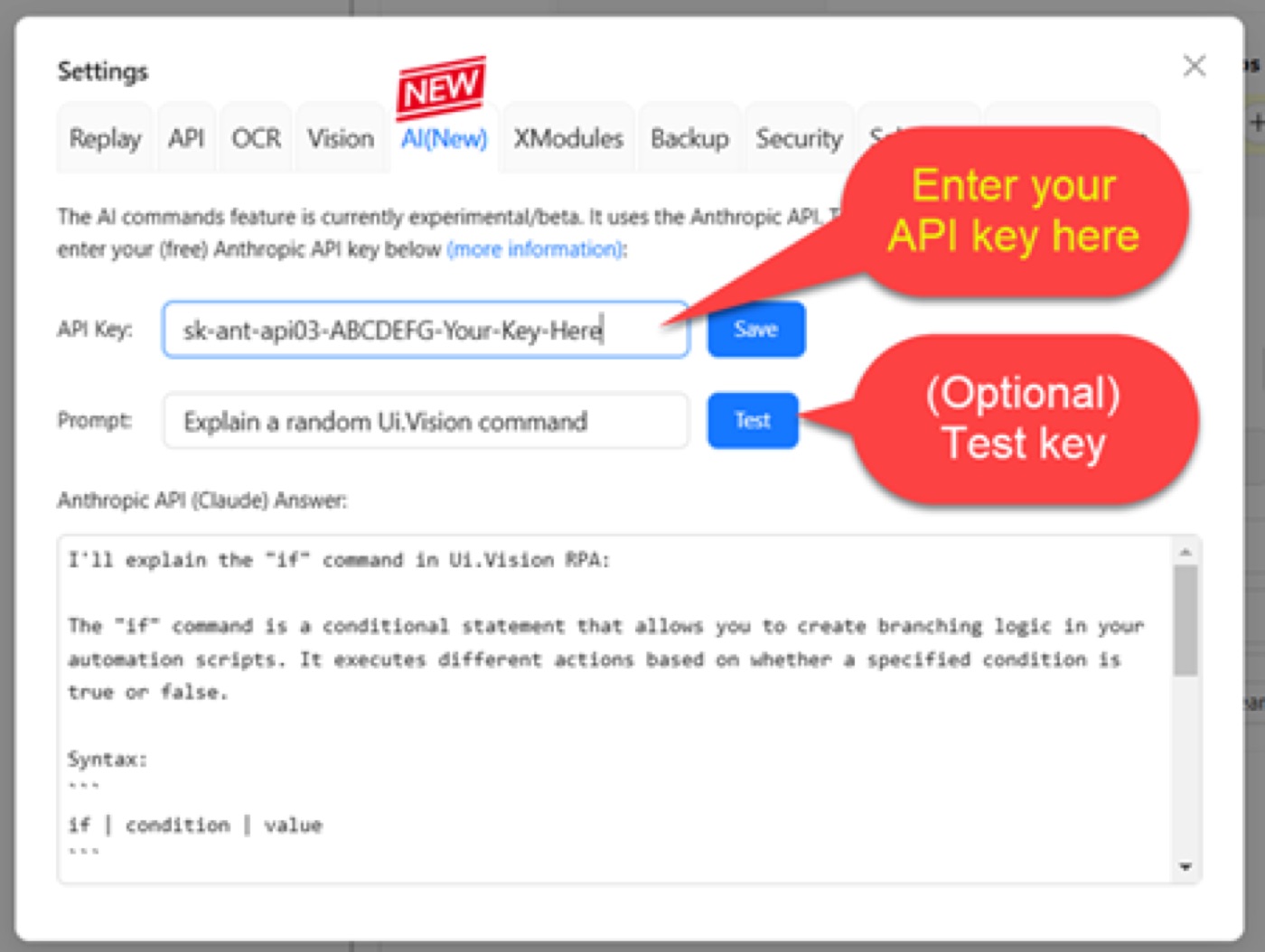
| AI providers | Hosted Ui.Vision AI, Anthropic, OpenRouter or a local OpenAI-compatible endpoint | src ↗ |
| Command line variables | cmd_var1 to cmd_var10 as of 10.0.307 | src ↗ |
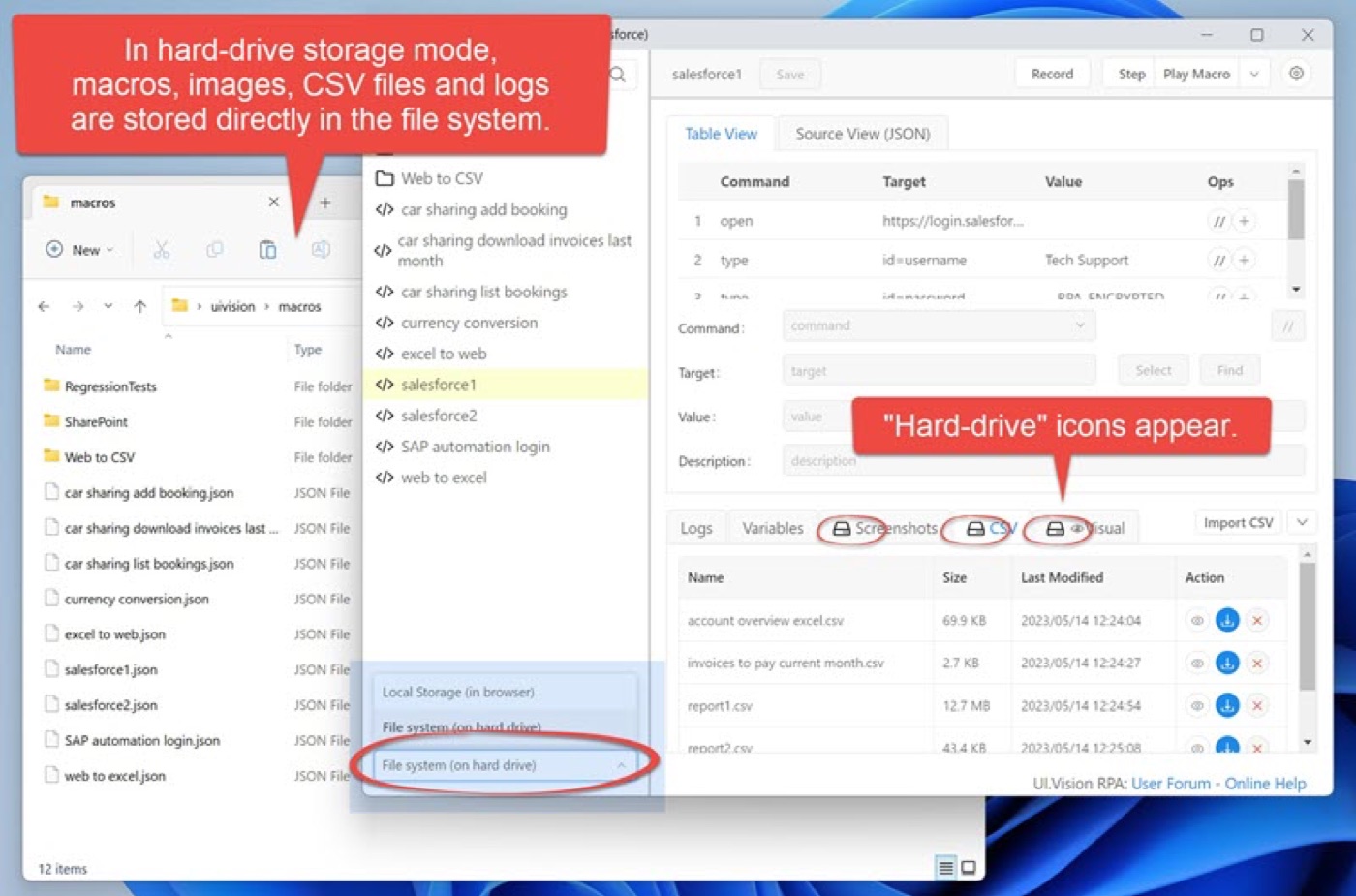
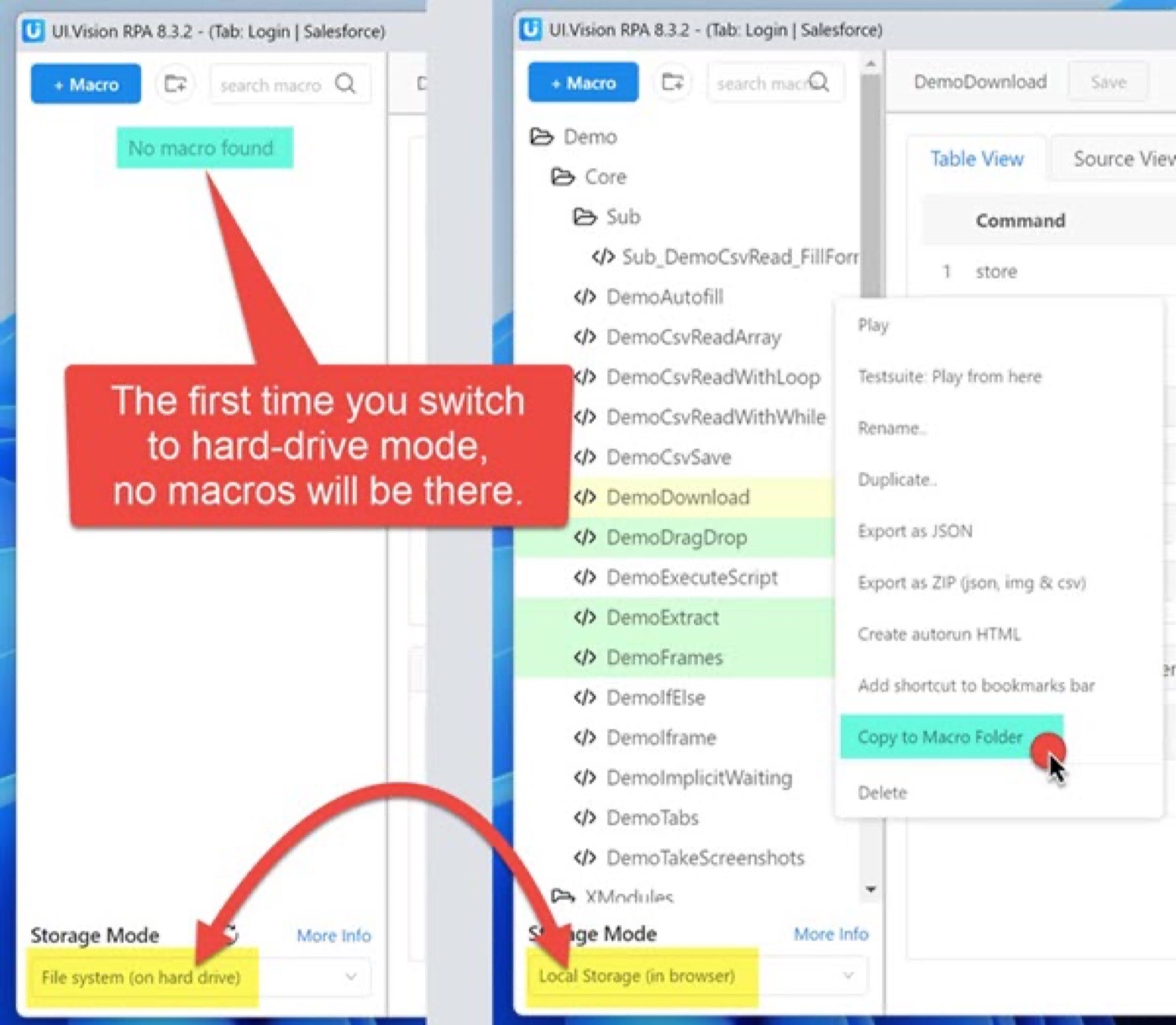
| Macro storage | Browser local storage or hard drive with XModules | src ↗ |
| Enterprise Player OCR | 10,000 included conversions per day per license | src ↗ |
| Shared macro links | Beta; links expire after 30 days | src ↗ |
Price
Free and open source; PRO $299 a year; Enterprise from $999 a year.
Free for personal and commercial use US$299.00 /Year
Quoted from the vendor pricing page on November 16, 2026.
Plans on file · 10
| Plan | Price | Includes | Checked |
|---|---|---|---|
| Free Edition | $0Free for personal and commercial use | Open source; Unlimited web automation; Unlimited desktop automation; Forum support | Checked Nov 24, 2026 |
| PRO Edition | $299Per year | Unlimited web and desktop automation; Forum and email support; No update management | Checked Nov 24, 2026 |
| Enterprise Edition, up to 5 users | $999Yearly subscription | PRO features; Update management with separate update channels; Priority email, remote screen sharing and phone or chat support; Same-day response on weekdays | Checked Nov 24, 2026 |
| Enterprise Player | $1,499Enterprise license; yearly subscription terms stated on the pricing page | Macro replay on unlimited users and machines; Cannot save new macros; 10,000 OCR conversions per day per Player license; Attended and unattended use, inside or outside the organization | Checked Nov 24, 2026 |
| Special Player Bundle | $1,999Enterprise license; yearly subscription terms stated on the pricing page | Enterprise license for 5 users; Enterprise Player for unlimited replay machines | Checked Nov 24, 2026 |
| Enterprise Bundle 10 | $1,899Yearly subscription | Enterprise Edition for up to 10 users | Checked Nov 24, 2026 |
| Enterprise Bundle 20 | $2,999Yearly subscription | Enterprise Edition for up to 20 users | Checked Nov 24, 2026 |
| Enterprise Bundle 50 | $4,999Yearly subscription | Enterprise Edition for up to 50 users; Contact sales above 50 licenses | Checked Nov 24, 2026 |
| Ui.Vision AI Free | $0No signup or API key | Faster model; AI macro assistant; aiPrompt, aiScreenXY and aiComputerUse; Daily limits; amount not published on the plan page | Checked Nov 24, 2026 |
| Ui.Vision AI PRO | $10 per monthIntroductory price, 50% off a listed $20; cancel anytime | 10 times the free plan's AI limits; Faster and Smarter models; Introductory price kept after regular pricing starts; No uptime guarantee | Checked Nov 24, 2026 |
Key features
Image and OCR targeting
Commands can find a button by picture or a word by OCR and then click, type or extract text. The maker documents this for browser canvases, PDFs, remote desktops and Citrix windows, where only pixels may be available. OCRExtractRelative reads a marked area at a fixed position from an anchor image.
Browser Vision
Version 10's uiv.browser commands send trusted mouse and keyboard input through the browser debugging interface. They work in Chrome and Edge with the window in the background and without XModules. Firefox is not supported for this mode.
Desktop automation on three systems
XModules adds native mouse, keyboard, screenshot and file access on Windows, macOS and Linux. Version 2 adds multi-monitor support, its own desktop app and Wayland support. The Windows and Linux installers need no administrator or root rights, according to the download post.
AI macro assistant
The assistant inspects the page, writes a macro, runs it, reads the log and retries with a cap on fix loops. Its output goes into an AI_Chat folder and does not overwrite existing macros. Once created, an ordinary macro replays locally without an AI call unless it contains an AI command.
MCP bridge
A local bridge registers with Claude Code, Claude Desktop, Codex, Cursor, Windsurf and VS Code. A client can create, run and debug macros in the user's browser. The bridge listens on 127.0.0.1, while data shared with the assistant still follows that provider's rules.
Command line integration
A script opens the exported ui.vision.html page with a macro name, variables and a log path. The macro can be started from batch, PowerShell, Python, Node.js or VBS, and the first log line reports success or the error. XRun lets a macro launch another program.
CSV and version control
Macros can read and write CSV files for repeated forms and extraction. With hard-drive storage, macros, images and data become files that can be kept in Git or a shared folder. Version 9.6.1, released June 28, 2026, made hard-drive storage unlimited for all users.
Strengths and weaknesses
Plus · 7
- Free edition allows commercial use and lists unlimited web and desktop automation
- Runs on Windows, macOS and Linux with Chrome, Edge or Firefox
- Enterprise Player covers unlimited replay machines for $1,499 instead of charging per bot
- AI assistant starts at $0 with no signup or API key, and local models are supported
- Source is available under AGPLv3, with a separate commercial license option
- Chrome and Edge macros can use image, OCR and locator targets in the background without a desktop install
- Version 10 keeps classic command-table macros while adding JavaScript
Minus · 6
- No central orchestrator is listed, even in Enterprise; recurring jobs need Windows Task Scheduler, CI or another scheduler
- XClick, XMove and XType require an unlocked desktop and cannot be recorded
- XModules Version 1 stops working with Version 10, and the Version 2 desktop app is still labeled Beta
- Free edition support is forum only; same-day weekday response starts at the $999 Enterprise Edition
- AI limits are described as daily or 10 times larger, without a request count, and AI PRO has no uptime guarantee
- The Player license disables saving, so editing macros requires another edition or the $1,999 bundle
Key facts
- Free edition: Yes, open source
- PRO: $299 a year
- Enterprise: From $999 a year for up to 5 users
- Enterprise Player: $1499, unlimited machines for macro replay
Where it ranks
Ui.Vision RPA is No. 7 in our Best RPA Software verdict.
AltAlternatives to weigh
- Microsoft Power Automate →Better for Microsoft 365 teams that need cloud flows and Windows desktop bots: Premium is $15 per user a month paid yearly, and unattended bots are $150 a month.
- UiPath →Better for a managed bot program with orchestration. It has a free Community plan, Basic starts at $25 a month and larger plans go through sales.
- Robomotion →Better when managed robots and monthly plans matter: cloud plans are $49, $129 and $399 a month, with extra robots from $19.
- Axiom.ai →A no-code browser bot builder for users who do not need desktop control; paid plans start at $15 a month after 2 free hours of runtime.
Questions readers ask
- QIs Ui.Vision RPA worth it?
- AUi.Vision RPA is worth trying for local browser and desktop work because the free edition includes unlimited automation and allows commercial use. Paying makes sense mainly for support, controlled updates or broad macro replay, since PRO and Enterprise do not list higher automation limits.
- QIs Ui.Vision RPA really free?
- AYes, the pricing page says Ui.Vision is free for personal and commercial use, with unlimited web and desktop automation. Hosted AI has daily limits, and support on the free edition is limited to the forum.
- QHow much does Ui.Vision RPA cost?
- AUi.Vision RPA costs $0 for Free, $299 a year for PRO and $999 a year for Enterprise with up to 5 users, as checked in November 2026. AI PRO is separate at an introductory $10 a month.
- QCan Ui.Vision RPA automate desktop apps?
- AYes, it automates Windows, macOS and Linux apps after the XModules desktop component is installed. Version 10 needs XModules Version 2, and native input needs an unlocked desktop.
- QCan Ui.Vision RPA run on a schedule?
- AYes, its command line API can be started by Windows Task Scheduler or another script. For macros with XClick, XMove or XType, the maker recommends autologin because those commands need a user desktop; it does not recommend headless browser mode.
- QUi.Vision RPA vs UiPath: which is better?
- AUi.Vision is better for free local automation, while UiPath is better for centrally managed automation programs. Ui.Vision lists no per-bot fee or central orchestrator; UiPath's Basic plan starts at $25 a month, with a free Community plan.
- QDoes Ui.Vision RPA send data to the cloud?
- AMacro replay and image matching are local, according to Ui.Vision, but hosted AI sends chat content and any included page data or screenshots to a server. Online OCR also sends images. A local model and local OCR keep those processing steps on the computer.
- QWhat is the difference between RPA PRO and AI PRO?
- ARPA PRO costs $299 a year for email support, while AI PRO costs an introductory $10 a month for 10 times the free AI limits. AI PRO also includes the Smarter model, which the free AI plan does not.
LogSource log
- [01]Ui.Vision RPA pricing · checked Nov 24, 2026
- [02]Ui.Vision AI PRO · checked Nov 24, 2026
- [03]Ui.Vision AI and providers · checked Nov 24, 2026
- [04]Ui.Vision release notes · checked Nov 24, 2026
- [05]Ui.Vision MCP server · checked Nov 24, 2026
- [06]Ui.Vision RPA product page · checked Nov 24, 2026
- [07]Ui.Vision XModules · checked Nov 24, 2026
- [08]XModules Version 2 download post · checked Nov 24, 2026
- [09]XClick and XMove documentation · checked Nov 24, 2026
- [10]Windows Task Scheduler guide · checked Nov 24, 2026
- [11]Ui.Vision user manual and command line API · checked Nov 24, 2026
- [12]OCR screen scraping documentation · checked Nov 24, 2026
- [13]Desktop automation documentation · checked Nov 24, 2026
- [14]About a9t9 software · checked Nov 24, 2026
- [15]Ui.Vision source repository · checked Nov 24, 2026
- [16]Ui.Vision RPA license notice · checked Nov 24, 2026
- [17]Ui.Vision in the Chrome Web Store · checked Nov 24, 2026
- [18]UiPath pricing · checked Nov 24, 2026
- [19]Robomotion pricing · checked Nov 24, 2026
- [20]Microsoft Power Automate pricing · checked Nov 20, 2026
- [21]Axiom.ai pricing · checked Nov 24, 2026
Deep review last updated November 24, 2026. Prices and specs are rechecked against these pages.
Alternatives we scored
Cite this page
DBotMaker. Ui.Vision RPA review. Updated November 24, 2026. https://dbotmaker.io/review/ui-vision-rpa
Visit ui.vision · Questions or corrections: editorial@dbotmaker.io